cancel
Showing results for 
Search instead for 
Did you mean: 

The Power BI Data Visualization World Championships is back! Get ahead of the game and start preparing now! Learn more

Reply
Anonymous
Not applicable

Power Query Error / Bug ?

Hi,


I'm having an issue I can't really figure out.


I have a query statement that basically adds 8 conditional columns to an existing table through nested IF statements.

I'm however having a problem when I try to remove unused columns before loading to Desktop.


As soon as I apply a "Remove Other Columns" or "Remove Columns" step, then PQ throws a "We cannot convert the value null to type Logical:" error.


However, if I simply try to load all columns in the query, then it loads just fine without errors. Equally I can just fine do a "Group By" on the columns I want to load, without PQ throwing an error.


The problem is caused by a conditional column using a mixture of "If larger than" / "if equal to" and "if equal to" with a bunch or "or" statements attached. I tried to isolate the problem, and it seems that the problem is caused by a "larger than" logic.


Checked all columns in the "larger than" logic, and all of them are formated as decimal numbers.


To error check I tried to check each column seperately but all of them throws the error. Additionally I tried to run it on just a sample of the dataset (top 20 rows) and I still get the error.


Then I thought it might be Query Folding messing with me, so I tried to convert the format of all conditional columns to Text and then do the "Remove Other Columns" afterwards, but that still throws the same error.


To make things worse, I copied my query from another PBIX file where it seems to run fine.


Anyone have a clue to what's going on, as I can load all columns just fine?


Thanks in advance

/Barslund

3 REPLIES 3
BobBI
Resolver III
Resolver III

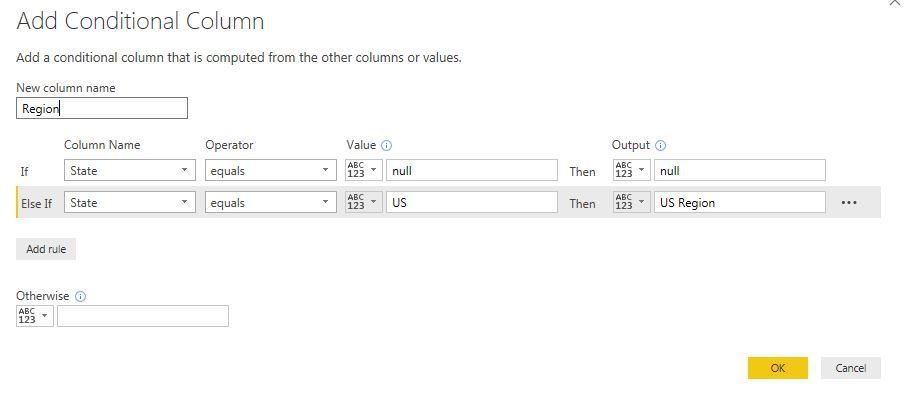
In your conditional Columns make first condition as


if field value = Null then null , followed by another condition.


Try this , i might help.


conditional column.JPG

Good Luck

SS

Anonymous
Not applicable

How you elaborate how that should help?


I've shortend the query statement, and this is the isolated part that's causing problems when I try to remove columns / do other changes.


    #"Added Messi" = Table.AddColumn(#"Added Messi", "Messi", each 
                    if [Goals_Scored] > 0 then "Awesome" else
                    if [Minutes_Played] > 0 then "Awesome" else
                    if [Hattricks] > 0 then "Awesome" else
                    if [Assigned_Club] = "Barcelona" then "Awesome" else
                    if [Assigned Position] = "CF" or   
                        [Is_injured] = "Yes" 
                        then "Unavaliable"
                    else "No Input")


The only logical explanation I can get to, is that there must be some problem in my , [Goals_Scored] , [Minutes_Played] or [Hattricks] column. But since it doesn't return this error when I load all columns, then it doesn't make sense to me.

Anonymous
Not applicable

Okay, to make things more weird...


I removed my "top 20" row step in the start of my steps and now I can remove columns just fine, however...

If I try to apply a "Extract First Characters" step to one column then the error reappears.

Helpful resources

Announcements
Power BI DataViz World Championships

Power BI Dataviz World Championships

The Power BI Data Visualization World Championships is back! Get ahead of the game and start preparing now!

December 2025 Power BI Update Carousel

Power BI Monthly Update - December 2025

Check out the December 2025 Power BI Holiday Recap!

FabCon Atlanta 2026 carousel

FabCon Atlanta 2026

Join us at FabCon Atlanta, March 16-20, for the ultimate Fabric, Power BI, AI and SQL community-led event. Save $200 with code FABCOMM.