cancel
Showing results for 
Search instead for 
Did you mean: 

The Power BI Data Visualization World Championships is back! Get ahead of the game and start preparing now! Learn more

Reply
Daniel_3000
Regular Visitor

Power KPI (2.0.0)_Date Axis

Hi there,


currently I'm using the "Power KPI (2.0.0)" visual.


Now with the first report in 2021 I have noticed a problem with the formating of the date axis.

Here the visual shows january 2021 as first datapoint and before all months of 2020.


I could show all data depending to the day instead of the month and get the right order but I want to show the average for each month.


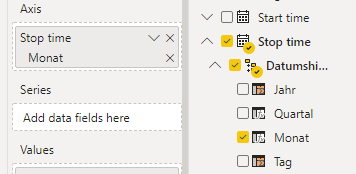
I also tried to set the hierachy to year AND month which works with normal line charts but I think that the "Power KPI (2.0.0)" visual only allows one date (year OR quarter OR month OR day).

KPI2.0.0_2.PNG

Is there any solution for that problem?


BG,

Daniel

1 ACCEPTED SOLUTION
timg
Solution Sage
Solution Sage

Hi Daniel,


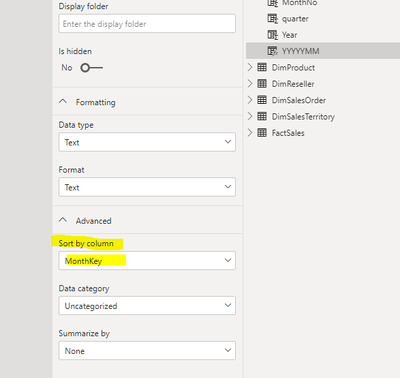
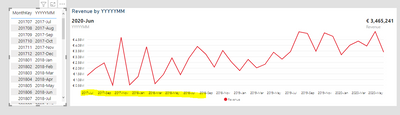
I'm not sure how your month column looks, but if it is in a similar format "2021-Jan" the issue could be that the data is saved as text and is therefore sorted alphabetically. By sorting the month column by a numerical column for example a MonthKey (e.g. 202101 for Januari 2021) you could correct these sorting issues. You can find the sort by option in de model view and in the column tools tab when you have a column selected.

image 1: alphabetical sortimage 1: alphabetical sort

image 2: sort optionimage 2: sort option

image 3: corrected sortimage 3: corrected sort


Regards,


Tim


Did I answer your question? Mark my post as a solution!

Proud to be a Super User!


View solution in original post

1 REPLY 1
timg
Solution Sage
Solution Sage

Hi Daniel,


I'm not sure how your month column looks, but if it is in a similar format "2021-Jan" the issue could be that the data is saved as text and is therefore sorted alphabetically. By sorting the month column by a numerical column for example a MonthKey (e.g. 202101 for Januari 2021) you could correct these sorting issues. You can find the sort by option in de model view and in the column tools tab when you have a column selected.

image 1: alphabetical sortimage 1: alphabetical sort

image 2: sort optionimage 2: sort option

image 3: corrected sortimage 3: corrected sort


Regards,


Tim


Did I answer your question? Mark my post as a solution!

Proud to be a Super User!


Helpful resources

Announcements
Power BI DataViz World Championships

Power BI Dataviz World Championships

The Power BI Data Visualization World Championships is back! Get ahead of the game and start preparing now!

December 2025 Power BI Update Carousel

Power BI Monthly Update - December 2025

Check out the December 2025 Power BI Holiday Recap!

FabCon Atlanta 2026 carousel

FabCon Atlanta 2026

Join us at FabCon Atlanta, March 16-20, for the ultimate Fabric, Power BI, AI and SQL community-led event. Save $200 with code FABCOMM.