FabCon is coming to Atlanta
Join us at FabCon Atlanta from March 16 - 20, 2026, for the ultimate Fabric, Power BI, AI and SQL community-led event. Save $200 with code FABCOMM.
Register now!- Power BI forums
- Get Help with Power BI
- Desktop
- Service
- Report Server
- Power Query
- Mobile Apps
- Developer
- DAX Commands and Tips
- Custom Visuals Development Discussion
- Health and Life Sciences
- Power BI Spanish forums
- Translated Spanish Desktop
- Training and Consulting
- Instructor Led Training
- Dashboard in a Day for Women, by Women
- Galleries
- Data Stories Gallery
- Themes Gallery
- Contests Gallery
- QuickViz Gallery
- Quick Measures Gallery
- Visual Calculations Gallery
- Notebook Gallery
- Translytical Task Flow Gallery
- TMDL Gallery
- R Script Showcase
- Webinars and Video Gallery
- Ideas
- Custom Visuals Ideas (read-only)
- Issues
- Issues
- Events
- Upcoming Events
The Power BI Data Visualization World Championships is back! Get ahead of the game and start preparing now! Learn more
- Power BI forums
- Forums
- Get Help with Power BI
- Desktop
- Power Bi showing 10.8% instead of 110.8%!
- Subscribe to RSS Feed
- Mark Topic as New
- Mark Topic as Read
- Float this Topic for Current User
- Bookmark
- Subscribe
- Printer Friendly Page


- Mark as New
- Bookmark
- Subscribe
- Mute
- Subscribe to RSS Feed
- Permalink
- Report Inappropriate Content
Power Bi showing 10.8% instead of 110.8%!
Hey all,
So I have a calendar table with all the days and another column that has a DAX function doing this ( if is holiday or weekend equals 0 else 8), 8 is the standard daily work hours we have here in the company, this is working as expected, this column is called standard hours.
Aside from that, I have a table with all the employee and the hours they worked etc.
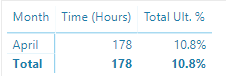
I've created a quick measure that is "sum of work hours divided by standard hours" in %, pretty simple right? But although the calculation is right, the visualization doesn't work as expected, see the image below:
So, this employee, worked 178 hours in April, in our company the standard is 5 days per week, 8 hours per day, so the math is:
5x8= 40 hours per week
4x40= 160 hours per month
So he worked 178 hours instead of the standard 160 hours for that month, this should be 110.8% (111% rounding up) but PBI is showing 10.8%.
I don't know what I'm doing wrong here.
Any thoughs?


- Mark as New
- Bookmark
- Subscribe
- Mute
- Subscribe to RSS Feed
- Permalink
- Report Inappropriate Content
Quick Measures are not too efficient and smart sometimes. Show us the measure created by quick measure
- Mark as New
- Bookmark
- Subscribe
- Mute
- Subscribe to RSS Feed
- Permalink
- Report Inappropriate Content
Total Ult. % =
DIVIDE(SUM('Hours Total'[Time (Hours)]), SUM('Calendar'[DayHours]))
Here you go, @rafaelmpsantos
- Mark as New
- Bookmark
- Subscribe
- Mute
- Subscribe to RSS Feed
- Permalink
- Report Inappropriate Content
Well, the measure is ok.
but try this
Total Ult. % =
DIVIDE(SUM('Hours Total'[Time (Hours)]), SUM('Calendar'[DayHours]))+1
- Mark as New
- Bookmark
- Subscribe
- Mute
- Subscribe to RSS Feed
- Permalink
- Report Inappropriate Content
@rafaelmpsantos the displayed numbers are right now but it broke the chart:

And if I try to do the same with "billable %", the results are very wrong, right now it should be 3% instead of 0.3% with the +1 it goes to 103%.

- Mark as New
- Bookmark
- Subscribe
- Mute
- Subscribe to RSS Feed
- Permalink
- Report Inappropriate Content
- Mark as New
- Bookmark
- Subscribe
- Mute
- Subscribe to RSS Feed
- Permalink
- Report Inappropriate Content
- Mark as New
- Bookmark
- Subscribe
- Mute
- Subscribe to RSS Feed
- Permalink
- Report Inappropriate Content
Currently i am posting on mobile please check for any missing parenthesis or typo.
Total Ult. % =
If(SUM('Hours Total'[Time (Hours)])>SUM('Calendar'[DayHours]), DIVIDE(SUM('Hours Total'[Time (Hours)]), SUM('Calendar'[DayHours]))+1, DIVIDE(SUM('Hours Total'[Time (Hours)]), SUM('Calendar'[DayHours])))
- Mark as New
- Bookmark
- Subscribe
- Mute
- Subscribe to RSS Feed
- Permalink
- Report Inappropriate Content
Thanks @Xvierlh but nothing changes, the DAX worked but it remained the same %.

- Mark as New
- Bookmark
- Subscribe
- Mute
- Subscribe to RSS Feed
- Permalink
- Report Inappropriate Content
Hi @GeorgesKV,
If it is convenient, could you share a dummy pbix file which can reproduce the scenario, so that we can help further investigate on it? You can upload it to OneDrive or Dropbox and post the link here. Do mask sensitive data before uploading.)
Best Regards,
Cherry
If this post helps, then please consider Accept it as the solution to help the other members find it more quickly.

Helpful resources

Power BI Monthly Update - November 2025
Check out the November 2025 Power BI update to learn about new features.

Fabric Data Days
Advance your Data & AI career with 50 days of live learning, contests, hands-on challenges, study groups & certifications and more!

FabCon Atlanta 2026
Join us at FabCon Atlanta, March 16-20, for the ultimate Fabric, Power BI, AI and SQL community-led event. Save $200 with code FABCOMM.

| User | Count |
|---|---|
| 58 | |
| 45 | |
| 42 | |
| 20 | |
| 18 |


| User | Count |
|---|---|
| 169 | |
| 109 | |
| 91 | |
| 55 | |
| 44 |


