cancel
Showing results for 
Search instead for 
Did you mean: 

Get Fabric Certified for FREE during Fabric Data Days. Don't miss your chance! Request now

Reply
jake97
New Member

Power Bi Card showing as (Blank) on Filtered Count of Text

Hi All, 


I'm a Power Bi novice! I have established a Power Bi report, and within the report I am counting the text value for a 'Completed' column. The text results are only 'True' or 'False'. 


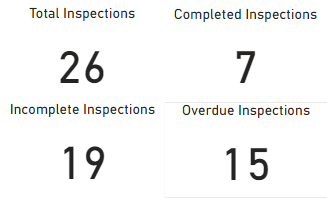
I have a count of all occurances which works fine, I am then counting all "True" values, all "False" values and all "False" values that are before today's date. As pictured below. 


Capture1.PNG


When I publish the report to My Workspace, the report initially shows as desired. When a dataset refresh occurs, I keep receiving the below result. 


Capture2.PNG


Does anyone know how to fix this issue? I've tried to create new columns, measures, etc. to no avail. I can't find an answer anywhere. 


Any help is appreciated!

1 ACCEPTED SOLUTION
jake97
New Member

Fixed the issue! Converted the column to True/False data type, then used a measures to get count:


TrueCount = COUNTAX(FILTER('Table',[Completed]=TRUE()),TRUE())


And a measure so the card shows as '0' not '(Blank)' if no data:


TrueCountIf = IF('Table'[TrueCount]>=1,[TrueCount],0)

View solution in original post

4 REPLIES 4
Anonymous
Not applicable

Hi, 

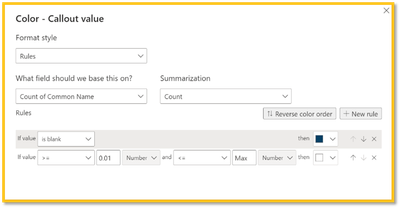
You can hide the blank value using a Conditional Formatting rule on the Callout Value. The rule is 'if blank' then select the same color as the card or canvas background. 

I have created a video tutorial on how to create the conditional rule: https://youtu.be/Xsmbfpa4oCA

biancagilly_1-1652137235851.png


jake97
New Member

Fixed the issue! Converted the column to True/False data type, then used a measures to get count:


TrueCount = COUNTAX(FILTER('Table',[Completed]=TRUE()),TRUE())


And a measure so the card shows as '0' not '(Blank)' if no data:


TrueCountIf = IF('Table'[TrueCount]>=1,[TrueCount],0)

PhilipTreacy
Super User
Super User

Hi @jake97 


How are you counting the values that show as BLANK?


After the data refresh, what data is in your dataset?  Can you please provide this data.


Regards


Phil


Did I answer your question? Then please mark my post as the solution.
If I helped you, click on the Thumbs Up to give Kudos.


Blog :: YouTube Channel :: Connect on Linkedin


Proud to be a Super User!


Hi @PhilipTreacy, thank you for your response!

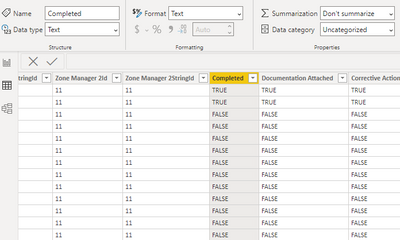
There are no blanks in the column I am counting. The data is populated from a SharePoint list, the default for "Completed" is FALSE (No). 

Below is what the data looks like for the column I'm counting. 

Capture3.PNG


Is there anything else I can provide you with? 


Thank you very much. 

Helpful resources

Announcements
November Power BI Update Carousel

Power BI Monthly Update - November 2025

Check out the November 2025 Power BI update to learn about new features.

Fabric Data Days Carousel

Fabric Data Days

Advance your Data & AI career with 50 days of live learning, contests, hands-on challenges, study groups & certifications and more!

FabCon Atlanta 2026 carousel

FabCon Atlanta 2026

Join us at FabCon Atlanta, March 16-20, for the ultimate Fabric, Power BI, AI and SQL community-led event. Save $200 with code FABCOMM.

Top Solution Authors
Top Kudoed Authors