Join us at FabCon Atlanta from March 16 - 20, 2026, for the ultimate Fabric, Power BI, AI and SQL community-led event. Save $200 with code FABCOMM.
Register now!The Power BI Data Visualization World Championships is back! Get ahead of the game and start preparing now! Learn more
Hello,
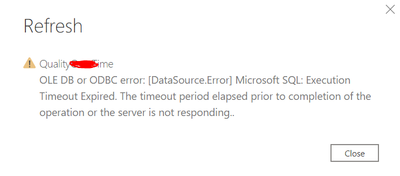
I have connected to one of the views in Azure SQL server database and opened them in query editor. After doing transformations when i click on close and apply I end up with the error after 15min.
The connectrion was successful when i connect to the databse initially when i apply changes to the table I am getting this error.
Anyone has any suggesstions or solutions on this issue?
Regards,
Krishna.
@Krish89 If you are still getting this error, You could check the Issues forum here:
https://community.powerbi.com/t5/Issues/idb-p/Issues
And if it is not there, then you could post it.
If you have Pro account you could try to open a support ticket. If you have a Pro account it is free. Go to https://support.powerbi.com. Scroll down and click "CREATE SUPPORT TICKET".
@Krish89 , What is the timeout ate database level.
There is a setting in power query for that, check if you can use in this case. Refer similar ticket -https://community.powerbi.com/t5/Desktop/Query-Timeout-on-update/td-p/53459
I have been getting this a lot myself as well. I usually just try again and it works! No idea what causes it.
The Power BI Data Visualization World Championships is back! Get ahead of the game and start preparing now!
Check out the November 2025 Power BI update to learn about new features.
| User | Count |
|---|---|
| 59 | |
| 46 | |
| 42 | |
| 23 | |
| 18 |
| User | Count |
|---|---|
| 193 | |
| 123 | |
| 99 | |
| 67 | |
| 49 |