Advance your Data & AI career with 50 days of live learning, dataviz contests, hands-on challenges, study groups & certifications and more!
Get registeredGet Fabric Certified for FREE during Fabric Data Days. Don't miss your chance! Request now
Hi Experts,
Firstly, the report titled "LIMS CoA Report" was published to the Workspace "LIMS CoA". Following that, I created an App called "LIMS CoA" where I could view the report from the App.
Then, I published a second report named "LIMS CoA PBI" and set the "updated the App" option to "Yes." However, I am unable to see the second report "LIMS CoA PBI" in the App.
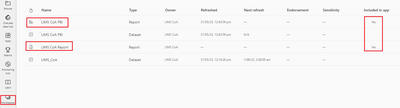
Please refer to the screenshot below, which demonstrates that the second report "LIMS CoA PBI" is set to "Yes" with Workspace "LIMS CoA"
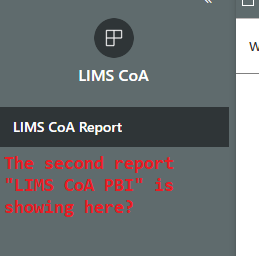
But it does not show in the App
What could be the reasons? I sometimes have this issue for other Apps
Much appreciated
Solved! Go to Solution.
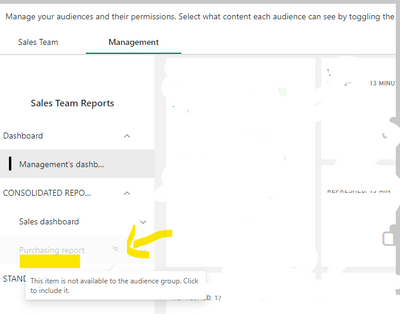
go to audience tab, and see if the content is made visible,
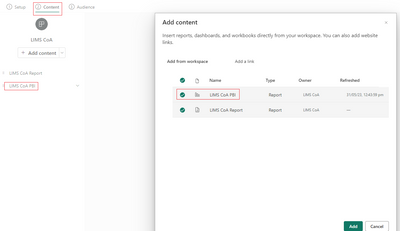
@Anonymous go to the update app option, add the content (your second report in this case), make it visible and then update your app.
Hi AbbasG,
Before I posted the question I already did the steps that you have mentioned and that's why "included in App" was set to "Yes" for this second report. Where is your step "make it visible" following up the below screenshot?
Thank you
go to audience tab, and see if the content is made visible,
Advance your Data & AI career with 50 days of live learning, contests, hands-on challenges, study groups & certifications and more!
Check out the October 2025 Power BI update to learn about new features.