cancel
Showing results for 
Search instead for 
Did you mean: 

Get Fabric Certified for FREE during Fabric Data Days. Don't miss your chance! Request now

Reply
jcary02
Frequent Visitor

DAX help: Show Sales YOY, but show the current year overlaid on the entire previous year

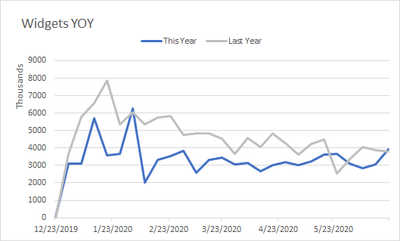
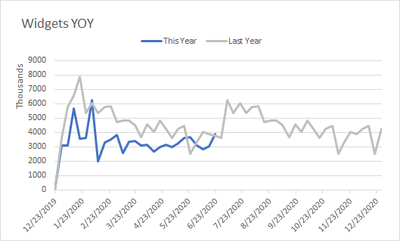
I'd like to reproduce a graph similar to the second one shown below in Power BI. I have measures for the current year and sameday last year.  I'm having trouble projecting my last year measure into the future.


Basically, I want to show the same period last year for a future date. I have the data just can't get it to overlay.  Any advise would be awesome!


This is an example of what I have so far in Power BI:

jcary02_1-1593810480446.png


What I want to acheive is shown below. The blue line is the current year which ends today. the gray line is same period last year for but for a future date:

jcary02_0-1593793985253.png


1 ACCEPTED SOLUTION

sorry I meant "put the date from the dates table minus the year component on the x axis".  Calculated column is enough.


you need to strip the year from the date column, and then use the year as legend (the way you already did)

View solution in original post

6 REPLIES 6
lbendlin
Super User
Super User

put the date from the dates table (not the facts table) on the x axis and then select "show items with no data".

Ok, I have the date from my dimension table on the x axis. Where can I find the 'show items with no data' option?

click the triangle next to the date field in the visual's axis section

Shoot, that didn't work. My date dimension goes until 2025, but when I select the 'show item with no data' option nothing changes. 

sorry I meant "put the date from the dates table minus the year component on the x axis".  Calculated column is enough.


you need to strip the year from the date column, and then use the year as legend (the way you already did)

Thank you! Got it!

Helpful resources

Announcements
November Power BI Update Carousel

Power BI Monthly Update - November 2025

Check out the November 2025 Power BI update to learn about new features.

Fabric Data Days Carousel

Fabric Data Days

Advance your Data & AI career with 50 days of live learning, contests, hands-on challenges, study groups & certifications and more!

FabCon Atlanta 2026 carousel

FabCon Atlanta 2026

Join us at FabCon Atlanta, March 16-20, for the ultimate Fabric, Power BI, AI and SQL community-led event. Save $200 with code FABCOMM.