cancel
Showing results for 
Search instead for 
Did you mean: 

View all the Fabric Data Days sessions on demand. View schedule

Reply
mkadir
Regular Visitor

Power BI complains it cannot find a table even though the table is available in Edit Query source

I have a Power BI report which connects to an Azure SQL Database via Direct Query. It seems to validate and refresh successfully upon opening and works fine.


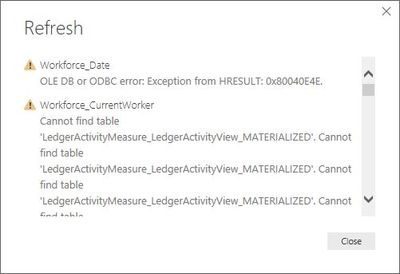
When trying to switch the tables to Import mode however, Power BI presents an error message complaining that it cannot find a table: 


Cannot find table.JPG

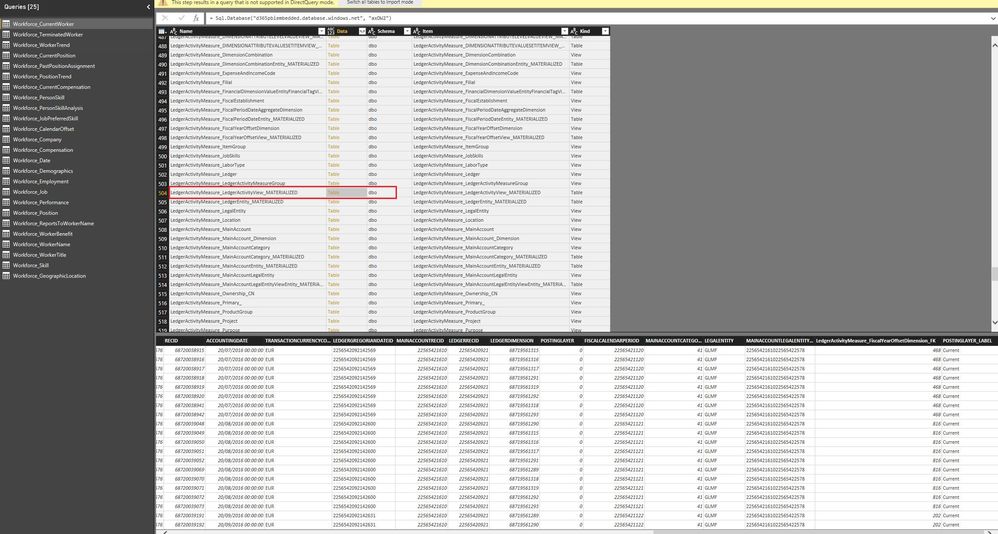
What is strange however, is that I am able to access/view the SQL table via Management Studio and within the Edit Query section of Power BI. I am able to click on query Source and can see the table listed. I can preview the data there yet Power BI complains that it cannot find the table as soon as I try to switch to Import mode. 


Can preview data.JPG


Can anyone explain why Power BI is complaining it cannot find a table during the switch to Import mode, and suggest a solution please? Thanks 

1 REPLY 1
v-yuta-msft
Community Support
Community Support

Hi mkadir,


Click refresh in the report view and check if this issue still occurs.


Regards,

Jimmy Tao

Helpful resources

Announcements
November Power BI Update Carousel

Power BI Monthly Update - November 2025

Check out the November 2025 Power BI update to learn about new features.

Fabric Data Days Carousel

Fabric Data Days

Advance your Data & AI career with 50 days of live learning, contests, hands-on challenges, study groups & certifications and more!

FabCon Atlanta 2026 carousel

FabCon Atlanta 2026

Join us at FabCon Atlanta, March 16-20, for the ultimate Fabric, Power BI, AI and SQL community-led event. Save $200 with code FABCOMM.

Top Solution Authors
Top Kudoed Authors