cancel
Showing results for 
Search instead for 
Did you mean: 

The Power BI Data Visualization World Championships is back! Get ahead of the game and start preparing now! Learn more

Reply
powerbi_seek
Frequent Visitor

Power BI - Variation of value by month

Hello guys,


I need your help please.


I have a Datetime table (full calendar), and another table related to it, with appointment data.


I need to show the variatiion of number of appoitments by Month, in a WaterFall chart.


Actually, I have a filter on a customer, who had only 2 records on October in whole 2017.

So normally, the variation in October should be +2, and in November -2, December 0.


Unfortunatly, it's not what I have, I got only +2 in october, and that's it.


So this is the formulas of my measure:

DIFF_RDV_byMONTH:=-(calculate(sum(Interaction[NbRDVbyRow]); PARALLELPERIOD(DateDim[Date];-1;MONTH))+calculate(sum(Interaction[NbRDVbyRow])))

Thanks for your help.


regards

1 ACCEPTED SOLUTION
spuder
Resolver IV
Resolver IV

Hi @powerbi_seek

I tried to rebuilt your issue and for me it seems to work. 

2 things. Change both operators and (just for optic) use PREVIOUSMONTH() instead

=CALCULATE(SUM(factAppointments[Appointments]))-CALCULATE(SUM(factAppointments[Appointments]);PREVIOUSMONTH(Kalender[Date]))


But I also tried it with Parallelperiod() and it worked as well.


View solution in original post

6 REPLIES 6
spuder
Resolver IV
Resolver IV

Hi @powerbi_seek

I tried to rebuilt your issue and for me it seems to work. 

2 things. Change both operators and (just for optic) use PREVIOUSMONTH() instead

=CALCULATE(SUM(factAppointments[Appointments]))-CALCULATE(SUM(factAppointments[Appointments]);PREVIOUSMONTH(Kalender[Date]))


But I also tried it with Parallelperiod() and it worked as well.


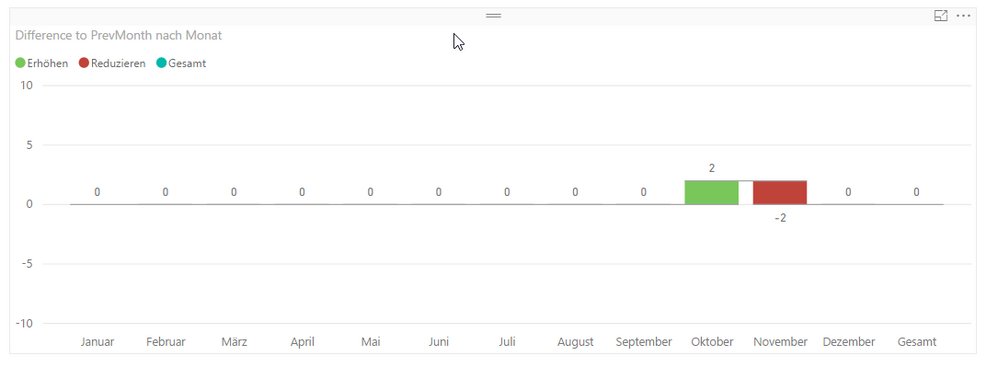
Can you please show a visual ?

@powerbi_seek 


looks like this


visual.png

I got it, my issue is related to January. I made an IF statement to do that only if the month is not January. And that seems not working

I think this should work as well. The whole calculation should be surounded by a CALCULATE() that has a filter condition "not January"

CALCULATE([Total Appointments]-CALCULATE([Total Appointments];PREVIOUSMONTH(DateTable[Date]));DateTable[Date].[Monat]<>"Januar")

Hi, that's it what I did, but didn't work, till I also filtered on Non Blank date field. Thanks anyway, it's working .

Helpful resources

Announcements
Power BI DataViz World Championships

Power BI Dataviz World Championships

The Power BI Data Visualization World Championships is back! Get ahead of the game and start preparing now!

December 2025 Power BI Update Carousel

Power BI Monthly Update - December 2025

Check out the December 2025 Power BI Holiday Recap!

FabCon Atlanta 2026 carousel

FabCon Atlanta 2026

Join us at FabCon Atlanta, March 16-20, for the ultimate Fabric, Power BI, AI and SQL community-led event. Save $200 with code FABCOMM.