
Join us at FabCon Atlanta from March 16 - 20, 2026, for the ultimate Fabric, Power BI, AI and SQL community-led event. Save $200 with code FABCOMM.
Register now!The Power BI Data Visualization World Championships is back! Get ahead of the game and start preparing now! Learn more
Hello,
In Power Bi Desktop I am getting data from Salesforce Objects (Case Table). Whenever the data is imported the timestamps on the dates are 5hrs ahead of time, which is throwing off our metrics on every record. Is there anyone who could help resolve this issue?
Example:
Actual Salesforce Created Date = 6/4/2019 4:02 PM
Power BI Converted Created Date = 6/4/2019 9:02 PM
Hi @Anonymous ,
Is your calendar table created with DAX formula? If that is the case, you can not edit this calendar table in "Power Query".
Best regards,
Lionel Chen
If this post helps, then please consider Accept it as the solution to help the other members find it more quickly.
I was able to get this formula to work in DAX, but it doesnt relate to my calendar table after aligning the formats. I would like to try this in M. How would this formula look as an M function?
Thank you so much for the help! This is great for building my power bi knowledge .
Hi @Anonymous ,
How did this date field come from? From DAX formula or M function?
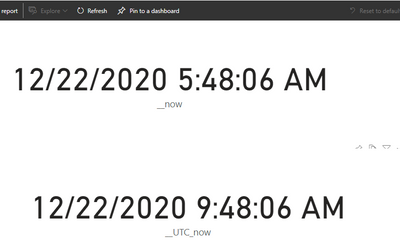
You don't need to create a new column, you can subtract 5 hours from this date field to get your local time.
__now = NOW() -TIME(4,0,0)
Best regards,
Lionel Chen
If this post helps, then please consider Accept it as the solution to help the other members find it more quickly.
Hi @Anonymous ,
How many hours is there between your local time and UTC time? Service server uses UTC time.
Try to add such a column in 'Edit Query'.
Best regards,
Lionel Chen
If this post helps, then please consider Accept it as the solution to help the other members find it more quickly.
Hello, there is a 5hr difference. For performance reasons, is there a solution without having to create a new column?
Hi @Anonymous - Did you ever come up with a workable solution for this? I'm pretty new to PBI and I'm experiencing the same issue. Thanks!
The Power BI Data Visualization World Championships is back! Get ahead of the game and start preparing now!
Check out the November 2025 Power BI update to learn about new features.
| User | Count |
|---|---|
| 59 | |
| 43 | |
| 42 | |
| 23 | |
| 17 |
| User | Count |
|---|---|
| 190 | |
| 122 | |
| 96 | |
| 66 | |
| 47 |