cancel
Showing results for 
Search instead for 
Did you mean: 

Get Fabric certified for FREE! Don't miss your chance! Learn more

Reply
Anonymous
Not applicable

Power BI Relationship between two tables

I have 2 tables T1 and T2 and they related to each other using T1(1-*)T2. 

Now I wanted to show the rows from T1 where I couldn't find atleast one row in T2. 

Using SQL I could write something like this ... 


Select * from T1

Left Join T2 on T1.c1= T2.c1

where T2.c1 is NULL


But how could I acheive this in Power BI. 

Any Idea would be appreciated. Thanks in advance.

4 REPLIES 4
v-cherch-msft
Microsoft Employee
Microsoft Employee

Hi @Anonymous


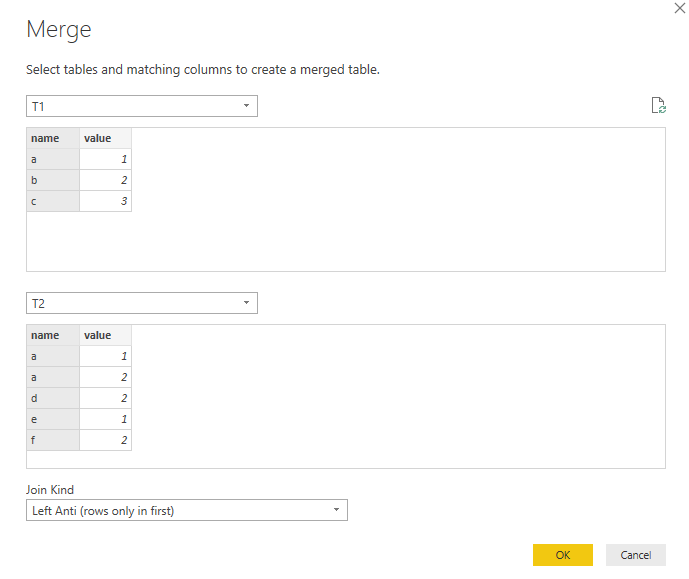
One way is to new a table with EXCEPT Function . The other way is to use Merge Queries in Query Editor. For example:

1.png

Regards,

Cherie


Community Support Team _ Cherie Chen
If this post helps, then please consider Accept it as the solution to help the other members find it more quickly.
Anonymous
Not applicable

Is there any way that we can do by just making use of relationships ?

Hi @Anonymous


You may try to set the 'Cross filter direction' to 'Both' in relationship.


Regards,

Cherie

Community Support Team _ Cherie Chen
If this post helps, then please consider Accept it as the solution to help the other members find it more quickly.
Anonymous
Not applicable

Thanks @v-cherch-msft

The Cross filter direction to both is not surving my purpose. 

Helpful resources

Announcements
Sticker Challenge 2026 Carousel

Join our Community Sticker Challenge 2026

If you love stickers, then you will definitely want to check out our Community Sticker Challenge!

January Power BI Update Carousel

Power BI Monthly Update - January 2026

Check out the January 2026 Power BI update to learn about new features.

FabCon Atlanta 2026 carousel

FabCon Atlanta 2026

Join us at FabCon Atlanta, March 16-20, for the ultimate Fabric, Power BI, AI and SQL community-led event. Save $200 with code FABCOMM.