Don't miss your chance to take exam DP-600 or DP-700 on us!
Request nowLearn from the best! Meet the four finalists headed to the FINALS of the Power BI Dataviz World Championships! Register now
Hi All,
I am stuck in one scannario related to RLS. I need to create dynamic RLS on the basis of supplier_ID and Receiver_ID
Below is the data and i have use report server (USERPRINCIPALNAME).
Date Supplier ID Receiver_ID Item
202301 abc@hmx.com xyz@hmx.com hedphone
202301 xyz@hmx.com abc@hmx.com mouse
202301 xyz@hmx.com lmn@hmx.co Key
202301 xyz@hmx.com xyz@hmx.com Pen
202302 lmn@hmx.com xyz@hmx.com Hedphone
202302 xyz@hmx.com abc@hmx.com mouse
202302 xyz@hmx.com lmn@hmx.com key
202302 lmn@hmx.com xyz@hmx.com pen
Solved! Go to Solution.
Hi @AF_VK ,
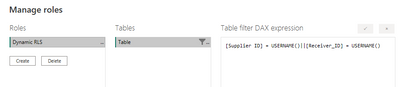
Please try:
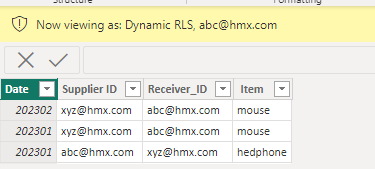
Final output:
Best Regards,
Jianbo Li
If this post helps, then please consider Accept it as the solution to help the other members find it more quickly.
Hi @AF_VK ,
When you are viewing as abc@hmx.com, As long as Supplier ID or Receiver_ID contains abc@hmx.com, that line of data will be visible.
[Supplier ID] = USERNAME()||[Receiver_ID] = USERNAME()
This formula is used to filter the table, "||" means "or". Regardless of Supplier ID or Receiver_ID, as long as one of the two column contains xxxx, that row of data could be visible.
Best Regards,
Jianbo Li
If this post helps, then please consider Accept it as the solution to help the other members find it more quickly.
Thanks Jianbo, actually i am new to RLS so one question when you are viewing as abc@hmx.com ,is it supplier_id login or receiver_id login ? Also if you can explain the formula [Supplier ID] = USERNAME()||[Receiver_ID] = USERNAME() that would be great help. Thanks again for your reply
Hi @AF_VK ,
Please try:
Final output:
Best Regards,
Jianbo Li
If this post helps, then please consider Accept it as the solution to help the other members find it more quickly.
Share feedback directly with Fabric product managers, participate in targeted research studies and influence the Fabric roadmap.
Check out the February 2026 Power BI update to learn about new features.
| User | Count |
|---|---|
| 54 | |
| 47 | |
| 39 | |
| 16 | |
| 15 |
| User | Count |
|---|---|
| 83 | |
| 71 | |
| 39 | |
| 29 | |
| 27 |