Hi all.
I'm really struggling with some DAX and would appreciate some help.
Requirement
I want a count of how many 'Apps' are not equal to 'Complete' for a specific 'Build'.
Data Model
Builds
Build
App

Apps
App (FK into Builds.App)
Status
I previously asked a question here: DAX subquery measure?
for instruction on how to create a specific measure column for a visualisation. To keep the example simple, I kept it to one fictitious table and the DAX query worked really well.
In reality, however, the visualisation that the measure column is for is made up of multiple joined tables. And the results of the DAX query unexpectedly produced all zeros! So I'll refactor my example here for more help...
Requirement
I want a count of how many 'Apps' are not equal to 'Complete' for a specific 'Build'.
Data Model
Builds
Build
App

Apps
App
Status
Sample Data
Builds
Build...........App
Build1..........App1
Build1..........App2
Build1..........App9
Build2..........App3
Build3..........App1
Build3..........App5
Build3..........App8
Build3..........App9
Apps
App...........Status
App1..........UAT
App2..........Complete
App9..........New
App3..........Complete
App5..........UAT
App8..........Complete
Relationship
The relationship is MANY Builds.App to ONE Apps.App.
Visualisation Table
This is my visualisation - note the different tables:
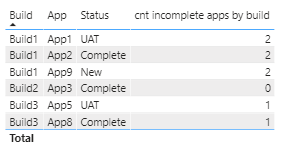
Builds.Build....Builds.App....Apps.Status
Build1..........App1..........UAT
Build1..........App2..........Complete
Build1..........App9..........New
Build2..........App3..........Complete
Build3..........App5..........UAT
Build3..........App8..........Complete
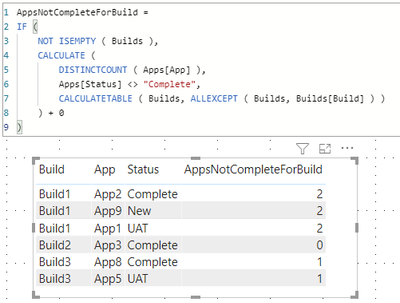
This is my required results (for example, i can see there are 2 Apps not Complete for Build1):
Builds.Build....Builds.App....Apps.Status....AppsNotCompleteForBuild
Build1..........App1..........UAT............2
Build1..........App2..........Complete.......2
Build1..........App9..........New............2
Build2..........App3..........Complete.......0
Build3..........App5..........UAT............1
Build3..........App8..........Complete.......1
ATTEMPT 1 (Not working!)
CALCULATE (
    COUNT ( Builds[App] ),
    FILTER (
        ALL ( Builds[Build], Builds[App] ),
        Builds[Build] = SELECTEDVALUE ( Builds[Build] )
    ),
    FILTER (
        ALL ( Apps[Status] ),
        Apps[Status] <> "Complete"
    )
) + 0
ATTEMPT 2 (Not working!)
Measure 5 = CALCULATE (
    COUNT ( Builds[App] ),
    FILTER (
        ALL ( Builds[Build] ),
        Builds[Build] = SELECTEDVALUE ( Builds[Build] )
    ),
    FILTER (RELATEDTABLE(Apps),
    Apps[Status] <> "Complete")
) + 0
ATTEMPT 3 (Not working!)
Measure5 = CALCULATE (
   COUNTAX(FILTER( Builds
            ,  RELATED(Apps[Status]) <>"Complete"
               && Builds[Build] = SELECTEDVALUE(Builds[Build])
             )
     ,Builds[App])
) + 0
Thanks for any help!!