cancel
Showing results for 
Search instead for 
Did you mean: 

The Power BI Data Visualization World Championships is back! Get ahead of the game and start preparing now! Learn more

Reply
Jierenjoel
Frequent Visitor

Power BI Auto Transformation of Date Issue

Hi,

I got a question about how to resolve the transformation of the date.


Context: Enquiry Date is type "text", Enquiry_Date_Transformed is just "Enquiry Date" that is type "Date"


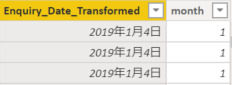
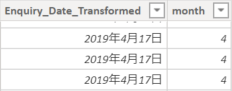
For some reason part of the data is formatted differently from the other rows. The correct format should be "dd-mm-yyyy" but I have no idea how to resolve this auto-detection and transformation issue.


forum1.pngforum2.png

forum3.pngforum4.png


Joel

1 ACCEPTED SOLUTION
TimoRiikonen
Helper V
Helper V

Try to enforce the locale to your liking, here I have changed it to Finnish for Datetime field:

#"Changed Type with Locale1" = Table.TransformColumnTypes(#"Changed Type with Locale", {{"Local timestamp without offset", type datetime}}, "fi-FI"),

View solution in original post

4 REPLIES 4
TimoRiikonen
Helper V
Helper V

Try to enforce the locale to your liking, here I have changed it to Finnish for Datetime field:

#"Changed Type with Locale1" = Table.TransformColumnTypes(#"Changed Type with Locale", {{"Local timestamp without offset", type datetime}}, "fi-FI"),

JirkaZ
Solution Specialist
Solution Specialist

IMHO you'll have to change your regional settings:


Go to Options and Settings -> Options -> Current File section -> Regional Settings and change to the appropriate locale.

I changed all regional settings and refreshed the datasource but it didn't change.


I resolved the issue by splitting the date into 3 seperate substring columns (day, month, year) and created a new date column with those components. However, it is an inelegant and burdensome method.


I just don't understand how half the data of a column can be automatically detected as "mm/dd/yyyy" and the other half of the same column as "dd/mm/yyyy". In addition, I cannot find a way to modify this "automatic detection"


Joel

JirkaZ
Solution Specialist
Solution Specialist

Are the differences within the same table or different tables? 
Also the preferences should be set prior the data load ideally and of course turn-off the automatic data type detection and auto Date/Time tables etc.

Helpful resources

Announcements
Power BI DataViz World Championships

Power BI Dataviz World Championships

The Power BI Data Visualization World Championships is back! Get ahead of the game and start preparing now!

November Power BI Update Carousel

Power BI Monthly Update - November 2025

Check out the November 2025 Power BI update to learn about new features.

FabCon Atlanta 2026 carousel

FabCon Atlanta 2026

Join us at FabCon Atlanta, March 16-20, for the ultimate Fabric, Power BI, AI and SQL community-led event. Save $200 with code FABCOMM.