We've captured the moments from FabCon & SQLCon that everyone is talking about, and we are bringing them to the community, live and on-demand. Starts on April 14th. Register now
Looking for suggestion on a way that allows me to see an invetory of dashboards, and those permitted to access them.
The goal is to better administrate the distribution and consistency in dashboard/report availability.
Thanks - appreciate all the feedback.
Hi @Anonymous,
In Power BI desktop, the report and dataset use your local computer momery. You can check each .pbix file size.
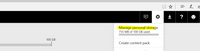
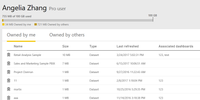
In Power BI desktop, you can see storege of all datasets( by yourself or owned by others, and corresponding reports and dashboards) by clicking the setting->Manage personal storage.
Click Settings->Admin Portal, which is accessible to all users who are Global Admins in Office 365 or have been assigned the Power BI service administrator role.
Best Regards,
Angelia
There is a REST API available to access metadata of dashboards, reports, and datasets. You can use this API from custom application to manage Power BI resources. For more information see the documentation here: http://docs.powerbi.apiary.io/#.
If you have recently started exploring Fabric, we'd love to hear how it's going. Your feedback can help with product improvements.
A new Power BI DataViz World Championship is coming this June! Don't miss out on submitting your entry.
Share feedback directly with Fabric product managers, participate in targeted research studies and influence the Fabric roadmap.
| User | Count |
|---|---|
| 57 | |
| 38 | |
| 32 | |
| 18 | |
| 16 |
| User | Count |
|---|---|
| 66 | |
| 66 | |
| 40 | |
| 34 | |
| 25 |