Forum Discussion

Possible Tip/Trick: Dynamic Date Dimension Table

I am new to PowerBI and I don't understand how to actually create this table.
I tried creating a New Source -> Blank Query and inserting your query, but that doesn't seem to work.
Could you please add some more detailed steps on how to add it to the queries, for newbies like me? :)
- konstantinos10 years agoMemorable Member
bernitorres You can create/import tables with 2 ways. One is importing with "Get Data" and the other is through DAX data modelling.
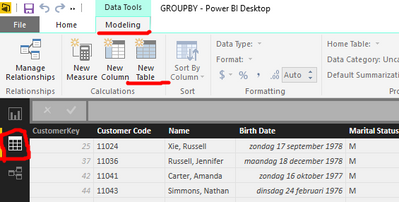
You need to go to the data model view and in the ribbon go to modeling tab & select "New Table". thus using DAX language.
The "Get data" uses M language which is used only for importing data to data model.
Keep in mind that you need to already have import some data in order to see the :Modelling" tab..
 ALeef10 years agoResolver II
konstantinos has it right. I made it using the New Table option on the ribbon.
- ALeef10 years agoResolver II
I edited the table above to inclue ISO Week number, which also helped fix the Week Ending values. Should be more accurate now. Please let me know if you figure out how to break it!
- amysmith9 years agoHelper I
Hi, if you wish, you will be able to learn more here: