Don't miss your chance to take the Fabric Data Engineer (DP-600) exam for FREE! Find out how by attending the DP-600 session on April 23rd (pacific time), live or on-demand.
Learn moreJoin the FabCon + SQLCon recap series. Up next: Power BI, Real-Time Intelligence, IQ and AI, and Data Factory take center stage. All sessions are available on-demand after the live show. Register now
Hi there,
I have sample data shown below in the grid.
The time values are by date - with upper and lower boundaries of 6pm and 8pm.
Times should sit between these boundaries.
Ideally I would like to plot a line graph, showing the upper and lower boundaries as lines, where my "actual time" is plotted between. Any values that cross the boundaries are breach of SLA.
Please help me make this work.
Thanks,
| CollectedDate | CollectedTime | Lowerboundary | UpperBoundary |
| 04/10/2017 | 18:47:23 | 18:00:00 | 20:00:00 |
| 30/07/2017 | 19:48:00 | 18:00:00 | 20:00:00 |
| 09/12/2017 | 19:59:48 | 18:00:00 | 20:00:00 |
| 09/01/2017 | 19:45:50 | 18:00:00 | 20:00:00 |
| 15/09/2017 | 19:29:43 | 18:00:00 | 20:00:00 |
| 08/07/2017 | 19:11:08 | 18:00:00 | 20:00:00 |
| 19/08/2017 | 18:12:58 | 18:00:00 | 20:00:00 |
| 24/11/2017 | 18:04:36 | 18:00:00 | 20:00:00 |
| 11/07/2017 | 18:20:01 | 18:00:00 | 20:00:00 |
| 17/12/2017 | 19:24:06 | 18:00:00 | 20:00:00 |
| 25/11/2017 | 19:21:30 | 18:00:00 | 20:00:00 |
| 05/03/2017 | 18:27:13 | 18:00:00 | 20:00:00 |
| 22/04/2017 | 19:39:13 | 18:00:00 | 20:00:00 |
| 30/11/2017 | 22:00:00 | 18:00:00 | 20:00:00 |
| 23/10/2017 | 18:48:58 | 18:00:00 | 20:00:00 |
| 23/10/2017 | 19:02:04 | 18:00:00 | 20:00:00 |
Solved! Go to Solution.
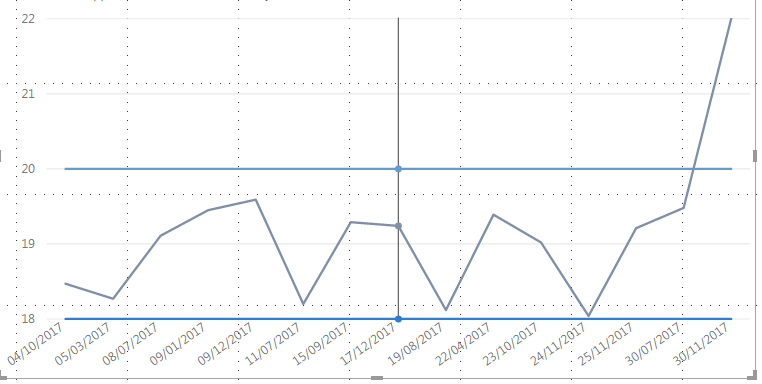
you will get something like above
Subscribe to the @PowerBIHowTo YT channel for an upcoming video on List and Record functions in Power Query!!
Learn Power BI and Fabric - subscribe to our YT channel - Click here: @PowerBIHowTo
If my solution proved useful, I'd be delighted to receive Kudos. When you put effort into asking a question, it's equally thoughtful to acknowledge and give Kudos to the individual who helped you solve the problem. It's a small gesture that shows appreciation and encouragement! ❤
Did I answer your question? Mark my post as a solution. Proud to be a Super User! Appreciate your Kudos 🙂
Feel free to email me with any of your BI needs.
basically you need to convert your hh:mm to decimal, i'm sure there are other way, let's start with this:
add following 3 columns
Upper = VALUE(FORMAT('Time'[UpperBoundary], "hh.mm"))
Lower = = VALUE(FORMAT('Time'[Lowerboundary], "hh.mm"))
Collected = VALUE(FORMAT('Time'[CollectedTime], "hh.mm"))
add line visual and drop collecteddate on x axis and 3 newly added column to values and change aggregation to max
Subscribe to the @PowerBIHowTo YT channel for an upcoming video on List and Record functions in Power Query!!
Learn Power BI and Fabric - subscribe to our YT channel - Click here: @PowerBIHowTo
If my solution proved useful, I'd be delighted to receive Kudos. When you put effort into asking a question, it's equally thoughtful to acknowledge and give Kudos to the individual who helped you solve the problem. It's a small gesture that shows appreciation and encouragement! ❤
Did I answer your question? Mark my post as a solution. Proud to be a Super User! Appreciate your Kudos 🙂
Feel free to email me with any of your BI needs.
you will get something like above
Subscribe to the @PowerBIHowTo YT channel for an upcoming video on List and Record functions in Power Query!!
Learn Power BI and Fabric - subscribe to our YT channel - Click here: @PowerBIHowTo
If my solution proved useful, I'd be delighted to receive Kudos. When you put effort into asking a question, it's equally thoughtful to acknowledge and give Kudos to the individual who helped you solve the problem. It's a small gesture that shows appreciation and encouragement! ❤
Did I answer your question? Mark my post as a solution. Proud to be a Super User! Appreciate your Kudos 🙂
Feel free to email me with any of your BI needs.
Check out the April 2026 Power BI update to learn about new features.
If you have recently started exploring Fabric, we'd love to hear how it's going. Your feedback can help with product improvements.
A new Power BI DataViz World Championship is coming this June! Don't miss out on submitting your entry.
| User | Count |
|---|---|
| 48 | |
| 46 | |
| 41 | |
| 20 | |
| 17 |
| User | Count |
|---|---|
| 70 | |
| 69 | |
| 32 | |
| 27 | |
| 26 |