Join us at FabCon Atlanta from March 16 - 20, 2026, for the ultimate Fabric, Power BI, AI and SQL community-led event. Save $200 with code FABCOMM.
Register now!The Power BI Data Visualization World Championships is back! Get ahead of the game and start preparing now! Learn more
Hi guys,
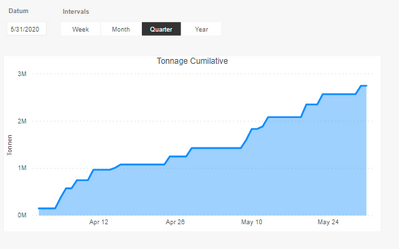
I made the following cumulative graph:
And used the following measure:
Measure = IF(SELECTEDVALUE('DateTabel'[Date]) > CALCULATE( LASTDATE(Tonnage_table[Day]), ALL(Tonnage_table)), BLANK(),
CALCULATE( SUM(Tonnage_table[Tonnage]),
FILTER(ALLSELECTED('DateTabel'),
'DateTabel'[Date] <= MAX('DateTabel'[Date]))))
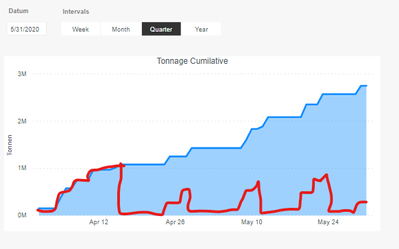
Now i would like to show zero when there is no data and start over with the cumilative graph like i show below in red line.
The results should look like this :
@Anonymous ,
Create measure +0 if needed
Measure 10 = IF(SELECTEDVALUE('DateTabel'[Date]) > CALCULATE( LASTDATE(Tonnage_table[Day]), ALL(Tonnage_table)), BLANK(),
CALCULATE( SUM(Tonnage_table[Tonnage]),
FILTER(ALLSELECTED('DateTabel'),
'DateTabel'[Date] <= MAX('DateTabel'[Date]))))+0
Change type to categorial
What is +0 supposed to do ?
When I changed to categorical and use inteval year then its not is the graph not readable anymore, on top of that it dosent give me the desired result.
The Power BI Data Visualization World Championships is back! Get ahead of the game and start preparing now!
| User | Count |
|---|---|
| 38 | |
| 36 | |
| 33 | |
| 31 | |
| 28 |
| User | Count |
|---|---|
| 129 | |
| 88 | |
| 79 | |
| 68 | |
| 63 |