cancel
Showing results for 
Search instead for 
Did you mean: 

We've captured the moments from FabCon & SQLCon that everyone is talking about, and we are bringing them to the community, live and on-demand. Starts on April 14th. Register now

Reply
mcobelens
Frequent Visitor

Pivot table about missing data

Hi,


I'm struggling with the following. I have to create a pivot table with information about clients that have send in data. Clients have to send in data every month and the table has to show per client information about who has send in the data, who hasn't and who hasn't but didn't have to.


Each client has a begin and end date, if the end date was for example feb 2018, then the table of 2018 has to show if he did send in his data in jan. and feb. but for the remaining months it has to show an x


So lets say we have the following model:


Clients

Id                       Name                         BeginDate                 EndDate

------------------------------------------------------------------------------------

1                        Joe                              2014-01-01

2                        Bill                              2018-02-02              

3                        Jill                               2016-06-02              2017-05-01

4                        Fred                                                             2018-02-01


Reports

----------------------------------------------------------------------------------

ClientId             Total                         Date

2                        50                            2018-01-02

2                        25                            2018-02-14

2                        100                          2018-04-09

4                         60                           2018-01-04


Calender

-------------------------------------------------------------------------------------

Date

MonthName

Year


And the report has to look somthing like this


Joe      -         -         -            -        -

Bill       v        v         -            -        v

Jill        x        x         x           x         x 

Fred     v        -         x           x         x

           jan    feb    march    may   april


where v = received, - = missing and x = not applicable


I did manage to get the report with on received and missing, but I have no idea how to add the not applicable?

1 ACCEPTED SOLUTION
MFelix
Super User
Super User

Hi @mcobelens,


Try the following measure:


delivery Reports =
IF (
    MAX ( 'Calendar'[Date] )
        <= IF (
            MAX ( Clients[EndDate] ) = BLANK ();
            TODAY ();
            EOMONTH ( MAX ( Clients[EndDate] ); 0 )
        )
        && MAX ( 'Calendar'[Date] )
            >= IF (
                MAX ( Clients[BeginDate] ) = BLANK ();
                DATE ( 1900; 1; 1 );
                MAX ( Clients[EndDate] )
            );
    IF ( COUNT ( Reports[Client ID] ) = BLANK (); "-"; "V" );
    "X"
)

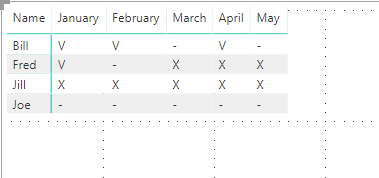
As you can see result below:

reportcount.png


Attach PBIX File.


Regards,

MFelix


Regards

Miguel Félix


Did I answer your question? Mark my post as a solution!

Proud to be a Super User!

Check out my blog: Power BI em Português


View solution in original post

3 REPLIES 3
mcobelens
Frequent Visitor

Hi,


I'm struggling with the following. I have to create a pivot table with information about clients that have send in data. Clients have to send in data every month and the table has to show per client information about who has send in the data, who hasn't and who hasn't but didn't have to.


Each client has a begin and end date, if the end date was for example feb 2018, then the table of 2018 has to show if he did send in his data in jan. and feb. but for the remaining months it has to show an x


So lets say we have the following model:


Clients

Id                       Name                         BeginDate                 EndDate

------------------------------------------------------------------------------------

1                        Joe                              2014-01-01

2                        Bill                              2018-02-02              

3                        Jill                               2016-06-02              2017-05-01

4                        Fred                                                             2018-02-01


Reports

----------------------------------------------------------------------------------

ClientId             Total                         Date

2                        50                            2018-01-02

2                        25                            2018-02-14

2                        100                          2018-04-09

4                         60                           2018-01-04


Calender

-------------------------------------------------------------------------------------

Date

MonthName

Year


And the report has to look somthing like this


Joe      -         -         -            -        -

Bill       v        v         -            -        v

Jill        x        x         x           x         x 

Fred     v        -         x           x         x

           jan    feb    march    may   april


where v = received, - = missing and x = not applicable


I did manage to get the report with on received and missing, but I have no idea how to add the not applicable?

MFelix
Super User
Super User

Hi @mcobelens,


Try the following measure:


delivery Reports =
IF (
    MAX ( 'Calendar'[Date] )
        <= IF (
            MAX ( Clients[EndDate] ) = BLANK ();
            TODAY ();
            EOMONTH ( MAX ( Clients[EndDate] ); 0 )
        )
        && MAX ( 'Calendar'[Date] )
            >= IF (
                MAX ( Clients[BeginDate] ) = BLANK ();
                DATE ( 1900; 1; 1 );
                MAX ( Clients[EndDate] )
            );
    IF ( COUNT ( Reports[Client ID] ) = BLANK (); "-"; "V" );
    "X"
)

As you can see result below:

reportcount.png


Attach PBIX File.


Regards,

MFelix


Regards

Miguel Félix


Did I answer your question? Mark my post as a solution!

Proud to be a Super User!

Check out my blog: Power BI em Português


 Thanks, works like a charm!

Helpful resources

Announcements
New to Fabric survey Carousel

New to Fabric Survey

If you have recently started exploring Fabric, we'd love to hear how it's going. Your feedback can help with product improvements.

Power BI DataViz World Championships carousel

Power BI DataViz World Championships - June 2026

A new Power BI DataViz World Championship is coming this June! Don't miss out on submitting your entry.

Join our Fabric User Panel

Join our Fabric User Panel

Share feedback directly with Fabric product managers, participate in targeted research studies and influence the Fabric roadmap.

March Power BI Update Carousel

Power BI Community Update - March 2026

Check out the March 2026 Power BI update to learn about new features.