Join us at FabCon Atlanta from March 16 - 20, 2026, for the ultimate Fabric, Power BI, AI and SQL community-led event. Save $200 with code FABCOMM.
Register now!The Power BI Data Visualization World Championships is back! Get ahead of the game and start preparing now! Learn more
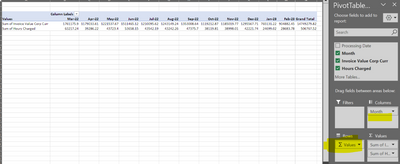
Hi. Any ideas how to put a table together like the below - Months across the top and multiple values in the body with the title of the value in the left. I really cant work this one out. In excel when you set up this pivot its the same as it is in a matrix table but then you drag "Values" from columns to rows. I cant see how to do this in PBI. Any help appreciated.
HI. I have one large invoice data dump with dates in and values like hours / invoice value etc. I can create ait using a table its month up and down rather than titles left to right. I have been racking my brain
@MITeam ,
Try this staitc table for Sum of invoice value and hours charged and then use the matrix visual. Drag the month on the columns and static table metrics on the rows and measures on the values.
https://community.powerbi.com/t5/Desktop/Display-Column-Names-with-Values-on-Bar-Chart/m-p/3107542#M...
Thanks,
Arul
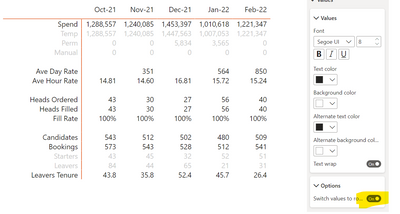
I got there in the end - Found the toggle Thanks for your help:
Check out the November 2025 Power BI update to learn about new features.
Advance your Data & AI career with 50 days of live learning, contests, hands-on challenges, study groups & certifications and more!
| User | Count |
|---|---|
| 58 | |
| 45 | |
| 41 | |
| 20 | |
| 18 |