Join us at FabCon Atlanta from March 16 - 20, 2026, for the ultimate Fabric, Power BI, AI and SQL community-led event. Save $200 with code FABCOMM.
Register now!The Power BI Data Visualization World Championships is back! Get ahead of the game and start preparing now! Learn more
Hello,
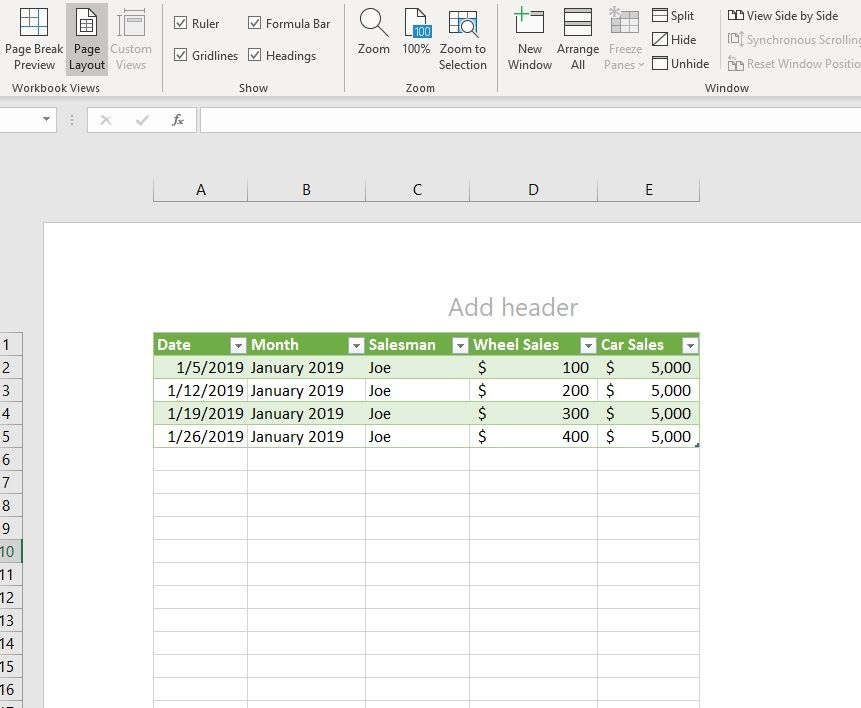
I'd like to create a pivot table that displays "Wheel Sales" on a weekly basis, while also showing monthly subtotals that sum together two different columns: [ "Wheel Sales" + "Car Sales" ]. "Car Sales" is recorded on a monthly basis, and I don't want it combined with the weekly "Wheel Sales" in the pivot table.
Below is a screenshot of the final dataset. For January 2019, only $5,000 of car sales is to be summed into the monthly subtotal, giving a January monthly subtotal of $6,000.
Solved! Go to Solution.
@Anonymous
You may try adding the measure below.
Measure =
IF (
ISINSCOPE ( 'Table'[Date] ),
SUM ( 'Table'[Wheel Sales] ),
SUM ( 'Table'[Wheel Sales] ) + MAX ( 'Table'[Car Sales] )
)
@Anonymous
You may try adding the measure below.
Measure =
IF (
ISINSCOPE ( 'Table'[Date] ),
SUM ( 'Table'[Wheel Sales] ),
SUM ( 'Table'[Wheel Sales] ) + MAX ( 'Table'[Car Sales] )
)
The Power BI Data Visualization World Championships is back! Get ahead of the game and start preparing now!
| User | Count |
|---|---|
| 46 | |
| 42 | |
| 34 | |
| 31 | |
| 21 |
| User | Count |
|---|---|
| 134 | |
| 126 | |
| 95 | |
| 80 | |
| 65 |