cancel
Showing results for 
Search instead for 
Did you mean: 

Try your skills in the Power BI Dataviz World Championship! Round one ends June 26. Join now

Reply
udian
Helper III
Helper III

Pivot Excel Data

Hi,


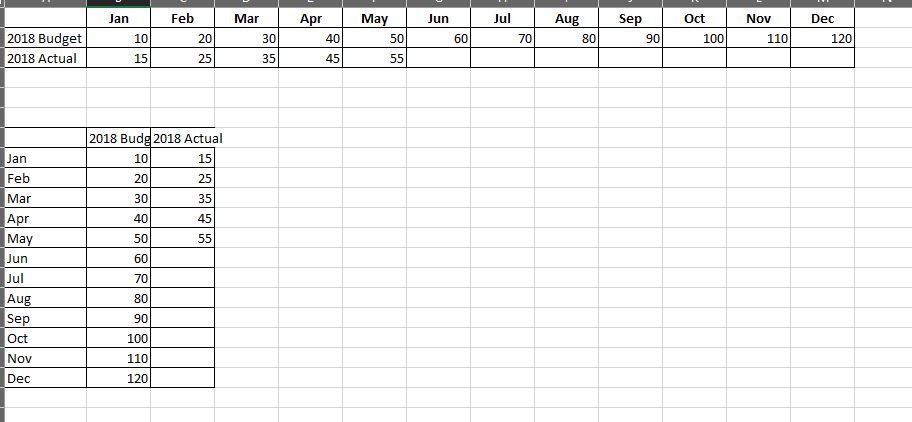
i wish to pivot my excel data so that it will look like the bottom one.

How can i achive this?


Capture.JPG

Thanks!

1 ACCEPTED SOLUTION
Vvelarde
Community Champion
Community Champion

@udian


Hi, 


In Query Editor.


1. Select the column with the Budget / Actual

 Transform - Unpivot Other Columns

2.  Select the column with Budget / Actual

  Pivot  Column:  Value 


Regards


Victor


Lima - Peru

View solution in original post

2 REPLIES 2
Vvelarde
Community Champion
Community Champion

@udian


Hi, 


In Query Editor.


1. Select the column with the Budget / Actual

 Transform - Unpivot Other Columns

2.  Select the column with Budget / Actual

  Pivot  Column:  Value 


Regards


Victor


Lima - Peru

Thanks for your help!

Helpful resources

Announcements
Fabric Data Days is here Carousel

Data Days 2026

Don't miss out on Data Days, June 15 through August 7. Learn Fabric, Power BI, SQL, AI and more.

Power BI DataViz World Championships carousel

Power BI DataViz World Championships - June 2026

A new Power BI DataViz World Championship is coming this June! Don't miss out on submitting your entry.