Join us at FabCon Atlanta from March 16 - 20, 2026, for the ultimate Fabric, Power BI, AI and SQL community-led event. Save $200 with code FABCOMM.
Register now!Learn from the best! Meet the four finalists headed to the FINALS of the Power BI Dataviz World Championships! Register now
Hi team,
How can I pick up only the LATEST DATE VALUES in the DATASET using DAX. Example below
Input:
| Customer | Value | Date |
| A | 25 | 30/06/2021 |
| B | 90 | 30/06/2021 |
| C | 45 | 12/04/2021 |
| D | 15 | 11/06/2021 |
Output:
| Customer | Value | Date |
| A | 25 | 30/06/2021 |
| B | 90 | 30/06/2021 |
Solved! Go to Solution.
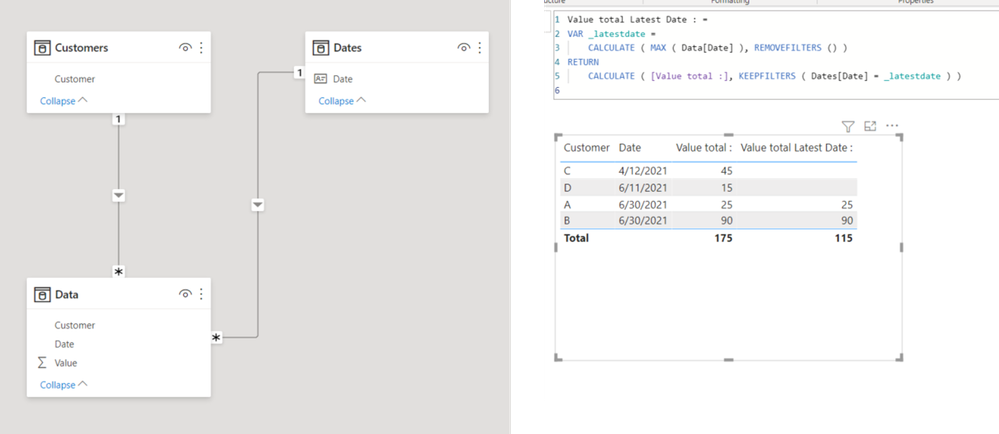
Value total Latest Date : =
VAR _latestdate =
CALCULATE ( MAX ( Data[Date] ), REMOVEFILTERS () )
RETURN
CALCULATE ( [Value total :], KEEPFILTERS ( Dates[Date] = _latestdate ) )
Value total Latest Date : =
VAR _latestdate =
CALCULATE ( MAX ( Data[Date] ), REMOVEFILTERS () )
RETURN
CALCULATE ( [Value total :], KEEPFILTERS ( Dates[Date] = _latestdate ) )
Share feedback directly with Fabric product managers, participate in targeted research studies and influence the Fabric roadmap.
Check out the February 2026 Power BI update to learn about new features.
| User | Count |
|---|---|
| 50 | |
| 49 | |
| 35 | |
| 15 | |
| 14 |
| User | Count |
|---|---|
| 92 | |
| 75 | |
| 41 | |
| 26 | |
| 25 |