cancel
Showing results for 
Search instead for 
Did you mean: 

Get Fabric Certified for FREE during Fabric Data Days. Don't miss your chance! Request now

Reply
Anonymous
Not applicable

Persisting a Running Total

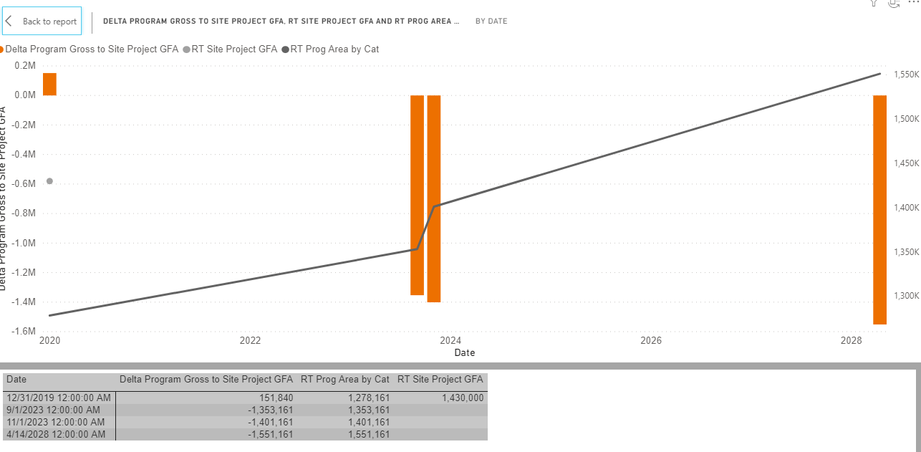
I have the following visual and the underlaying data:
RTchart.PNG

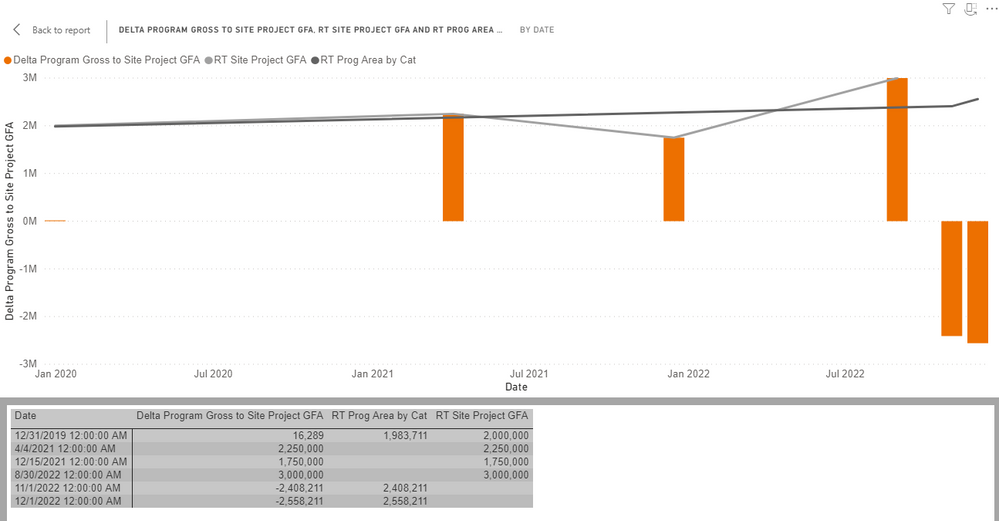
[RT Program Area by Cat] is a running total measure.

[RT Site Project GFA] is another running total measure.

[Delta Program Gross to SIte Project GFA] is a measure and the difference between the two running totals.


As you can see [RT Site Project GFA] only has enough data to calculate a single point in time (12/31/2019), whereas [RT Program Area by Cat] has four data points, 12/31/19, 9/1/2020, etc... In reality [RT Site Project GFA] is static, there are no additional data points because is it hasn't and is not currently planned to change (but new data could be added later). How can I persist the RT "forward" as other data grows? This works both ways, because another scenario would be that Site GFA has more data points and Proj Area has fewer.


Can anyone point me to suggested resouces or thinking on this topic?


Thank you!


By way of an additional example, here is the same chart, but with different data.
RTchart_II.PNG

3 REPLIES 3
amitchandak
Super User
Super User

@Anonymous , you can get running total like this using a date table

Cumm Sales = CALCULATE(SUM(Sales[Sales Amount]),filter(date,date[date] <=maxx(date,date[date])))
Cumm Sales = CALCULATE(SUM(Sales[Sales Amount]),filter(date,date[date] <=max(Sales[Sales Date])))


To get the best of the time intelligence function. Make sure you have a date calendar and it has been marked as the date in model view. Also, join it with the date column of your fact/s. Refer :
https://radacad.com/creating-calendar-table-in-power-bi-using-dax-functions
https://www.archerpoint.com/blog/Posts/creating-date-table-power-bi
https://www.sqlbi.com/articles/creating-a-simple-date-table-in-dax/

See if my webinar on Time Intelligence can help: https://community.powerbi.com/t5/Webinars-and-Video-Gallery/PowerBI-Time-Intelligence-Calendar-WTD-YTD-LYTD-Week-Over-Week/m-p/1051626#M184


Appreciate your Kudos.

Share with Power BI Enthusiasts: Full Power BI Video (20 Hours) YouTube
Microsoft Fabric Series 60+ Videos YouTube
Microsoft Fabric Hindi End to End YouTube
Anonymous
Not applicable

@amitchandak Yes, the running totals are both calculating properly, as demonstrated in the table in both screen shots. There is also a date table marked properly and joined. The issue is that its two different series of data, so even though they're joined to the same date table, the series don't "persist forward" past their last date. Now I could go back in the date hierarchy to "month" or "quarter" or "year" but then the problem becomes that you still have to have data at that "scale". If one series only has data in January and the other series has data that carries forward to November and you only drill down to quarter, you would still have the same dilema. I want/need to be able to say value "X" (the running total) persists forward for all dates, even though there are no rows of data in the fact table driving that persistence.


I hope that makes sense.

Icey
Community Support
Community Support

Hi @Anonymous ,


It's best to create a dummy .pbix file for test. Please remove sensitive information. It is suggested to upload your file to OneDrive for Business and then paste the link here.


Best Regards,

Icey

Helpful resources

Announcements
November Power BI Update Carousel

Power BI Monthly Update - November 2025

Check out the November 2025 Power BI update to learn about new features.

Fabric Data Days Carousel

Fabric Data Days

Advance your Data & AI career with 50 days of live learning, contests, hands-on challenges, study groups & certifications and more!

FabCon Atlanta 2026 carousel

FabCon Atlanta 2026

Join us at FabCon Atlanta, March 16-20, for the ultimate Fabric, Power BI, AI and SQL community-led event. Save $200 with code FABCOMM.

Top Solution Authors
Top Kudoed Authors