cancel
Showing results for 
Search instead for 
Did you mean: 

Get Fabric Certified for FREE during Fabric Data Days. Don't miss your chance! Request now

Reply
Syndicate_Admin
Administrator
Administrator

Permissions for other users with access to the report to export data to Excel

Good as they are?

I have a report with a data matrix and in the upper right corner I have 3 points, I select the option "Export data" and these options appear:

olivercortinas_0-1674827849105.png

However the users with whom I share this report the option of Data with current design do not see that option, I guess it is a matter of permissions but I can not find where that could be configured, anyone has an idea?

Best regards.

1 REPLY 1
Pragati11
Super User
Super User

HI @Syndicate_Admin ,


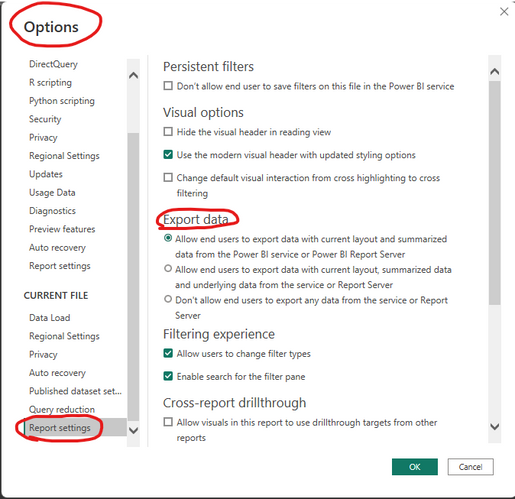
Make sure in Power BI Desktop following setting is enabled before you publish the report to Power BI Service:

File --> Options & Settings --> Options

Then enable the following settings.

Pragati11_0-1674828564294.png


Best Regards,

Pragati Jain


MVP logo


LinkedIn | Twitter | Blog YouTube 

Did I answer your question? Mark my post as a solution! This will help others on the forum!

Appreciate your Kudos!!

Proud to be a Super User!!

Helpful resources

Announcements
Fabric Data Days Carousel

Fabric Data Days

Advance your Data & AI career with 50 days of live learning, contests, hands-on challenges, study groups & certifications and more!

October Power BI Update Carousel

Power BI Monthly Update - October 2025

Check out the October 2025 Power BI update to learn about new features.

FabCon Atlanta 2026 carousel

FabCon Atlanta 2026

Join us at FabCon Atlanta, March 16-20, for the ultimate Fabric, Power BI, AI and SQL community-led event. Save $200 with code FABCOMM.

Top Solution Authors