cancel
Showing results for 
Search instead for 
Did you mean: 

The Power BI Data Visualization World Championships is back! Get ahead of the game and start preparing now! Learn more

Reply
onedayover
Helper III
Helper III

Percentages on unpivoted table by group

Hi All

I'm hoping someone can help me out with this problem I'm having. I've tried searching for an answer but still can't work out how to do it correctly.

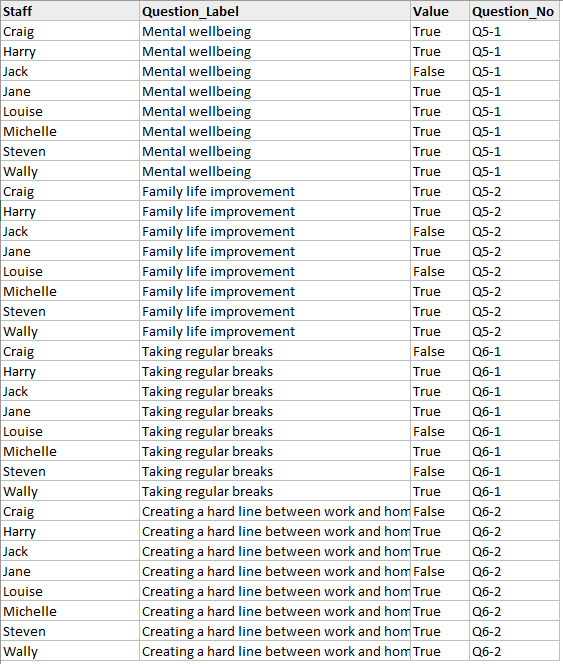
I have an unpivoted table and am having trouble calculating a percentage for each group.

In the example below, I need a measure that will return the percentage of "True" responses for each separate "Question_No" (Q5-1).

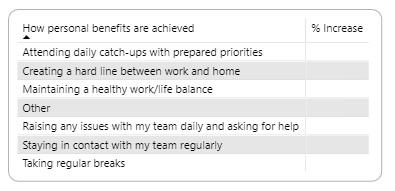
I'm trying to present the associated "Question_Label" with the percentage next to it in a matrix.

Many thanks

Darlene

UnpivotPercentage.PNGUnpivotPercentage2.PNG

1 ACCEPTED SOLUTION
Anonymous
Not applicable

Hi @onedayover,

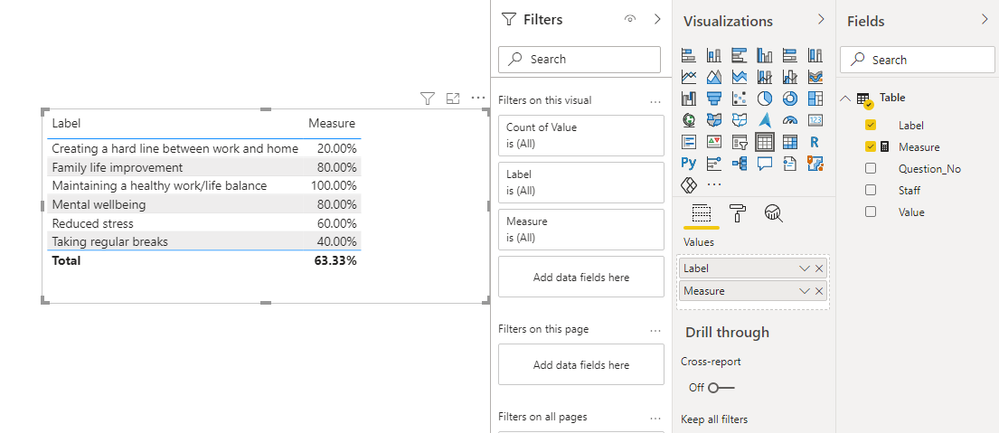
You can use the following measure formula with your label field to achieve your requirement:

Measure = 
CALCULATE (
    CALCULATE ( COUNTROWS ( 'Table' ), 'Table'[Value] = TRUE () )
        / COUNTROWS ( 'Table' ),
    ALLSELECTED ( 'Table' ),
    VALUES ( 'Table'[Label] )
)

1.png
Regards,
Xiaoxin Sheng

View solution in original post

4 REPLIES 4
onedayover
Helper III
Helper III

@amitchandak, hi and thank you for your help. I tried this solution but I wasn't able to get it to work so I'm assuming I explained this wrong. I will place a table of my sample data below and the expected results. 

Thanks again


StaffLabelValueQuestion_No
CraigMental wellbeingTRUEQ5-1
HarryMental wellbeingTRUEQ5-1
JackMental wellbeingTRUEQ5-1
JaneMental wellbeingFALSEQ5-1
MichelleMental wellbeingTRUEQ5-1
CraigFamily life improvementTRUEQ5-2
HarryFamily life improvementTRUEQ5-2
JackFamily life improvementTRUEQ5-2
JaneFamily life improvementFALSEQ5-2
MichelleFamily life improvementTRUEQ5-2
CraigReduced stressFALSEQ5-3
HarryReduced stressFALSEQ5-3
JackReduced stressTRUEQ5-3
JaneReduced stressTRUEQ5-3
MichelleReduced stressTRUEQ5-3
CraigTaking regular breaksFALSEQ6-1
HarryTaking regular breaksFALSEQ6-1
JackTaking regular breaksFALSEQ6-1
JaneTaking regular breaksTRUEQ6-1
MichelleTaking regular breaksTRUEQ6-1
CraigCreating a hard line between work and homeTRUEQ6-2
HarryCreating a hard line between work and homeFALSEQ6-2
JackCreating a hard line between work and homeFALSEQ6-2
JaneCreating a hard line between work and homeFALSEQ6-2
MichelleCreating a hard line between work and homeFALSEQ6-2
CraigMaintaining a healthy work/life balanceTRUEQ6-3
HarryMaintaining a healthy work/life balanceTRUEQ6-3
JackMaintaining a healthy work/life balanceTRUEQ6-3
JaneMaintaining a healthy work/life balanceTRUEQ6-3
MichelleMaintaining a healthy work/life balanceTRUEQ6-3


Expected results...

Label%
Mental wellbeing80%
Family life improvement80%
Reduced stress60%
Taking regular breaks40%
Creating a hard line between work and home20%
Maintaining a healthy work/life balance100%
Anonymous
Not applicable

Hi @onedayover,

You can use the following measure formula with your label field to achieve your requirement:

Measure = 
CALCULATE (
    CALCULATE ( COUNTROWS ( 'Table' ), 'Table'[Value] = TRUE () )
        / COUNTROWS ( 'Table' ),
    ALLSELECTED ( 'Table' ),
    VALUES ( 'Table'[Label] )
)

1.png
Regards,
Xiaoxin Sheng

Thanks so much, this is exactly what I needed 🙂

amitchandak
Super User
Super User

@onedayover , Try if these measures can help

calculate( divide(calculate(count(table[value]), filter(Table,Table[value] ="True")) , count(table[value])) , allexcept(Table, Table[Question_no]))

calculate( divide(calculate(count(table[value]), filter(Table,Table[value] ="True")) , count(table[value])) , Table[Question_no] ="Q5-1" )


if not

Can you share sample data and sample output in table format?

Share with Power BI Enthusiasts: Full Power BI Video (20 Hours) YouTube
Microsoft Fabric Series 60+ Videos YouTube
Microsoft Fabric Hindi End to End YouTube

Helpful resources

Announcements
Power BI DataViz World Championships

Power BI Dataviz World Championships

The Power BI Data Visualization World Championships is back! Get ahead of the game and start preparing now!

December 2025 Power BI Update Carousel

Power BI Monthly Update - December 2025

Check out the December 2025 Power BI Holiday Recap!

FabCon Atlanta 2026 carousel

FabCon Atlanta 2026

Join us at FabCon Atlanta, March 16-20, for the ultimate Fabric, Power BI, AI and SQL community-led event. Save $200 with code FABCOMM.