Join the #PBI10 DataViz contest
Power BI is turning 10, and we’re marking the occasion with a special community challenge. Use your creativity to tell a story, uncover trends, or highlight something unexpected.
Get started- Power BI forums
- Get Help with Power BI
- Desktop
- Service
- Report Server
- Power Query
- Mobile Apps
- Developer
- DAX Commands and Tips
- Custom Visuals Development Discussion
- Health and Life Sciences
- Power BI Spanish forums
- Translated Spanish Desktop
- Training and Consulting
- Instructor Led Training
- Dashboard in a Day for Women, by Women
- Galleries
- Webinars and Video Gallery
- Data Stories Gallery
- Themes Gallery
- Contests Gallery
- Quick Measures Gallery
- Notebook Gallery
- Translytical Task Flow Gallery
- R Script Showcase
- Ideas
- Custom Visuals Ideas (read-only)
- Issues
- Issues
- Events
- Upcoming Events
Join us for an expert-led overview of the tools and concepts you'll need to become a Certified Power BI Data Analyst and pass exam PL-300. Register now.
- Power BI forums
- Forums
- Get Help with Power BI
- Desktop
- Percentage of grand total in parentheses
- Subscribe to RSS Feed
- Mark Topic as New
- Mark Topic as Read
- Float this Topic for Current User
- Bookmark
- Subscribe
- Printer Friendly Page


- Mark as New
- Bookmark
- Subscribe
- Mute
- Subscribe to RSS Feed
- Permalink
- Report Inappropriate Content
Percentage of grand total in parentheses
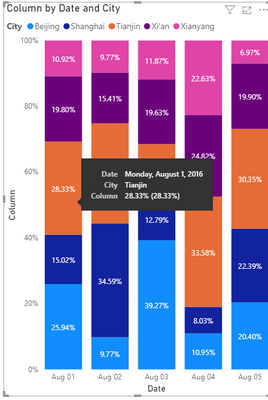
I have a 100% clustered column chart. In the Values section, I have a column set to '% of grand total'. When I hover over my chart, it shows 2 percentages, one outside parenthesis and the other in parentheses. The percentage in parentheses is what I am looking for. Any suggestions on how to display only the percentage in parentheses?
Solved! Go to Solution.
- Mark as New
- Bookmark
- Subscribe
- Mute
- Subscribe to RSS Feed
- Permalink
- Report Inappropriate Content

- Mark as New
- Bookmark
- Subscribe
- Mute
- Subscribe to RSS Feed
- Permalink
- Report Inappropriate Content
Hi @busybee ,
Do you wanna get a result as shown in below pic?

If so ,you can create a calculated column as below:
Column = DIVIDE('Table'[Visitor],SUMX(ALL('Table'),'Table'[Visitor]))
Or a measure as below:
Measure 2 = DIVIDE(SUMX(FILTER('Table','Table'[City]=MAX('Table'[City])),'Table'[Visitor]),SUMX(ALL('Table'),'Table'[Visitor]))
For details,pls click here to check my sample .pbix file.
Kelly
- Mark as New
- Bookmark
- Subscribe
- Mute
- Subscribe to RSS Feed
- Permalink
- Report Inappropriate Content
The percentage in the parentheses seems to be correct. How do I only display the percentage in parentheses(28.33 %) and not 6.62 %?
- Mark as New
- Bookmark
- Subscribe
- Mute
- Subscribe to RSS Feed
- Permalink
- Report Inappropriate Content
- Mark as New
- Bookmark
- Subscribe
- Mute
- Subscribe to RSS Feed
- Permalink
- Report Inappropriate Content
If I don't want to show values in paranthesis, how to do that
In my PBI, it's showing as 92.8% (100 %)
I don't wnat to show (100%)
- Mark as New
- Bookmark
- Subscribe
- Mute
- Subscribe to RSS Feed
- Permalink
- Report Inappropriate Content
The formula mentioned above does not work with a combination of positive and negative values. I have attached a Sample Power BI dashboard.
https://drive.google.com/file/d/1CZh5WPWqz5BK0txFkC8HabsjAAfs58xT/view?usp=sharing
In this dashboard, Col1 is the axis, Col2 is the legend and Col3 contains the values. Any suggestions on how to resolve this with a combination of positive and negative values?
- Mark as New
- Bookmark
- Subscribe
- Mute
- Subscribe to RSS Feed
- Permalink
- Report Inappropriate Content
I have a combination of negative and positive values in the column corresponding to the Visitors column in my Power BI file. The percentage displays correctly on one of the bars but incorrectly on the other bar. Could this be because I have a combination of negative and positive values in the column corresponding to the Visitors column in my Power BI file?
- Mark as New
- Bookmark
- Subscribe
- Mute
- Subscribe to RSS Feed
- Permalink
- Report Inappropriate Content
I just created a Temp Table filtered with only the positive values of the field utilized as value. I created a similar chart and the percentages match.


- Mark as New
- Bookmark
- Subscribe
- Mute
- Subscribe to RSS Feed
- Permalink
- Report Inappropriate Content
@busybee you can create our custom tooltip, read this post
I would ❤ Kudos if my solution helped. 👉 If you can spend time posting the question, you can also make efforts to give Kudos whoever helped to solve your problem. It is a token of appreciation!
⚡Visit us at https://perytus.com, your one-stop shop for Power BI related projects/training/consultancy.⚡
Subscribe to the @PowerBIHowTo YT channel for an upcoming video on List and Record functions in Power Query!!
Learn Power BI and Fabric - subscribe to our YT channel - Click here: @PowerBIHowTo
If my solution proved useful, I'd be delighted to receive Kudos. When you put effort into asking a question, it's equally thoughtful to acknowledge and give Kudos to the individual who helped you solve the problem. It's a small gesture that shows appreciation and encouragement! ❤
Did I answer your question? Mark my post as a solution. Proud to be a Super User! Appreciate your Kudos 🙂
Feel free to email me with any of your BI needs.
Helpful resources

Join our Fabric User Panel
This is your chance to engage directly with the engineering team behind Fabric and Power BI. Share your experiences and shape the future.

Power BI Monthly Update - June 2025
Check out the June 2025 Power BI update to learn about new features.

Fabric Community Update - June 2025
Find out what's new and trending in the Fabric community.

| User | Count |
|---|---|
| 78 | |
| 78 | |
| 58 | |
| 35 | |
| 32 |


| User | Count |
|---|---|
| 99 | |
| 59 | |
| 56 | |
| 46 | |
| 40 |


