Join us at FabCon Atlanta from March 16 - 20, 2026, for the ultimate Fabric, Power BI, AI and SQL community-led event. Save $200 with code FABCOMM.
Register now!Get Fabric Certified for FREE during Fabric Data Days. Don't miss your chance! Request now
Hi,
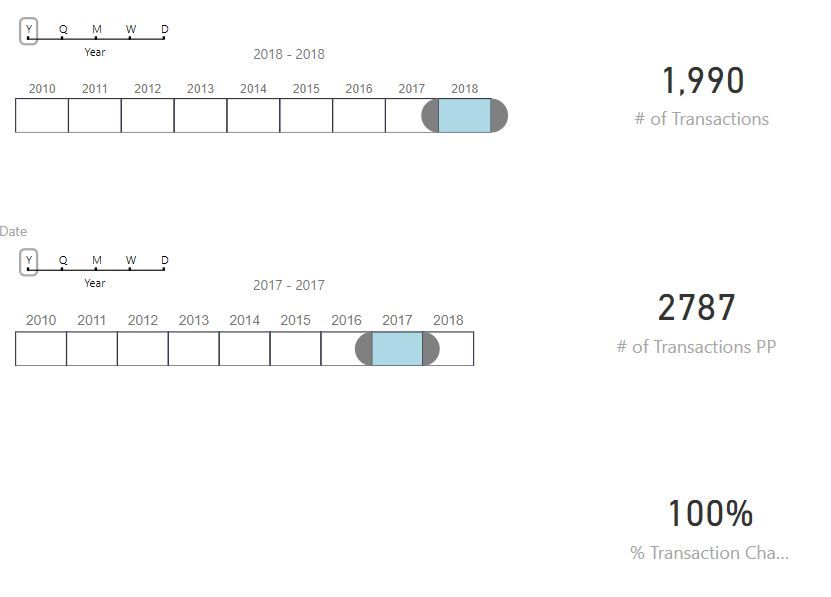
I have a scenario with two data slicers. The first data slicer filters data for the current period, the second one for a previous period. By editing visual interactions I got this works at the same page.
Now I want to calculate percentage change between two values and this is a point where I have a problem - my % of change is always 100 or 0. How can I solve this? Please see a screenshot below.
This is how I calculate "number of transactions (# of Transactions):
# of Transactions = COUNT(Report[ProductID]) - for the current period
# of Transactions PP = COUNT(Report[ProductID]) - for a previous period period
These two measures are sliced with two different data slicers and the resultsare 1,990 / 2,787. Now I want to calculate % of change. I tried with:
% Change = 1 - DIVIDE([# of Transactions],[# of Transactions PP])
I understand why a result is 100% ut I don't know how to fix it (I need both data slicers on he page).
I made some changes but still don't right result. i made two date columns - each for both date slicers, and I calculated First Date and Last Date for each date range. The percantage change is still wrong.
# of Transactions = CALCULATE(COUNT(Report[ProductID]),DATESBETWEEN(Report[Date],[Start Date],[Last Date])) # of Transactions PP = CALCULATE(COUNT(Report[ProductID]),DATESBETWEEN(Report[Date PP],[Start Date PP],[Last Date PP])) - previous period (second slicer) % Transaction Change = ([# of Transactions]/[# of Transactions PP]) - 1
HI @LakiCG,
I think these timeline slicers are use same source column with different interaction to effect measures, right?
If this is a case, power bi not support to get different result from same datasource column at same time.
Please duplicate a table with same relationship and use this table as source one of timeline slier to achieve your requirement.
Regards,
Xiaoxin Sheng
Check out the November 2025 Power BI update to learn about new features.
Advance your Data & AI career with 50 days of live learning, contests, hands-on challenges, study groups & certifications and more!