cancel
Showing results for 
Search instead for 
Did you mean: 

The Power BI Data Visualization World Championships is back! Get ahead of the game and start preparing now! Learn more

Reply
Anonymous
Not applicable

Percent of Total by Filtered Value

Hello,

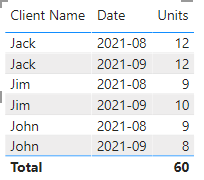
I am trying to figure out the percentage of total people who had >=10 Units Total for the given month. 

akeck_1-1631822322894.png


So in this case there are 3 Total people. In September, 2 out of 3 have total sum of units greater than 10. So the percentage would = 2/3 = 66% 


August would be 1 out of 3 people had units >=10 so the percentage would be 33%


I am looking for a measure or something to be able to throw on a card and when the page is filtered by month it shows the percent 


Any help is greatly appreciated! 

1 ACCEPTED SOLUTION
v-chenwuz-msft
Community Support
Community Support

Hi @Anonymous ,


Try this measure:

Percent of Total =
DIVIDE (
    COUNTROWS (
        FILTER (
            ALL ( 'Table' ),
            [Date] = SELECTEDVALUE ( 'Table'[Date] )
                && [Unites] >= 10
        )
    ),
    COUNTROWS (
        FILTER ( ALL ( 'Table' ), [Date] = SELECTEDVALUE ( 'Table'[Date] ) )
    )
)


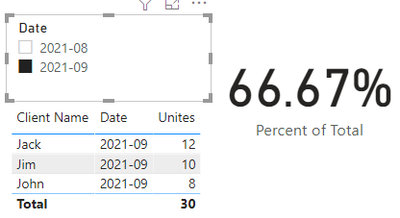
Result

vchenwuzmsft_0-1632100189350.png


Best Regards

Community Support Team _ chenwu zhu


If this post helps, then please consider Accept it as the solution to help the other members find it more quickly.

View solution in original post

2 REPLIES 2
v-chenwuz-msft
Community Support
Community Support

Hi @Anonymous ,


Try this measure:

Percent of Total =
DIVIDE (
    COUNTROWS (
        FILTER (
            ALL ( 'Table' ),
            [Date] = SELECTEDVALUE ( 'Table'[Date] )
                && [Unites] >= 10
        )
    ),
    COUNTROWS (
        FILTER ( ALL ( 'Table' ), [Date] = SELECTEDVALUE ( 'Table'[Date] ) )
    )
)


Result

vchenwuzmsft_0-1632100189350.png


Best Regards

Community Support Team _ chenwu zhu


If this post helps, then please consider Accept it as the solution to help the other members find it more quickly.

Ashish_Mathur
Super User
Super User

Hi,

I have assumed you have a Calendar Table with a relationship from the Date column of your Data Table to the Date column of the Calendar Table.  In the slicer select a Year and Month Name.  Try this measure

Measure 1 = COUNTROWS(FILTER(VALUES(Data[Client Name]),[Units]>=10))

Measure 2 = divide([measure1],distinctcount(data[client name]))

Hope this helps.


Regards,
Ashish Mathur
http://www.ashishmathur.com
https://www.linkedin.com/in/excelenthusiasts/

Helpful resources

Announcements
Power BI DataViz World Championships

Power BI Dataviz World Championships

The Power BI Data Visualization World Championships is back! Get ahead of the game and start preparing now!

November Power BI Update Carousel

Power BI Monthly Update - November 2025

Check out the November 2025 Power BI update to learn about new features.

FabCon Atlanta 2026 carousel

FabCon Atlanta 2026

Join us at FabCon Atlanta, March 16-20, for the ultimate Fabric, Power BI, AI and SQL community-led event. Save $200 with code FABCOMM.