FabCon is coming to Atlanta
Join us at FabCon Atlanta from March 16 - 20, 2026, for the ultimate Fabric, Power BI, AI and SQL community-led event. Save $200 with code FABCOMM.
Register now!- Power BI forums
- Get Help with Power BI
- Desktop
- Service
- Report Server
- Power Query
- Mobile Apps
- Developer
- DAX Commands and Tips
- Custom Visuals Development Discussion
- Health and Life Sciences
- Power BI Spanish forums
- Translated Spanish Desktop
- Training and Consulting
- Instructor Led Training
- Dashboard in a Day for Women, by Women
- Galleries
- Data Stories Gallery
- Themes Gallery
- Contests Gallery
- QuickViz Gallery
- Quick Measures Gallery
- Visual Calculations Gallery
- Notebook Gallery
- Translytical Task Flow Gallery
- TMDL Gallery
- R Script Showcase
- Webinars and Video Gallery
- Ideas
- Custom Visuals Ideas (read-only)
- Issues
- Issues
- Events
- Upcoming Events
The Power BI Data Visualization World Championships is back! Get ahead of the game and start preparing now! Learn more
- Power BI forums
- Forums
- Get Help with Power BI
- Desktop
- Passing Parameters/Variables into python Script
- Subscribe to RSS Feed
- Mark Topic as New
- Mark Topic as Read
- Float this Topic for Current User
- Bookmark
- Subscribe
- Printer Friendly Page

- Mark as New
- Bookmark
- Subscribe
- Mute
- Subscribe to RSS Feed
- Permalink
- Report Inappropriate Content
Passing Parameters/Variables into python Script
Dear Community,
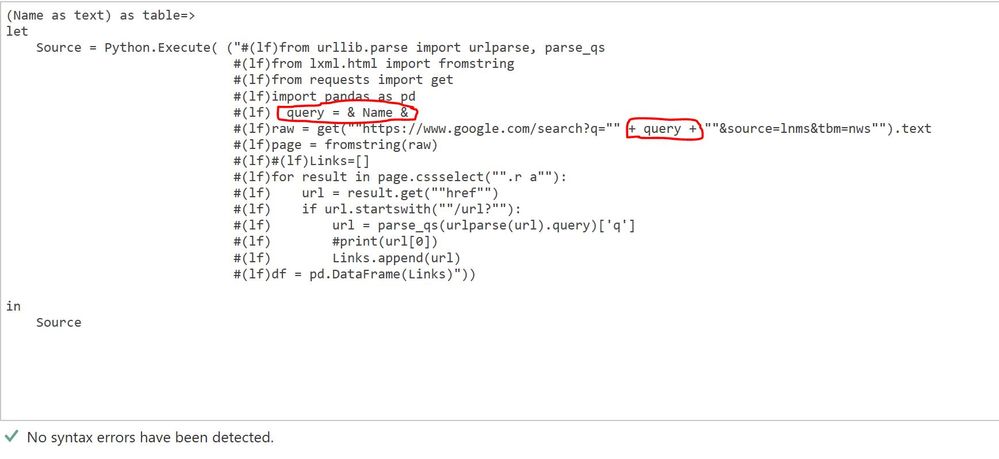
I am trying to build a function for web scrapping using a python script. I want to pass a parameter as a variable to the python script. I tried following the parameter passing formula in R script. But that is not working for python file.
Is there a way to declare the search 'query' as a parameter and have it passed through or stored as a variable to be used in each time the function is invoked?
I have also shared my code snippet for reference.
Thanks.
- Mark as New
- Bookmark
- Subscribe
- Mute
- Subscribe to RSS Feed
- Permalink
- Report Inappropriate Content
You need to concatenate text with & and not +
The following works fine for me:
let
Source = Python.Execute("import pandas#(lf) azureAppid='" & paramAzureAppID & "'#(lf)",
df1 = Source{[Name="df"]}[Value]
in
df1


- Mark as New
- Bookmark
- Subscribe
- Mute
- Subscribe to RSS Feed
- Permalink
- Report Inappropriate Content
Hi @Anonymous ,
Could you have refered to below link about Using Python in Query Editor:
https://docs.microsoft.com/en-us/power-bi/desktop-python-in-query-editor
Maybe you could just enter put the python code into the Run Python Script dialog.
Regards,
Daniel He
If this post helps, then please consider Accept it as the solution to help the other members find it more quickly.
- Mark as New
- Bookmark
- Subscribe
- Mute
- Subscribe to RSS Feed
- Permalink
- Report Inappropriate Content
Thank you for your reply.
I was trying to build a function with the python script. The parameter passing is not working for the function.
But the python script is working fine when it was added as a new Step.
I was wondering if there is any way I could make the same script as a function.
Regards,
Jannatun Nahar
- Mark as New
- Bookmark
- Subscribe
- Mute
- Subscribe to RSS Feed
- Permalink
- Report Inappropriate Content
Hey, @Anonymous
Can you explain more about "passing as a new step"? Were you able to find a workaround to use the parameter as part of your Python script?
Thanks!
- Mark as New
- Bookmark
- Subscribe
- Mute
- Subscribe to RSS Feed
- Permalink
- Report Inappropriate Content
Hi @Anonymous ,
Thank you very much for your reply. I am trying to create a custom invoked function using python or R script to extract tweets in powerBI. Instead of hardcoding the search term in the original R script, I wanted to pass it as a parameter. But the code is not working in this way. I am attaching a copy of my code here :
(Name as text) as table=>
let

  Source = R.Execute(" #(lf)   library(twitteR)
                         #(lf)   library(stringi)
                         #(lf)   consumer_key <- ""abcd ""
                         #(lf)   consumer_secret <- "" adbc ""
                         #(lf)   access_token <- ""abcd ""
                         #(lf)   access_secret <- ""abcd""
                         #(lf)   setup_twitter_oauth(consumer_key, consumer_secret, access_token, access_secret)
                         #(lf)   str1 <- ""#""
                         #(lf)   str2 <- ""&Name&""   (passing serach term as a parameter here)
                         #(lf)   search_term <- paste(str1,str2,sep="")
                         #(lf)   number_of_tweets <- 100
                         #(lf)   language <-'en'
                         #(lf)   tweets <- searchTwitter(search_term, number_of_tweets,language)
                         #(lf)   df_tweets <- twListToDF(tweets)
                         #(lf)   df_tweets <- df_tweets[,c('text','favorited','favoriteCount','created','retweetCount',
                                                                                              'isRetweet','retweeted')]
                         #(lf)   df_tweets$text <- stri_encode(df_tweets$text, '', 'UTF-8')"),
    df_tweets1 = Source{[Name="df_tweets"]}[Value]
in
    df_tweets1
I am working on this for my MSC capstone project. I would really appreciate any suggestion to pass through the error.
Thanks agaian.

- Mark as New
- Bookmark
- Subscribe
- Mute
- Subscribe to RSS Feed
- Permalink
- Report Inappropriate Content
Can someone please confirm whether this is possible or not?
- Mark as New
- Bookmark
- Subscribe
- Mute
- Subscribe to RSS Feed
- Permalink
- Report Inappropriate Content
This seems to work - note that dataset2 takes the dataset1 value and multiplies it by 2:
let
Source = Python.Execute("import pandas#(lf)dataset = pandas.DataFrame([1, 2, 3])"),
dataset1 = Source{[Name="dataset"]}[Value],
dataset2 = Python.Execute("
import pandas
dataset = dataset*2
dataset.to_csv('C:/Users/arman.schwarz/dataset_to_csv.csv')", [dataset = dataset1]),
dataset3 = dataset2{[Name="dataset"]}[Value],
#"Changed Type" = Table.TransformColumnTypes(dataset3,{{"0", Int64.Type}})
in
#"Changed Type"
Helpful resources

Power BI Dataviz World Championships
The Power BI Data Visualization World Championships is back! Get ahead of the game and start preparing now!

Power BI Monthly Update - December 2025
Check out the December 2025 Power BI Holiday Recap!

FabCon Atlanta 2026
Join us at FabCon Atlanta, March 16-20, for the ultimate Fabric, Power BI, AI and SQL community-led event. Save $200 with code FABCOMM.

| User | Count |
|---|---|
| 65 | |
| 43 | |
| 40 | |
| 29 | |
| 19 |


| User | Count |
|---|---|
| 200 | |
| 126 | |
| 103 | |
| 70 | |
| 54 |


