Don't miss your chance to take the Fabric Data Engineer (DP-700) exam on us!
Learn moreNext up in the FabCon + SQLCon recap series: The roadmap for Microsoft SQL and Maximizing Developer experiences in Fabric. All sessions are available on-demand after the live show. Register now
Hello All,
Getting data from sql by querly like:
select * from [dbo].[OrderByDate]('2019-05-01') For Report Date Filter Created DAX calender.
Report Date =
ADDCOLUMNS ( CALENDAR (DATE(2016,1,1),
DATE(2020,12,31)), "DateAsInteger", FORMAT ( [Date], "YYYYMMDD" ),
"Year", YEAR ( [Date] ), "YearMonthnumber", FORMAT ( [Date], "YYYY/MM" ),
"Month Year", FORMAT ( [Date], "mmm/YYYY" ) )
Create filter of date in UI and want to pass the selected Date value to SQL,
And in result get the Calculated data from SQL.
At SQL side lots of columns data updated based on Date pass. so that all data should be updated in report and Dashboard by Changing Report Date selection.
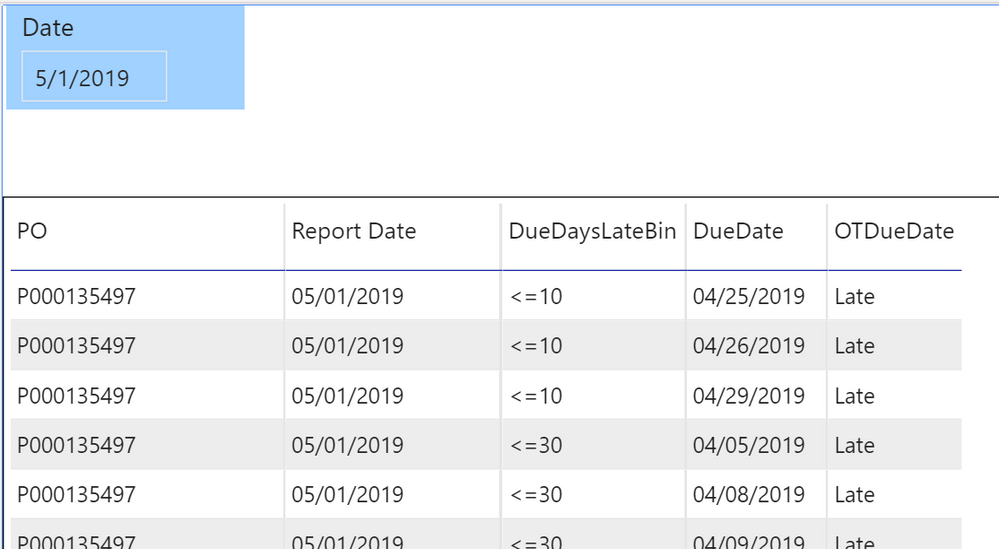
Check below image of sample, based on date selection it dispalyed status of it.
Report use for daily status report, and perticuler days status.
But here data displayed for selected date query in the SQL (Static values).
how to change it to dynamic filter.
Hi @amitchandak
Report Date is the User input.
Getting data using Direct Query, in that query Date pass to SQL, and there are lots of calculation at SQL side and in the result it gives calculated data.
I tried to do one fo the calculation from it at Power BI but unable to develop in DAX.
https://community.powerbi.com/t5/Desktop/Create-Dynamic-Column-based-on-date-filter-is-not-working/m...
So I want to pass the selected Date from POWER BI filter to SQL to get the data.
If date is 01-05-2020 then all data is related to this date.
Now User select date 05-05-2020 then data is different.
So how can I pass the date filter value into SQL and get data from there.
My question is Similar to:
Hi @Anonymous ,
Refer to this thread:
https://community.powerbi.com/t5/Desktop/Slicer-Value-as-a-parameter-to-stored-procedure/td-p/220397
Best Regards,
Liang
If this post helps, then please consider Accept it as the solution to help the other members find it more quickly.
If you have recently started exploring Fabric, we'd love to hear how it's going. Your feedback can help with product improvements.
A new Power BI DataViz World Championship is coming this June! Don't miss out on submitting your entry.
Share feedback directly with Fabric product managers, participate in targeted research studies and influence the Fabric roadmap.
| User | Count |
|---|---|
| 48 | |
| 45 | |
| 41 | |
| 19 | |
| 17 |
| User | Count |
|---|---|
| 68 | |
| 67 | |
| 33 | |
| 31 | |
| 29 |