Forum Discussion

 Helper I
Pareto Chart.. almost there just missing something!?
Hi All,
I am very close to achieving a successful pareto chart however i am missing something and it is causing a problem for me.
Here is my data:
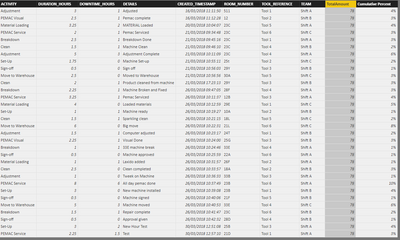
What I am trying to achieve is a pareto chart to show the duration hours vs the room number.
The DAX for TotalAmount = SUM(ENGINEER_TABLE[DURATION_HOURS])
The DAX for Cumulative Percent = [DURATION_HOURS] / [TotalAmount].
Here is the graph at the minute:
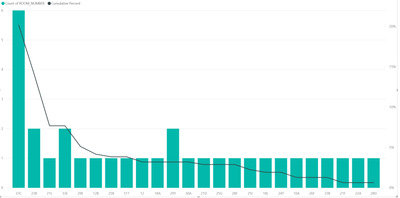
As you can see it is calculating the percentage total correctly... however why is it not to 100 percent at the right hand side?
Please help, Thanks!
Give these 5 MEASURES a try!
1) TotalAmount MEASURE =
CALCULATE (
    SUM ( ENGINEER_TABLE[DURATION_HOURS] ),
    ALLEXCEPT ( ENGINEER_TABLE, ENGINEER_TABLE[ROOM_NUMBER] )
)

2) OverallTotal MEASURE = CALCULATE ( [TotalAmount MEASURE], ALL ( ENGINEER_TABLE ) )

3) Room Rank MEASURE = RANKX ( ALL ( ENGINEER_TABLE[ROOM_NUMBER] ), [TotalAmount MEASURE] )

4) Pareto Value MEASURE =
SUMX (
    TOPN (
        [Room Rank MEASURE],
        ALL ( ENGINEER_TABLE[ROOM_NUMBER] ),
        [TotalAmount MEASURE]
    ),
    [TotalAmount MEASURE]
)

5) Pareto % MEASURE = DIVIDE ( [Pareto Value MEASURE], [OverallTotal MEASURE], 0 )
Here's the result!
Good Luck! :smileyhappy:

5 Replies
- Greg_Deckler
Community Champion
The issue is that your formula for cumulative percent is not a cumulative formula but instead just calculating the % of the current "bucket" (room #) in your case. The bigger issue is that generally a cumulative formula is based upon something like Date where you can filter out all dates less than the current date and use that for your accumulation. Not sure that will work with your room #'s.
But, in general a cumulative version of your formula would look something like this:
Cumulative Percent =
VAR myRoom = MAX(Table[Room #])

CALCULATE([DURATION_HOURS],FITER(ALL(Table),[Room #] < myRoom)) / CALCULATE([TotalAmount],FILTER(ALL(Table),[Room #] < myRooom))
 AaronRogers3
Hi Greg,
Appreciate the reply!
I copied and pasted your DAX and edited it to add in my corresponding field names - Like so:
Cumulative Percent =
VAR myRoom = MAX(ENGINEER_TABLE[ROOM_NUMBER])CALCULATE([DURATION_HOURS],FILTER(ALL(ENGINEER_TABLE),[ROOM_NUMBER] < myRoom)) / CALCULATE([TotalAmount],FILTER(ALL(ENGINEER_TABLE),[ROOM_NUMBER] < myRoom))
However, I am receiving this error:
The syntax for 'CALCULATE' is incorrect. (DAX(VAR myRoom = MAX(ENGINEER_TABLE[ROOM_NUMBER])CALCULATE([DURATION_HOURS],FILTER(ALL(ENGINEER_TABLE),[ROOM_NUMBER] < myRoom)) / CALCULATE([TotalAmount],FILTER(ALL(ENGINEER_TABLE),[ROOM_NUMBER] < myRoom)))).
With red line under the first calculate, Total Amount and the final myRoom.
Any ideas?
Thanks!:smileyhappy:
- Greg_Deckler
Try this:
Cumulative Percent =
VAR myRoom = MAX(ENGINEER_TABLE[ROOM_NUMBER])

CALCULATE(SUM([DURATION_HOURS]),FILTER(ALL(ENGINEER_TABLE),[ROOM_NUMBER] < myRoom)) / CALCULATE([TotalAmount],FILTER(ALL(ENGINEER_TABLE),[ROOM_NUMBER] < myRoom))
