cancel
Showing results for 
Search instead for 
Did you mean: 

Get Fabric Certified for FREE during Fabric Data Days. Don't miss your chance! Request now

Reply
durgaranga
Frequent Visitor

Parameters to a Power BI report in Power BI Report Server

Hi Team,


I need to create a power BI report and provide user to input parameters of there choice so that they will get desired results from a query which is connectiing to Teradata DB. My clients want this feature in high demand.


Ex: End user wants to select the data of customers who are in a particular city. Now end user needs to provide only city name as input parameter and she needs to get the result of the customers who live in that city.


Below is the query which needs to be run in backend by connecting to Teradata DB.


Select * from customers where city_name= ${input_parameter}.

1 ACCEPTED SOLUTION
Anonymous
Not applicable

You can use parameters, so the users can input their values and data can be filtered accordingly.


In Query Editor -> Home -> Manage Parameters -> New Parameter.


You can read abt the parameter and use for your case.


Thanks

Raj

View solution in original post

5 REPLIES 5
Anonymous
Not applicable

You can use parameters, so the users can input their values and data can be filtered accordingly.


In Query Editor -> Home -> Manage Parameters -> New Parameter.


You can read abt the parameter and use for your case.


Thanks

Raj

I've got the same challenge.

In powerbi desktop i made a report containing a parameter (made via edit queries/manage parameters)

I saved the report to my on-premise report server and i expected that my users could set another value in that parameter.


Unfortunetely my users do not have any option to change the parameter's value, they should have i suppose ? or maybe i should  set any option to pop-up the parameter ?


Anonymous
Not applicable

Hi Elevede, 


Did you ever figure out how to let your end users change the parameters value?


Thanks, 


Zar

Hi Zar, I have the same problem, did you find any solution?
Thanks!

Anonymous
Not applicable

Hi @durgaranga


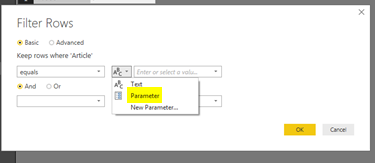
Go to the query in Query editor-> select the column you want to apply filter -> ex: select Equal to Filter -> The below window will appear, click on the down arrow in the middle box and select the Paramters to apply the parameter to th database columns.


Hope this helps.


Parameter.PNG


Thanks
Raj

Helpful resources

Announcements
November Power BI Update Carousel

Power BI Monthly Update - November 2025

Check out the November 2025 Power BI update to learn about new features.

Fabric Data Days Carousel

Fabric Data Days

Advance your Data & AI career with 50 days of live learning, contests, hands-on challenges, study groups & certifications and more!

FabCon Atlanta 2026 carousel

FabCon Atlanta 2026

Join us at FabCon Atlanta, March 16-20, for the ultimate Fabric, Power BI, AI and SQL community-led event. Save $200 with code FABCOMM.

Top Solution Authors
Top Kudoed Authors