- Power BI forums
- Updates
- News & Announcements
- Get Help with Power BI
- Desktop
- Service
- Report Server
- Power Query
- Mobile Apps
- Developer
- DAX Commands and Tips
- Custom Visuals Development Discussion
- Health and Life Sciences
- Power BI Spanish forums
- Translated Spanish Desktop
- Power Platform Integration - Better Together!
- Power Platform Integrations (Read-only)
- Power Platform and Dynamics 365 Integrations (Read-only)
- Training and Consulting
- Instructor Led Training
- Dashboard in a Day for Women, by Women
- Galleries
- Community Connections & How-To Videos
- COVID-19 Data Stories Gallery
- Themes Gallery
- Data Stories Gallery
- R Script Showcase
- Webinars and Video Gallery
- Quick Measures Gallery
- 2021 MSBizAppsSummit Gallery
- 2020 MSBizAppsSummit Gallery
- 2019 MSBizAppsSummit Gallery
- Events
- Ideas
- Custom Visuals Ideas
- Issues
- Issues
- Events
- Upcoming Events
- Community Blog
- Power BI Community Blog
- Custom Visuals Community Blog
- Community Support
- Community Accounts & Registration
- Using the Community
- Community Feedback
Register now to learn Fabric in free live sessions led by the best Microsoft experts. From Apr 16 to May 9, in English and Spanish.
- Power BI forums
- Forums
- Get Help with Power BI
- Desktop
- Re: PLZ Help- How to remove rows with more than 1 ...
- Subscribe to RSS Feed
- Mark Topic as New
- Mark Topic as Read
- Float this Topic for Current User
- Bookmark
- Subscribe
- Printer Friendly Page


- Mark as New
- Bookmark
- Subscribe
- Mute
- Subscribe to RSS Feed
- Permalink
- Report Inappropriate Content
PLZ Help- How to remove rows with more than 1 category type per day
If anyone wouldn't mind helping I would truly be thankful!!!
I am trying to figure out how to remove a row when a customer receives more than 1 service on a certain date. Example if a customer comes in for Evaluation and also receives some type of followup I only want to count the Evaluation. I need help creating a measure. When I use my slicer to count how many followup visits I do not want to count the followup that was performed on same date as an evaluation. Please see table example and image below. I have tried everything imaginable to achieve what I am needing. My boss is losing patience with me. 😫
Thank you in advance. Sincerely, Amanda Cross
| Date | TYPE | Customer ID | Total Visits |
| 4/26/2022 | EVAL | 2500660737 | 1 |
| 4/26/2022 | FOLLOWUP | 2500660737 | 1 |
| 4/29/2022 | FOLLOWUP | 2500660737 | 1 |
| Eval = 1 | FOLLOWUP = 1 | ||
| 4/12/2022 | FOLLOWUP | 2500760613 | 1 |
| 4/12/2022 | RE EVAL | 2500760613 | 1 |
| 4/19/2022 | FOLLOWUP | 2500760613 | 1 |
| 4/21/2022 | FOLLOWUP | 2500760613 | 1 |
| RE Eval = 1 | FOLLOWUP = 2 | ||
| 4/15/2022 | FOLLOWUP | 2500760717 | 1 |
| 4/15/2022 | RE EVAL | 2500760717 | 1 |
| 4/18/2022 | FOLLOWUP | 2500760717 | 1 |
| 4/21/2022 | FOLLOWUP | 2500760717 | 1 |
| 4/28/2022 | FOLLOWUP | 2500760717 | 1 |
| RE Eval = 1 | FOLLOWUP = 3 | ||
| 4/4/2022 | EVAL | 2500768591 | 1 |
| 4/4/2022 | FOLLOWUP | 2500768591 | 1 |
| 4/7/2022 | FOLLOWUP | 2500768591 | 1 |
| 4/12/2022 | FOLLOWUP | 2500768591 | 1 |
| 4/20/2022 | FOLLOWUP | 2500768591 | 1 |
| 4/21/2022 | FOLLOWUP | 2500768591 | 1 |
| 4/26/2022 | FOLLOWUP | 2500768591 | 1 |
| 4/28/2022 | FOLLOWUP | 2500768591 | 1 |
| Eval = 1 | FOLLOWUP = 6 | ||
| 4/28/2022 | EVAL | 2500769606 | 1 |
| 4/28/2022 | FOLLOWUP | 2500769606 | 1 |
| Eval = 1 | FOLLOWUP = 0 | ||
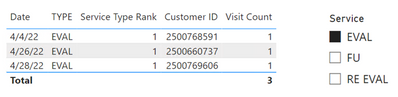
| Total Eval = | 3 | ||
| Total Re Eval = | 2 | ||
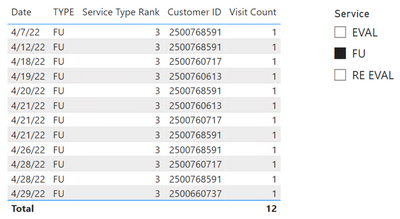
| Total FOLLOWUP | 12 |
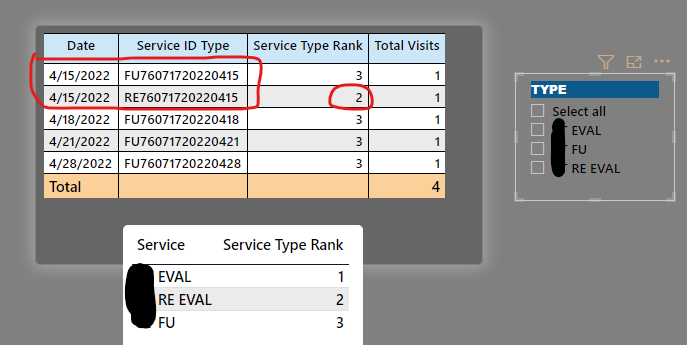
Solved! Go to Solution.


- Mark as New
- Bookmark
- Subscribe
- Mute
- Subscribe to RSS Feed
- Permalink
- Report Inappropriate Content
Glad to hear that! I modified the measure to handle multiple rows due to CPT codes. The SUMMARIZE function selects distinct combinations of Date, Customer ID, and Type. Then, ADDCOLUMNS adds a temporary column that is the same logic as the previous measure.
Visit Count =
VAR vTable =
    ADDCOLUMNS (
        SUMMARIZE (
            FactTable,
            FactTable[Date],
            FactTable[Customer ID],
            FactTable[TYPE]
        ),
        "@Count",
            VAR vCountEval =
                CALCULATE (
                    COUNTROWS ( FactTable ),
                    ALLEXCEPT ( FactTable, FactTable[Date], FactTable[Customer ID] ),
                    FactTable[TYPE] IN { "EVAL", "RE EVAL" }
                )
            RETURN
                SWITCH (
                    TRUE,
                    FactTable[TYPE] IN { "EVAL", "RE EVAL" }, 1,
                    FactTable[TYPE] = "FU"
                        && ISBLANK ( vCountEval ), 1
                )
    )
VAR vResult =
    SUMX ( vTable, [@Count] )
RETURN
    vResult
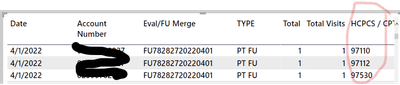
I added three rows on 4/1 for a single customer, each with a different CPT code:
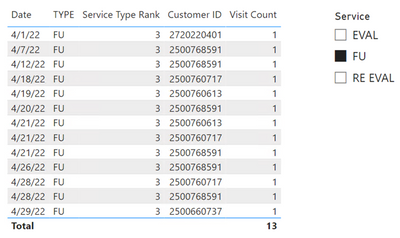
Did I answer your question? Mark my post as a solution!
Proud to be a Super User!
- Mark as New
- Bookmark
- Subscribe
- Mute
- Subscribe to RSS Feed
- Permalink
- Report Inappropriate Content
Try this. You can use "IN" followed by a list of values enclosed in "{}" to evaluate a column for multiple values.
Visit CountsNew =
VAR vTable =
    ADDCOLUMNS (
        SUMMARIZE (
            'Therapy Volume',
            _Calendar[Date],
            'Therapy Volume'[Account Number],
            'Therapy Volume'[TYPE]
        ),
        "@Count",
            VAR vCountEval =
                CALCULATE (
                    COUNTROWS ( 'Therapy Volume' ),
                    ALLEXCEPT (
                        'Therapy Volume',
                        _Calendar[Date],
                        'Therapy Volume'[Account Number]
                    ),
                    'Therapy Volume'[TYPE] IN { "PT EVAL", "PT RE EVAL", "OT EVAL", "OT RE EVAL" }
                )
            RETURN
                SWITCH (
                    TRUE,
                    'Therapy Volume'[TYPE] IN { "PT EVAL", "PT RE EVAL", "OT EVAL", "OT RE EVAL" }, 1,
                    'Therapy Volume'[TYPE]
                        IN { "OT FU", "PT FU" } && ISBLANK ( vCountEval ), 1
                )
    )
VAR vResult =
    SUMX ( vTable, [@Count] )
RETURN
    vResult
Did I answer your question? Mark my post as a solution!
Proud to be a Super User!
- Mark as New
- Bookmark
- Subscribe
- Mute
- Subscribe to RSS Feed
- Permalink
- Report Inappropriate Content
@DataInsights Thank you Thank you!!!! You are absolutely amazing!
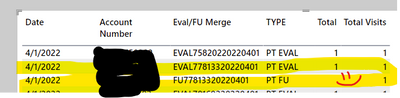
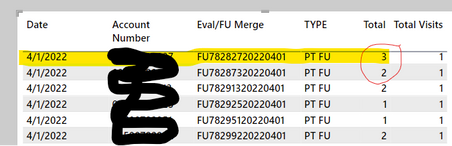
As you can see in image below it is working. I did run into one other issue. For some reason it was counting the Followup's more than 1 time. Since the measure counts the table rows I am thinking it is taking into account the CPT codes that billing uses to charge according to services performed during Followup. I added the CPT codes into my matrix and look like that was a correct assumption. Any idea how to only count a Followup 1 time no matter how many CPT codes were used for billing and coding during that visit.
Truly appreciate your help!!! My boss will be so pleased.
- Mark as New
- Bookmark
- Subscribe
- Mute
- Subscribe to RSS Feed
- Permalink
- Report Inappropriate Content
Glad to hear that! I modified the measure to handle multiple rows due to CPT codes. The SUMMARIZE function selects distinct combinations of Date, Customer ID, and Type. Then, ADDCOLUMNS adds a temporary column that is the same logic as the previous measure.
Visit Count =
VAR vTable =
    ADDCOLUMNS (
        SUMMARIZE (
            FactTable,
            FactTable[Date],
            FactTable[Customer ID],
            FactTable[TYPE]
        ),
        "@Count",
            VAR vCountEval =
                CALCULATE (
                    COUNTROWS ( FactTable ),
                    ALLEXCEPT ( FactTable, FactTable[Date], FactTable[Customer ID] ),
                    FactTable[TYPE] IN { "EVAL", "RE EVAL" }
                )
            RETURN
                SWITCH (
                    TRUE,
                    FactTable[TYPE] IN { "EVAL", "RE EVAL" }, 1,
                    FactTable[TYPE] = "FU"
                        && ISBLANK ( vCountEval ), 1
                )
    )
VAR vResult =
    SUMX ( vTable, [@Count] )
RETURN
    vResult
I added three rows on 4/1 for a single customer, each with a different CPT code:
Did I answer your question? Mark my post as a solution!
Proud to be a Super User!
- Mark as New
- Bookmark
- Subscribe
- Mute
- Subscribe to RSS Feed
- Permalink
- Report Inappropriate Content
I can't thank you enough!!! I have literally worked on this measure for days!!! It works Thank you! One last question if I may. 🙂
I need to add "OT FU" to the "PT FU" (I apologize I should have mentioned there is more than one type of service line.
I made the text red to showcase where the PT FU is within the measure...I am sure you already know what I am referring to but just in case you don't. Again, I can't thank you enough!
...................................................................
- Mark as New
- Bookmark
- Subscribe
- Mute
- Subscribe to RSS Feed
- Permalink
- Report Inappropriate Content
Try this. You can use "IN" followed by a list of values enclosed in "{}" to evaluate a column for multiple values.
Visit CountsNew =
VAR vTable =
    ADDCOLUMNS (
        SUMMARIZE (
            'Therapy Volume',
            _Calendar[Date],
            'Therapy Volume'[Account Number],
            'Therapy Volume'[TYPE]
        ),
        "@Count",
            VAR vCountEval =
                CALCULATE (
                    COUNTROWS ( 'Therapy Volume' ),
                    ALLEXCEPT (
                        'Therapy Volume',
                        _Calendar[Date],
                        'Therapy Volume'[Account Number]
                    ),
                    'Therapy Volume'[TYPE] IN { "PT EVAL", "PT RE EVAL", "OT EVAL", "OT RE EVAL" }
                )
            RETURN
                SWITCH (
                    TRUE,
                    'Therapy Volume'[TYPE] IN { "PT EVAL", "PT RE EVAL", "OT EVAL", "OT RE EVAL" }, 1,
                    'Therapy Volume'[TYPE]
                        IN { "OT FU", "PT FU" } && ISBLANK ( vCountEval ), 1
                )
    )
VAR vResult =
    SUMX ( vTable, [@Count] )
RETURN
    vResult
Did I answer your question? Mark my post as a solution!
Proud to be a Super User!
- Mark as New
- Bookmark
- Subscribe
- Mute
- Subscribe to RSS Feed
- Permalink
- Report Inappropriate Content
BAM! It Works!!! Thank you!!! 😊
- Mark as New
- Bookmark
- Subscribe
- Mute
- Subscribe to RSS Feed
- Permalink
- Report Inappropriate Content
Glad to hear that! 🙂
Did I answer your question? Mark my post as a solution!
Proud to be a Super User!
- Mark as New
- Bookmark
- Subscribe
- Mute
- Subscribe to RSS Feed
- Permalink
- Report Inappropriate Content
Hi Amanda,
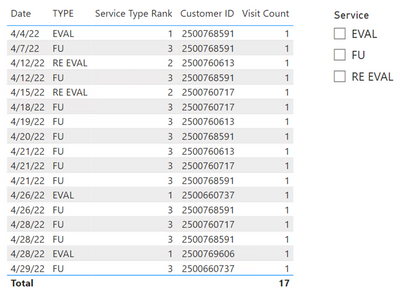
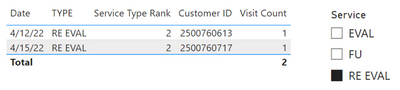
I created the measure below that I believe meets the requirements. I used SUMX in order to get correct totals. Hope this helps with the boss losing patience. 🙂
Visit Count =
SUMX (
    FactTable,
    VAR vCountEval =
        CALCULATE (
            COUNTROWS ( FactTable ),
            ALLEXCEPT ( FactTable, FactTable[Date], FactTable[Customer ID] ),
            FactTable[TYPE] IN { "EVAL", "RE EVAL" }
        )
    RETURN
        SWITCH (
            TRUE,
            FactTable[TYPE] IN { "EVAL", "RE EVAL" }, 1,
            FactTable[TYPE] = "FU"
                && ISBLANK ( vCountEval ), 1
        )
)
----------
----------
----------
Did I answer your question? Mark my post as a solution!
Proud to be a Super User!

Helpful resources

Microsoft Fabric Learn Together
Covering the world! 9:00-10:30 AM Sydney, 4:00-5:30 PM CET (Paris/Berlin), 7:00-8:30 PM Mexico City

Power BI Monthly Update - April 2024
Check out the April 2024 Power BI update to learn about new features.

Fabric Community Update - April 2024
Find out what's new and trending in the Fabric Community.

| User | Count |
|---|---|
| 109 | |
| 106 | |
| 87 | |
| 75 | |
| 66 |


| User | Count |
|---|---|
| 125 | |
| 114 | |
| 98 | |
| 81 | |
| 73 |


