cancel
Showing results for 
Search instead for 
Did you mean: 

Get Fabric Certified for FREE during Fabric Data Days. Don't miss your chance! Request now

Reply
Anonymous
Not applicable

Order of filter selection changes results

I have a page with a month filter selection on top that filters other visuals on the page.

When I select the months starting from january, ending at september, the value displayed in the filtered visuals is different from when I select september and select the months until january.

This makes no sense to me at all, how can the order of selecting filter values have any effect on the outcome of said filter?

I can't share the data due to sensitivity of the information displayed.

1 ACCEPTED SOLUTION
Anonymous
Not applicable

@Anonymous 

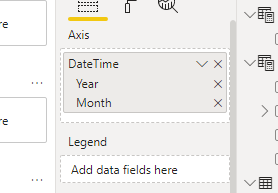
Are you using Month name in the X axis? You can use Month name as slicer but It is recommend to use Date column in the X axis with date hierarchy.

Vpazhenmsft_0-1634626758937.png


Paul Zheng _ Community Support Team
If this post helps, please Accept it as the solution to help the other members find it more quickly.

View solution in original post

3 REPLIES 3
rushi
Frequent Visitor

Sometimes when you select an option from the filter, if that option is somehow related to other options in the same filter, it is possible that your first selection filters down the number of rows that would have been higher if only the second filter were selected. 


In your case, selecting September first and then selecting months all the way to January, your filters might somehow filter down the data that other months would show. To be sure, you can check the row count on each filter item under the "filters on this page" section for the attribute of the month. Make a note of the row count against each month and start filtering by each month, if your current selection is affecting the row count of months not selected, then there is probably an unintended relationship that is causing that to happen and you may need to look into it.

Anonymous
Not applicable

@Anonymous 

Are you using Month name in the X axis? You can use Month name as slicer but It is recommend to use Date column in the X axis with date hierarchy.

Vpazhenmsft_0-1634626758937.png


Paul Zheng _ Community Support Team
If this post helps, please Accept it as the solution to help the other members find it more quickly.

amitchandak
Super User
Super User

@Anonymous , Based on what I got. Order of display in visual will depend on the order set on that visual(say Table) . I doubt selection order is taken forward

Share with Power BI Enthusiasts: Full Power BI Video (20 Hours) YouTube
Microsoft Fabric Series 60+ Videos YouTube
Microsoft Fabric Hindi End to End YouTube

Helpful resources

Announcements
November Power BI Update Carousel

Power BI Monthly Update - November 2025

Check out the November 2025 Power BI update to learn about new features.

Fabric Data Days Carousel

Fabric Data Days

Advance your Data & AI career with 50 days of live learning, contests, hands-on challenges, study groups & certifications and more!

FabCon Atlanta 2026 carousel

FabCon Atlanta 2026

Join us at FabCon Atlanta, March 16-20, for the ultimate Fabric, Power BI, AI and SQL community-led event. Save $200 with code FABCOMM.

Top Solution Authors
Top Kudoed Authors