Join us at FabCon Atlanta from March 16 - 20, 2026, for the ultimate Fabric, Power BI, AI and SQL community-led event. Save $200 with code FABCOMM.
Register now!The Power BI Data Visualization World Championships is back! Get ahead of the game and start preparing now! Learn more
Hi,
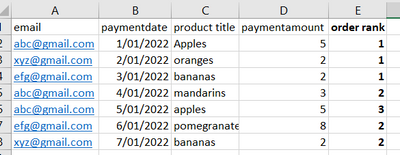
I'm struggling to add a new column to my dataset using a dax calculated column. I want it to look something similar to this:
Columns A-D are in my dataset, and I want it to have a running count so that every time a distinct email plays for an order, their count will go up by 1. This way, I'll be able to see how many times a product is the first bought item (ie to find out if Apples is the most purchased first item, then bananas etc).
Any help would be super appreciated!
Solved! Go to Solution.
Regards,
Ritesh
Mark my post as a solution if it helped you| Munde and Kudis (Ladies and Gentlemen) I like your Kudos!! !!
My YT Channel Dancing With Data !! Connect on Linkedin !!Power BI for Tableau Users
Hi,
Write this calculated column formula
Order rank = calculate(countrows(Data),filter(Data,Data[Email]=earlier(Data[Email])&&Data[payment date]=earlier(Data[payment date])))
Hope this helps.
Hi,
Write this calculated column formula
Order rank = calculate(countrows(Data),filter(Data,Data[Email]=earlier(Data[Email])&&Data[payment date]=earlier(Data[payment date])))
Hope this helps.
Regards,
Ritesh
Mark my post as a solution if it helped you| Munde and Kudis (Ladies and Gentlemen) I like your Kudos!! !!
My YT Channel Dancing With Data !! Connect on Linkedin !!Power BI for Tableau Users
The Power BI Data Visualization World Championships is back! Get ahead of the game and start preparing now!
| User | Count |
|---|---|
| 41 | |
| 38 | |
| 36 | |
| 31 | |
| 28 |
| User | Count |
|---|---|
| 129 | |
| 88 | |
| 79 | |
| 68 | |
| 63 |