cancel
Showing results for 
Search instead for 
Did you mean: 

The Power BI Data Visualization World Championships is back! Get ahead of the game and start preparing now! Learn more

Reply
Anonymous
Not applicable

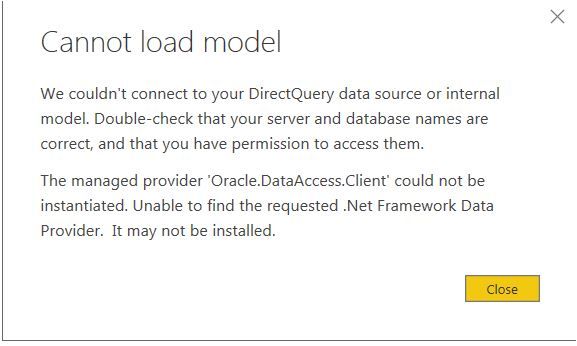
Oracle Connection Error -

Oracle - Cannot Load ModelOracle - Cannot Load Model


Hi All,


I am trying to connect to ORACLE Database. 


I tried to download the 64-bit ODAC 12c Release 4 (12.1.0.2.4) for Windows x64 and try to install. Unable to install Oracle nothing happens when I click SETUP.exe


Regards,
Venkat

1 ACCEPTED SOLUTION
v-piga-msft
Resident Rockstar
Resident Rockstar

Hi @Anonymous ,

It seems that you have probems when you install the Oracle client.

Please firstly make sure that you install the correct version Oracle client software based on the version of your power bi desktop on the machine that runs Power BI Desktop, for more details, please check this article.
However, if the issue still persists, please check the reference of machine.config files in the following folders. There is a similar thread for your reference.
C:\windows\microsoft.net\framework64\v4.0.30319\Config
C:\windows\microsoft.net\framework\v4.0.30319\Config

In addition, do you install the the latest version of power bi desktop?

Best Regards,

Cherry


Community Support Team _ Cherry Gao
If this post helps, then please consider Accept it as the solution to help the other members find it more quickly.

View solution in original post

3 REPLIES 3
mba076
New Member

I'm trying to set up Oracle SQL in my PC but connection fails  how can i try to fix the problem?

v-piga-msft
Resident Rockstar
Resident Rockstar

Hi @Anonymous ,

Have you solved your problem?

If you have solved, please always accept the replies making sense as solution to your question so that people who may have the same question can get the solution directly.

If you still need help, please feel free to ask.

Best  Regards,

Cherry

Community Support Team _ Cherry Gao
If this post helps, then please consider Accept it as the solution to help the other members find it more quickly.
v-piga-msft
Resident Rockstar
Resident Rockstar

Hi @Anonymous ,

It seems that you have probems when you install the Oracle client.

Please firstly make sure that you install the correct version Oracle client software based on the version of your power bi desktop on the machine that runs Power BI Desktop, for more details, please check this article.
However, if the issue still persists, please check the reference of machine.config files in the following folders. There is a similar thread for your reference.
C:\windows\microsoft.net\framework64\v4.0.30319\Config
C:\windows\microsoft.net\framework\v4.0.30319\Config

In addition, do you install the the latest version of power bi desktop?

Best Regards,

Cherry


Community Support Team _ Cherry Gao
If this post helps, then please consider Accept it as the solution to help the other members find it more quickly.

Helpful resources

Announcements
Power BI DataViz World Championships

Power BI Dataviz World Championships

The Power BI Data Visualization World Championships is back! Get ahead of the game and start preparing now!

December 2025 Power BI Update Carousel

Power BI Monthly Update - December 2025

Check out the December 2025 Power BI Holiday Recap!

FabCon Atlanta 2026 carousel

FabCon Atlanta 2026

Join us at FabCon Atlanta, March 16-20, for the ultimate Fabric, Power BI, AI and SQL community-led event. Save $200 with code FABCOMM.