Hello everyone!
I have tables where my source is through odata feed (from sap). My odata source only provides delta data, meaning, data that were just changed one day ago. Therefore, the output changes everyday.
I've looked through the docs and made RangeStart and RangeEnd date time parameters. I loaded my Odata and filtered the my changed date field with the RangeStart and RangeEnd parameters.
let
    url = "https://fiori----sap/opu/odata/sap/----",
    options =
    [
        Headers = [
            #"sap-client" = ----,
            #"Authorization" = "Basic " & ----
        ]
    ],
    Source = OData.Feed(url, null, options),
    #"Filtered Rows" = Table.SelectRows(Source, each [changed_date] >= RangeStart and [changed_date] <= RangeEnd)
in
    #"Filtered Rows"
I also set up the incremental settings on the Power BI Desktop:
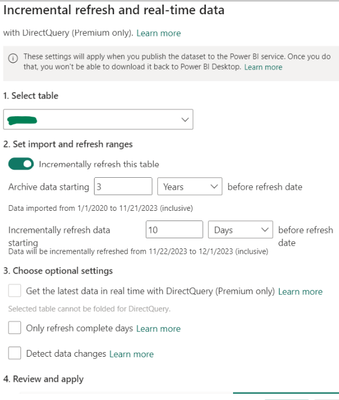
And then published it to Service.
When I the scheduled refresh runs, it does not append data (which is what is expected with incremental refresh). Instead, it replaces with a new data - it deletes the first data load and every time it refreshes, it deletes and places new data.
I followed the docs but I'm not getting the incremental refresh I'm supposed to have.
What would be the solution for this? There are no filters on my odata url because the odata url already provides data from the past day.
This has been bugging me for weeks. 😢
Advanced thank you for the help!


