cancel
Showing results for 
Search instead for 
Did you mean: 

The Power BI Data Visualization World Championships is back! Get ahead of the game and start preparing now! Learn more

Reply
Seth_C_Bauer
Community Champion
Community Champion

Oct Desktop release - Color difference in Slicer

Colors appear to be inconsistent between background and row/header as well. Same color chosen and this is what appears. Is this by design, or should it all be the same color if the same color is chosen for background, row, header backgrounds? Tried multiple colors and all showed the same with the overall background being lighter.
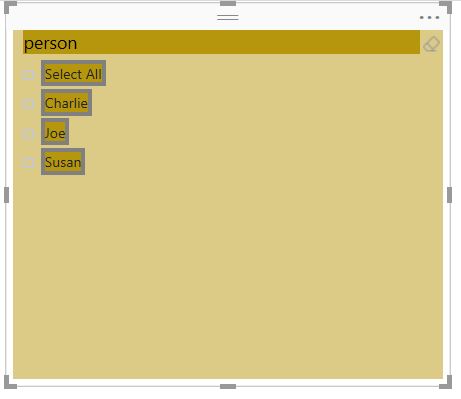
 

Capture.JPG


Looking for more Power BI tips, tricks & tools? Check out PowerBI.tips the site I co-own with Mike Carlo. Also, if you are near SE WI? Join our PUG Milwaukee Brew City PUG
1 REPLY 1
WillT
Community Admin
Community Admin

The background is set to 50% transparent by default, so it looks like it's a different color... You can change the transparency in the formatting pane too.

Helpful resources

Announcements
Power BI DataViz World Championships

Power BI Dataviz World Championships

The Power BI Data Visualization World Championships is back! Get ahead of the game and start preparing now!

December 2025 Power BI Update Carousel

Power BI Monthly Update - December 2025

Check out the December 2025 Power BI Holiday Recap!

FabCon Atlanta 2026 carousel

FabCon Atlanta 2026

Join us at FabCon Atlanta, March 16-20, for the ultimate Fabric, Power BI, AI and SQL community-led event. Save $200 with code FABCOMM.