FabCon is coming to Atlanta
Join us at FabCon Atlanta from March 16 - 20, 2026, for the ultimate Fabric, Power BI, AI and SQL community-led event. Save $200 with code FABCOMM.
Register now!- Power BI forums
- Get Help with Power BI
- Desktop
- Service
- Report Server
- Power Query
- Mobile Apps
- Developer
- DAX Commands and Tips
- Custom Visuals Development Discussion
- Health and Life Sciences
- Power BI Spanish forums
- Translated Spanish Desktop
- Training and Consulting
- Instructor Led Training
- Dashboard in a Day for Women, by Women
- Galleries
- Data Stories Gallery
- Themes Gallery
- Contests Gallery
- QuickViz Gallery
- Quick Measures Gallery
- Visual Calculations Gallery
- Notebook Gallery
- Translytical Task Flow Gallery
- TMDL Gallery
- R Script Showcase
- Webinars and Video Gallery
- Ideas
- Custom Visuals Ideas (read-only)
- Issues
- Issues
- Events
- Upcoming Events
The Power BI Data Visualization World Championships is back! Get ahead of the game and start preparing now! Learn more
- Power BI forums
- Forums
- Get Help with Power BI
- Desktop
- ODBC connection - field already exists
- Subscribe to RSS Feed
- Mark Topic as New
- Mark Topic as Read
- Float this Topic for Current User
- Bookmark
- Subscribe
- Printer Friendly Page

- Mark as New
- Bookmark
- Subscribe
- Mute
- Subscribe to RSS Feed
- Permalink
- Report Inappropriate Content
ODBC connection - field already exists
Dear Power BI community,
I just got started with Power BI and have (hopefully) only a minor issue.
I successfully connected with our ODBC database, which contains all the data from our business software. Until today we use Excel for reporting without any issues and Power BI seems to be a reasonable step forward.
I get a list with with over 400 tables when I connect to the ODBC data..the way it should be. However as soon I choose one of the table to show (and edit) the underlying data, I get the following error:
"Expression.Error: Field "UID" already exists in the database"
UID is the "unique ID" from our software and connects all the different tables, so this makes perfectly sense. However I don't need that for the reporting and would like to rename/delete that field. The problem: I don't even see the underlaying table with the error message.
Can anybody help? I'm stuck... 😞
Many thanks in advance and best regards from Munich
Alex
Solved! Go to Solution.

- Mark as New
- Bookmark
- Subscribe
- Mute
- Subscribe to RSS Feed
- Permalink
- Report Inappropriate Content
Does the issue still occur when you write specific statement in the screenshot below to connect to this table?
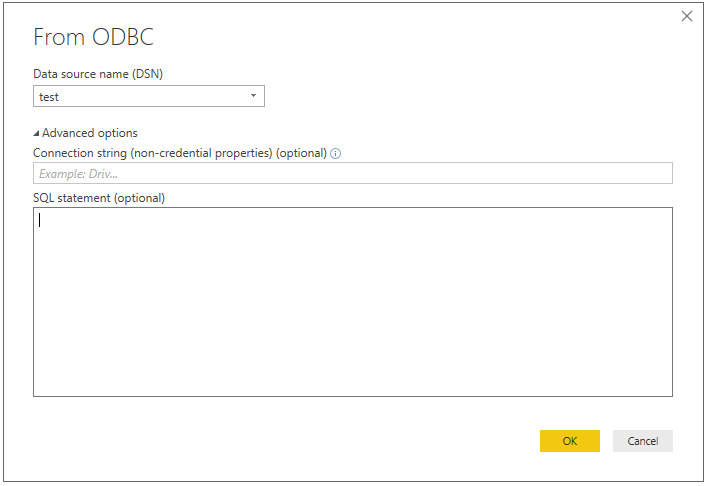
Or you may need to rename the columns in your database to improve the readability of column names.
Regards,
Lydia Zhang
- Mark as New
- Bookmark
- Subscribe
- Mute
- Subscribe to RSS Feed
- Permalink
- Report Inappropriate Content
Hi Lydia,
Many thanks for your reply. I tried a little bit back and forth in the last days and found the following:
Same thing happens in Excel with Power Query. I'm not really familiar with SQL, but figured to access the tables in my ODBC database directly with
select * from [Tablename]
and it works fine. Not sure if this is an elegant solution, but it works fine for my needs.
With best regards
Alex
- Mark as New
- Bookmark
- Subscribe
- Mute
- Subscribe to RSS Feed
- Permalink
- Report Inappropriate Content
Does the issue still occur when you write specific statement in the screenshot below to connect to this table?
Or you may need to rename the columns in your database to improve the readability of column names.
Regards,
Lydia Zhang
- Mark as New
- Bookmark
- Subscribe
- Mute
- Subscribe to RSS Feed
- Permalink
- Report Inappropriate Content
Hi Lydia,
Many thanks for your reply. I tried a little bit back and forth in the last days and found the following:
Same thing happens in Excel with Power Query. I'm not really familiar with SQL, but figured to access the tables in my ODBC database directly with
select * from [Tablename]
and it works fine. Not sure if this is an elegant solution, but it works fine for my needs.
With best regards
Alex
- Mark as New
- Bookmark
- Subscribe
- Mute
- Subscribe to RSS Feed
- Permalink
- Report Inappropriate Content
@AlexMUC,
Glad to hear the issue is solved. You can accept appropriate reply as solution. This way, other community members would easily find the solution when they get same issues.
Regards,

- Mark as New
- Bookmark
- Subscribe
- Mute
- Subscribe to RSS Feed
- Permalink
- Report Inappropriate Content
I had this too... seems like a bug... quite confusing to a new user especially since it's not intuitive there's a query behind the scenes or if it's possible to edit the query or if you have to start from scratch. The ramifications are painful to work around especially since I have 4 tables I'm joining each with long and cumbersome names I need to determine by connecting the normal way and closing out of that.
Of course all tables in my Quickbase ODBC connection are going to have Record ID as the primary key...
- Mark as New
- Bookmark
- Subscribe
- Mute
- Subscribe to RSS Feed
- Permalink
- Report Inappropriate Content
Did some more research and it seems like this is a specific problem with import from 4D data via ODBC.
-> https://stackoverflow.com/questions/43221692/connecting-to-4d-database-in-power-bi-via-odbc
Any idea how to fix this?
Many thanks in advance!
Helpful resources

Power BI Dataviz World Championships
The Power BI Data Visualization World Championships is back! Get ahead of the game and start preparing now!

Power BI Monthly Update - December 2025
Check out the December 2025 Power BI Holiday Recap!

FabCon Atlanta 2026
Join us at FabCon Atlanta, March 16-20, for the ultimate Fabric, Power BI, AI and SQL community-led event. Save $200 with code FABCOMM.

| User | Count |
|---|---|
| 39 | |
| 38 | |
| 38 | |
| 28 | |
| 27 |


| User | Count |
|---|---|
| 124 | |
| 88 | |
| 73 | |
| 66 | |
| 65 |


