cancel
Showing results for 
Search instead for 
Did you mean: 

The Power BI Data Visualization World Championships is back! Get ahead of the game and start preparing now! Learn more

Reply
Syndicate_Admin
Administrator
Administrator

Number of days between dates distributed by months

Hello.

I'm new to Power BI and need help figuring this out.

I have legacies of employees with various licenses. Each legacy can have several licenses in a year.

The number of days is counted by counting the days between Date from and Date To (including the day of the Date To)

When the number of days falls in different months, I need to allocate that number of days to the respective month and be able to visualize per month the number of days per legacy.

Ex: the start date is 06/01/2021 and the end date is 05/03/2022 - the total number of days is 337.

I need to see per month the respective number of days of that license.

Thanks a lot!

Tabla Licencias.PNG

1 ACCEPTED SOLUTION
Anonymous
Not applicable

Hi @Syndicate_Admin ,


I use this table for testing.
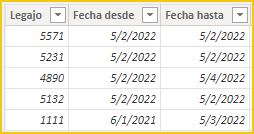
vcgaomsft_0-1653292600732.png

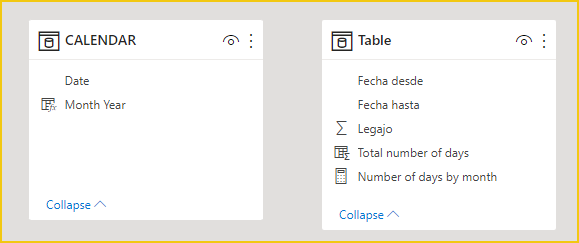
You need a date table with all consecutive dates and a column as the X-axis of the year month column.


CALENDAR = CALENDAR(MIN('Table'[Fecha desde]),MAX('Table'[Fecha hasta]))
Month Year = FORMAT('CALENDAR'[Date],"YYYYMM")


No relationship needs to be created between the two tables.
vcgaomsft_2-1653292865902.png

Then create a measure.


Number of days by month = 
CALCULATE(
    COUNTX(
        SUMMARIZE(
            FILTER(
                CROSSJOIN('Table','CALENDAR'),
                'CALENDAR'[Date] >= 'Table'[Fecha desde]
                    && 'CALENDAR'[Date] <= 'Table'[Fecha hasta]
            ),
            'Table'[Legajo],
            'CALENDAR'[Date]
        ),
        'CALENDAR'[Date]
    )
)


Select a visual and drag the fields and measure into it.
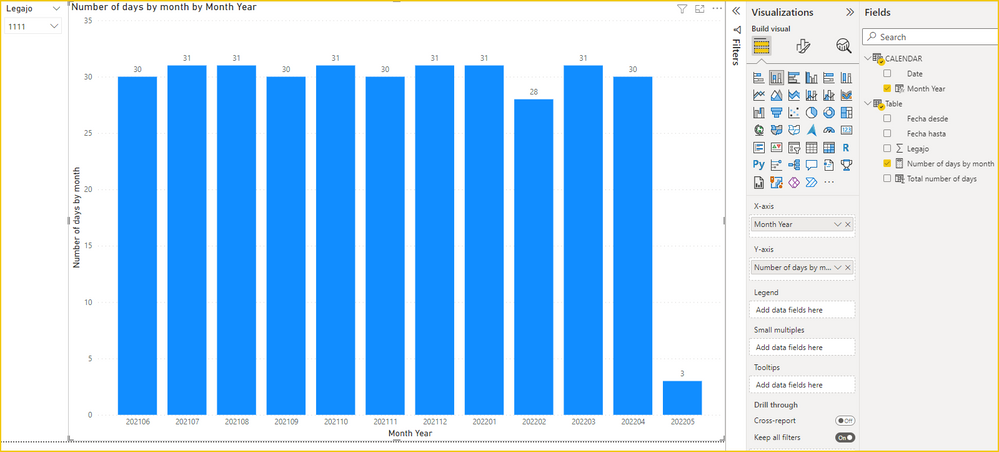
vcgaomsft_1-1653292840705.png

Attach the pbix file for reference.


Best Regards,
Gao

Community Support Team


If there is any post helps, then please consider Accept it as the solution to help the other members find it more quickly. If I misunderstand your needs or you still have problems on it, please feel free to let us know. Thanks a lot!

How to get your questions answered quickly -- How to provide sample data

View solution in original post

3 REPLIES 3
Thomas_S
Frequent Visitor

Hello


I was looking for a way to calculate the same values per month for my model. While searching in various topics, I found this one and it's almost what I was looking for, thank you 🙂


I however have an issue when I create an active relationship between my table 'calendar' et my other 'data table'. The results aren't he ones expected. How can I fix this please ? (I also have other tables in my model, which is why I need an active relationship).

Anonymous
Not applicable

Hi @Syndicate_Admin ,


I use this table for testing.

vcgaomsft_0-1653292600732.png

You need a date table with all consecutive dates and a column as the X-axis of the year month column.


CALENDAR = CALENDAR(MIN('Table'[Fecha desde]),MAX('Table'[Fecha hasta]))
Month Year = FORMAT('CALENDAR'[Date],"YYYYMM")


No relationship needs to be created between the two tables.

vcgaomsft_2-1653292865902.png

Then create a measure.


Number of days by month = 
CALCULATE(
    COUNTX(
        SUMMARIZE(
            FILTER(
                CROSSJOIN('Table','CALENDAR'),
                'CALENDAR'[Date] >= 'Table'[Fecha desde]
                    && 'CALENDAR'[Date] <= 'Table'[Fecha hasta]
            ),
            'Table'[Legajo],
            'CALENDAR'[Date]
        ),
        'CALENDAR'[Date]
    )
)


Select a visual and drag the fields and measure into it.

vcgaomsft_1-1653292840705.png

Attach the pbix file for reference.


Best Regards,
Gao

Community Support Team


If there is any post helps, then please consider Accept it as the solution to help the other members find it more quickly. If I misunderstand your needs or you still have problems on it, please feel free to let us know. Thanks a lot!

How to get your questions answered quickly -- How to provide sample data

Hi @Anonymous !


I followed your guidelines and worked ! Now, if I want to generate a table with the columns, Legajo and the months (jan, feb ... ) with the quantity of days inside, how should I do?

Helpful resources

Announcements
November Power BI Update Carousel

Power BI Monthly Update - November 2025

Check out the November 2025 Power BI update to learn about new features.

Fabric Data Days Carousel

Fabric Data Days

Advance your Data & AI career with 50 days of live learning, contests, hands-on challenges, study groups & certifications and more!

FabCon Atlanta 2026 carousel

FabCon Atlanta 2026

Join us at FabCon Atlanta, March 16-20, for the ultimate Fabric, Power BI, AI and SQL community-led event. Save $200 with code FABCOMM.

Top Kudoed Authors