Hi,
I have a Table with Month till Jun'19, and respective amount in a Table1. and have Calender table from Jan'19 to Dec'19.
This is for forecastting and my assumption is to carryforward the value of the current month till the end of the Year. Example, as on June i've june Numbers in place and the current value should carryforward till the end of Dec to acceratin the Revenue(This is an assumption that the June revenue will be expected till Dec'19.)
Example I'll share the requirements
Available Amounts till Jun'19 as below

Required Result:
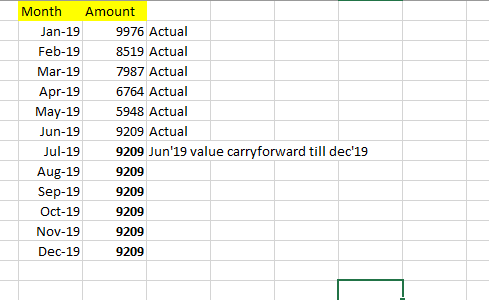
1. In the Above example, the values are actuals till Jun'19.
2. The number from Jun'19 should caarryforward till Last month of the Year ie till Dec'19.
3. Tried to create a New Table using calender table as months and trying to get the values and replicate the Jun'19 value "9209" till Dec. Please let me know if there is a better option.
Hope i'm good to convey the requirement. Please let me know if you need further details.
Regards,


