cancel
Showing results for 
Search instead for 
Did you mean: 

The Power BI Data Visualization World Championships is back! Get ahead of the game and start preparing now! Learn more

Reply
Anonymous
Not applicable

Not sure how to bring this data in to be able to step down into it

Hi there,

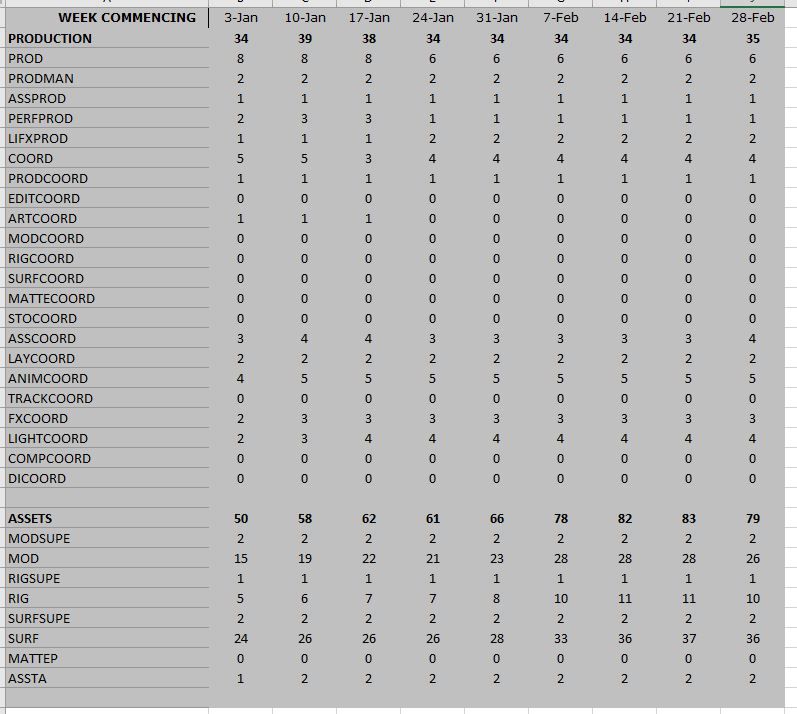
I bring in our crew plan to power bi for reporting.  What I do is extract the totals lines (bold) in the screen shot to another tab then use that to import into Power BI.  

Management now want to be able to drill into the headings to see the subtotals underneath.

My issue is the way the data is structured nothing really binds any of the sub headings to the main headings, when it boils down to it is just one column of information but I pull out the data I need first.

Are there any suggesitons on how to handle this sort of structure where I need to show on a graph the weekly numbers for all the main headings (Production, Assets) in this example, but then when I click into Assets it would show me a graph with all the individual roles also?

CrewPlanDrillDown.JPG

5 REPLIES 5
ebeery
Memorable Member
Memorable Member

I agree with @Ashish_Mathur in using Power Query and unpivot.  I think your ideal data structure should probably look something like this (abbreviated):

CagtegoryRoleWeekValue
ProductionPROD

3-Jan

8
ProductionPRODMAN3-Jan2
AssetsMODSUPE3-Jan2
AssetsMOD3-Jan15


In general, I would also recommend that you do some research on data modeling for Power BI.  The structure you've displayed in your screenshot is really only useful for displaying a report, but not at all for storing or modeling data.


Anonymous
Not applicable

Yeh the data isn't laid out in the best way, I have now say in how it is presented, just what comes out to people in the business who use it. 


I suppose the underlying format is always the same, I suppose if I could get a category column in there somehow and populate with the data I need I could then use that to drill down.

Ashish_Mathur
Super User
Super User

Hi,

In the Query Editor, you should get rid of the subtotal rows.  Right click on the first column and then select "Unpivot other columns".  This will be a good start.


Regards,
Ashish Mathur
http://www.ashishmathur.com
https://www.linkedin.com/in/excelenthusiasts/
Anonymous
Not applicable

I want to keep all the subtotal rows.  I want to be able to see the production line for example and see the line from week to week.  But then I want to be able to click on production and drill down into it to see what the individual lines are that make up the 34 for Jan 24th for example.


You can always see the subtotal row in the visualisation - you should just not have that row in the dataset.


Regards,
Ashish Mathur
http://www.ashishmathur.com
https://www.linkedin.com/in/excelenthusiasts/

Helpful resources

Announcements
Power BI DataViz World Championships

Power BI Dataviz World Championships

The Power BI Data Visualization World Championships is back! Get ahead of the game and start preparing now!

December 2025 Power BI Update Carousel

Power BI Monthly Update - December 2025

Check out the December 2025 Power BI Holiday Recap!

FabCon Atlanta 2026 carousel

FabCon Atlanta 2026

Join us at FabCon Atlanta, March 16-20, for the ultimate Fabric, Power BI, AI and SQL community-led event. Save $200 with code FABCOMM.