cancel
Showing results for 
Search instead for 
Did you mean: 

The Power BI Data Visualization World Championships is back! Get ahead of the game and start preparing now! Learn more

Reply
Anonymous
Not applicable

Not getting the YTD of previous year using measures

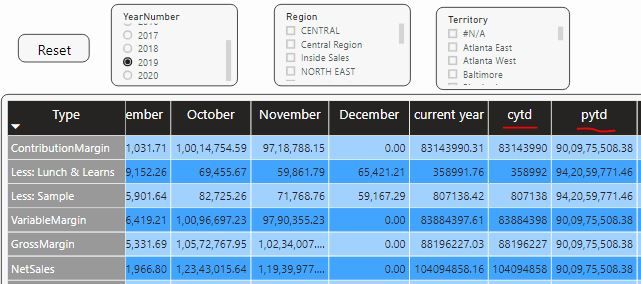
my previous year measure is showing wrong value. Can anyone help with this ?


cytd = TOTALYTD(SUM(FinalTable[Value]),FinalTable[Date],FinalTable[Date]<=TODAY(),"12/31")
 
pytd =
CALCULATE ( [cytd], SAMEPERIODLASTYEAR ( FinalTable[Date]), FILTER ( ALL ( FinalTable ), FinalTable[Date] <= DATE(YEAR(TODAY()) -1 , [Maximum], 1)))

Maximum =CALCULATE ( MAX( FinalTable[MonthNumber]), FILTER ( ALLSELECTED ( FinalTable), FinalTable[Value] <> BLANK ()
&& FinalTable[YearNumber] = [year selected] ))


Note: I am not using Date table as I need the filter slicers as shown in below screenshot.

cytd.JPG


1 ACCEPTED SOLUTION
Anonymous
Not applicable

HI @Anonymous,

I'd like to suggest you to use date function to define filter range to calculate, it is hard to custom and accuracy control the nested calculation of time intelligence functions.

Time Intelligence "The Hard Way" (TITHW)  

Regards,

Xiaoxin Sheng

View solution in original post

4 REPLIES 4
Anonymous
Not applicable

HI @Anonymous,

I'd like to suggest you to use date function to define filter range to calculate, it is hard to custom and accuracy control the nested calculation of time intelligence functions.

Time Intelligence "The Hard Way" (TITHW)  

Regards,

Xiaoxin Sheng

Anonymous
Not applicable

Hi @Anonymous ,

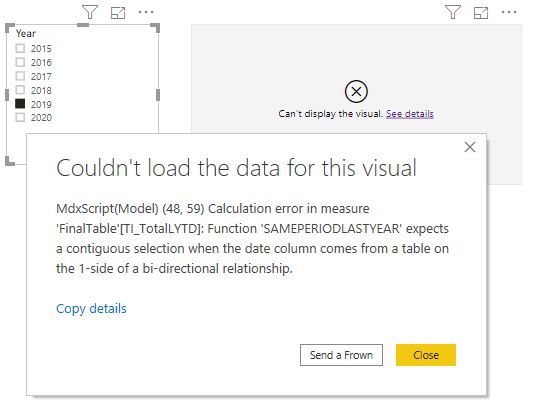
First of all, Thanks for the ref link which is helping me. But when I am trying it. I get the below visual error. Can you help me with that ?
Is there any other formula for LYTD ?
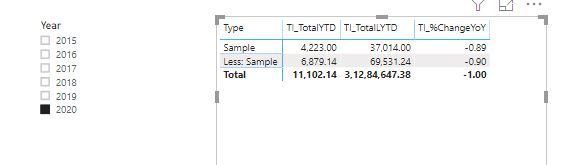
Checking on 2020 is fine. But when checking on other years give me error.
2020.JPG
2019.JPG


 I have the same measures 

TI_TotalYTD = TOTALYTD(SUM(FinalTable[Value]), DateTable[Date])
TI_TotalLYTD = CALCULATE([TI_TotalYTD],SAMEPERIODLASTYEAR(DateTable[Date]))

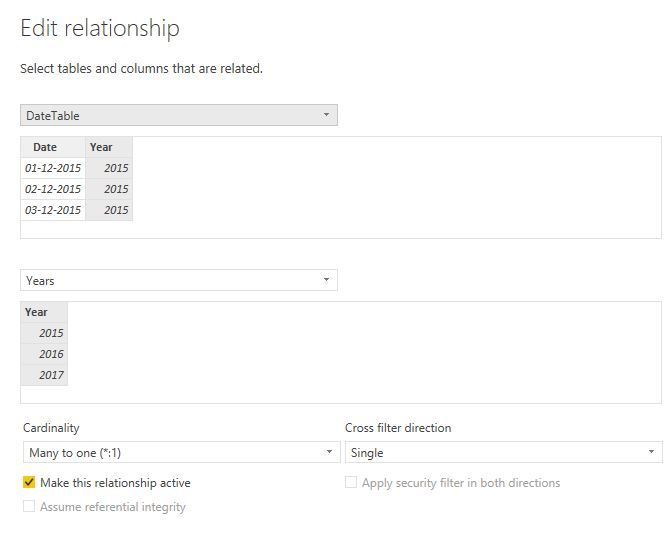
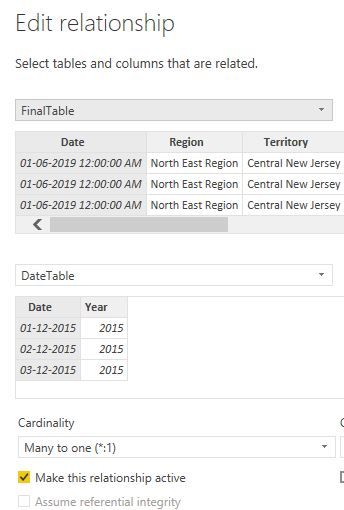
Relations in model is as follows
relation1.JPG


relation2.JPG


Relation for FinalTable and DateTable is Many to one with Both Corss filtering.

Let me know where is my issue.
Anonymous
Not applicable

Thanks @Anonymous ,

Your suggestion helped me. For the above issue, i have changed the relation of cross filter for DateTable and FinalTable Date column to Single.

Happy to learn Power bi.

Anonymous
Not applicable

Hi @v-huizhn-msft 
I have seen similar post in the below link.
https://community.powerbi.com/t5/Desktop/How-to-display-sales-YTD-and-sales-last-YTD-over-years/td-p...

Mine is similar issue but On check of the year number in slicer i need to calculate YTD and also Previous year YTD.
Your suggestions will be helpfull. 

I need this quick so I have tagged you. Anyone else who can help me with this will be great. Thanks in Advance.

Helpful resources

Announcements
Power BI DataViz World Championships

Power BI Dataviz World Championships

The Power BI Data Visualization World Championships is back! Get ahead of the game and start preparing now!

December 2025 Power BI Update Carousel

Power BI Monthly Update - December 2025

Check out the December 2025 Power BI Holiday Recap!

FabCon Atlanta 2026 carousel

FabCon Atlanta 2026

Join us at FabCon Atlanta, March 16-20, for the ultimate Fabric, Power BI, AI and SQL community-led event. Save $200 with code FABCOMM.