cancel
Showing results for 
Search instead for 
Did you mean: 

Get Fabric Certified for FREE during Fabric Data Days. Don't miss your chance! Request now

Reply
rikazuo
Regular Visitor

Normalize several series of different orders of magnitude

Good afternoon, as my first question on here, I'd like to know if any of you could help me on this.

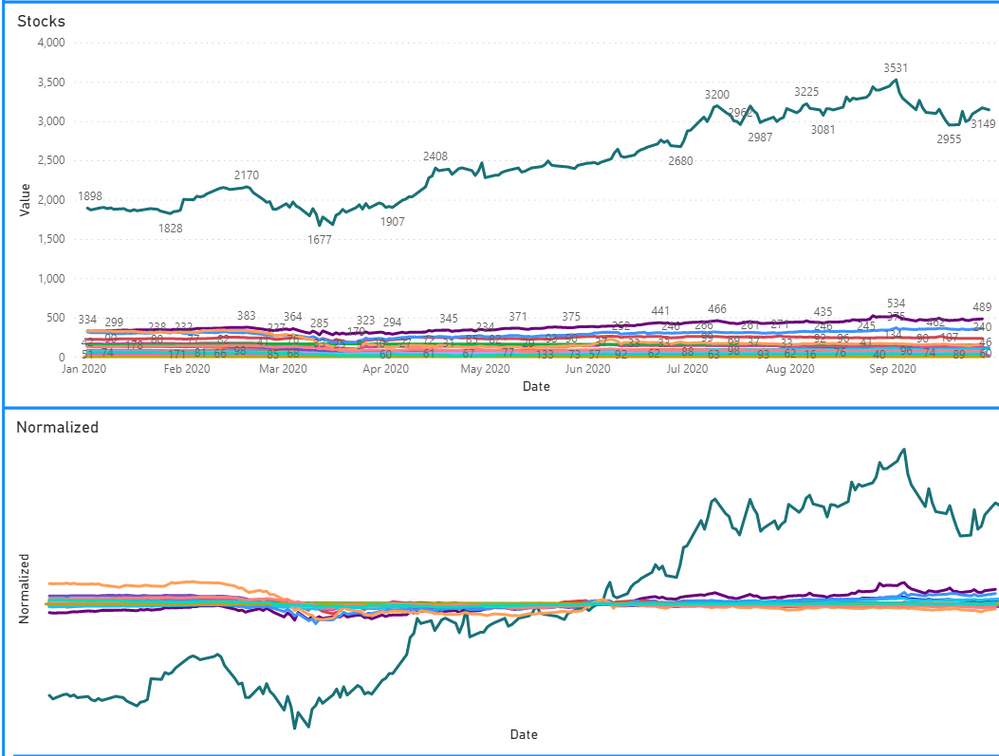
I'm stuck on PBI on trying to bring several series to a closer order of magnitude to best fit a chart.

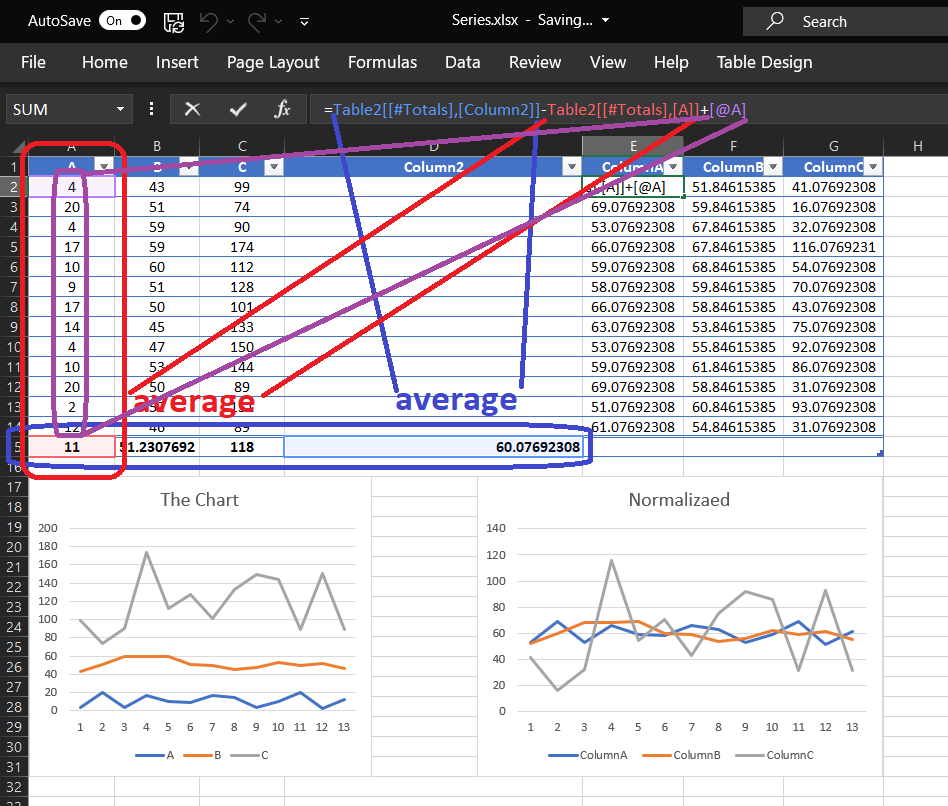
In this Excel file I can do it by using simple average manipulation.

Thank you!


Normalization.png

6 REPLIES 6
rikazuo
Regular Visitor

Well, nothing better than a good night of sleep.

I created a groupby with the average of each stock to use it on a RELATED fetching its values for each ticker!

Thank you very much for your time!!


Normalized.PNG

TomMartens
Super User
Super User

Hey @rikazuo ,


first things first - welcome to this community.


Regarding your question, I have to admit that I have my problems understanding your requirement.

Looking at the screenshot I assume the wanted result is the right chart, but it's still unclear what the x-axis is displaying.

It's also not clear what algorithm you are using to normalize the values from the left part of the screenshot: https://en.wikipedia.org/wiki/Normalization_(statistics)
Please provide information of the normalization.

It's always a good idea to prepare sample data either entering the data in Power BI Desktop (https://docs.microsoft.com/en-us/power-bi/connect-data/desktop-enter-data-directly-into-desktop) or use an Excel file to for the data generation.

Uploade the pbix and the xlsx to onedrive or dropbox and share the link.


Regards,

Tom


Did I answer your question? Mark my post as a solution, this will help others!

Proud to be a Super User!
I accept Kudos 😉
Hamburg, Germany

First of all, thank you very much for your time.

I have replaced the screen shoot for a better one in hope of explaining better.

I am most greatful for your site suggestion, I will get to it in the morning (Tokyo time here).


Hey  @rikazuo ,


you are welcome!

Please take the time and prepare sample data.


Regards,

Tom


Did I answer your question? Mark my post as a solution, this will help others!

Proud to be a Super User!
I accept Kudos 😉
Hamburg, Germany
amitchandak
Super User
Super User

@rikazuo ,The information you have provided is not making the problem clear to me. Can you please explain with an example.
Can you share sample data and sample output in table format? Or a sample pbix after removing sensitive data.
Appreciate your Kudos.

Share with Power BI Enthusiasts: Full Power BI Video (20 Hours) YouTube
Microsoft Fabric Series 60+ Videos YouTube
Microsoft Fabric Hindi End to End YouTube

Thank you for your time!

My deepest appologies on not being clear on the first time.

I hope this new picture explains it better.

Helpful resources

Announcements
November Power BI Update Carousel

Power BI Monthly Update - November 2025

Check out the November 2025 Power BI update to learn about new features.

Fabric Data Days Carousel

Fabric Data Days

Advance your Data & AI career with 50 days of live learning, contests, hands-on challenges, study groups & certifications and more!

FabCon Atlanta 2026 carousel

FabCon Atlanta 2026

Join us at FabCon Atlanta, March 16-20, for the ultimate Fabric, Power BI, AI and SQL community-led event. Save $200 with code FABCOMM.

Top Solution Authors
Top Kudoed Authors