Join us at FabCon Atlanta from March 16 - 20, 2026, for the ultimate Fabric, Power BI, AI and SQL community-led event. Save $200 with code FABCOMM.
Register now!The Power BI Data Visualization World Championships is back! Get ahead of the game and start preparing now! Learn more
Good Morning,
I'm having fun with dates and hoping someone can help me. I'm very close.
I have two different transaction tables, joined by user and I'm trying to count transactions by date. It's working, sort of, using the following DAX I get the right count for January if I filter to January however, the report breaks for the rest of the year.
Code:
GFS = CALCULATE(COUNT('Receiving(Parts Order)'[Name]),
FILTER('Receiving(Parts Order)', 'Receiving(Parts Order)'[LastModifiedDate].[Date] <= MAX (Dates[Date])))
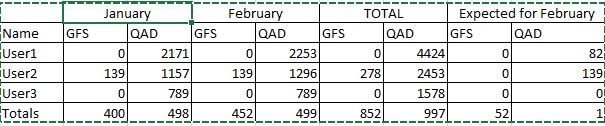
Looking at the output it appears it's returning a cumulative total here is some sample output and the desired:
Solved! Go to Solution.
I got it to work by cleaning up the tables and adjust relations.
Try changing you measure to be just
GFS = COUNT('Receiving(Parts Order)'[Name])
Hooking to the date table will take care of grouping it by months.
The Power BI Data Visualization World Championships is back! Get ahead of the game and start preparing now!
| User | Count |
|---|---|
| 39 | |
| 38 | |
| 38 | |
| 28 | |
| 27 |
| User | Count |
|---|---|
| 124 | |
| 88 | |
| 73 | |
| 66 | |
| 65 |