cancel
Showing results for 
Search instead for 
Did you mean: 

The Power BI Data Visualization World Championships is back! Get ahead of the game and start preparing now! Learn more

Reply
sbm
Helper II
Helper II

No RLS - Dynamic Row Level Security

Dynamic Row Level Security without creating roles and rules in Power BI Desktop and assigning users in Power BI Service.

Not sure that this way is correct but it works for me as same as implementing dynamic row-level security using the above steps. I'll Appreciate if experts can share thoughts and suggestions to add more values to this below logic.


The scenario is that the logged-in SalesPerson or the end-users can see only their own sales transaction, not others.


The logic I have created a TotalSales_NoRLS measure as below to filter sales transaction for only logged-in salesperson and dragged it to the value filed in Power BI Desktop. Using this logic, there is no requirement to create roles and rules using mange roles in Power BI desktop and assign users in Power BI Service, also no matters of users roles(Admin/Member/Contributor/Viewer) in the workspace. Users will be able to see only their own data.


for this scenario, I have two tables Salesperson and Transaction. 

Simple measure I have created to show sales data for only logged in user as below.


TotalSales_NoRLS =
SUMX (
FILTER ( VALUES ( SalesPerson[Email] ), SalesPerson[Email] = USERPRINCIPALNAME () ),
[Total Sales]
)

Checked in Power BI Desktop and its worked.
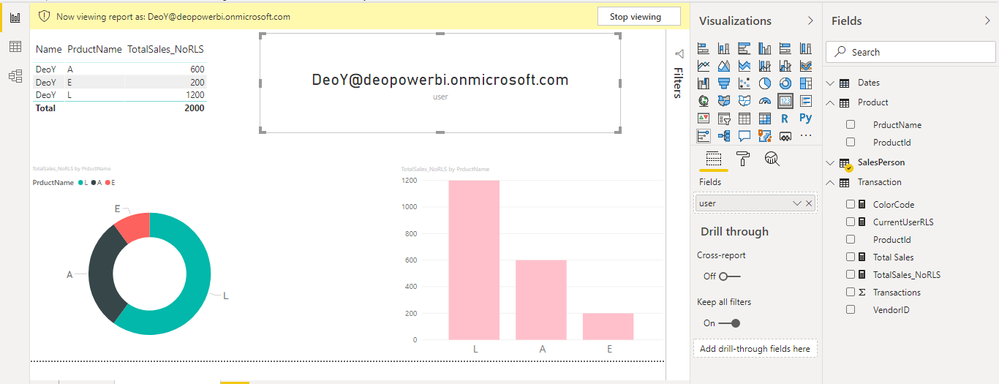
 

NoRLS.PNG


Published it to Service and shared through workspace and using App. In Both cases, it's working fine.
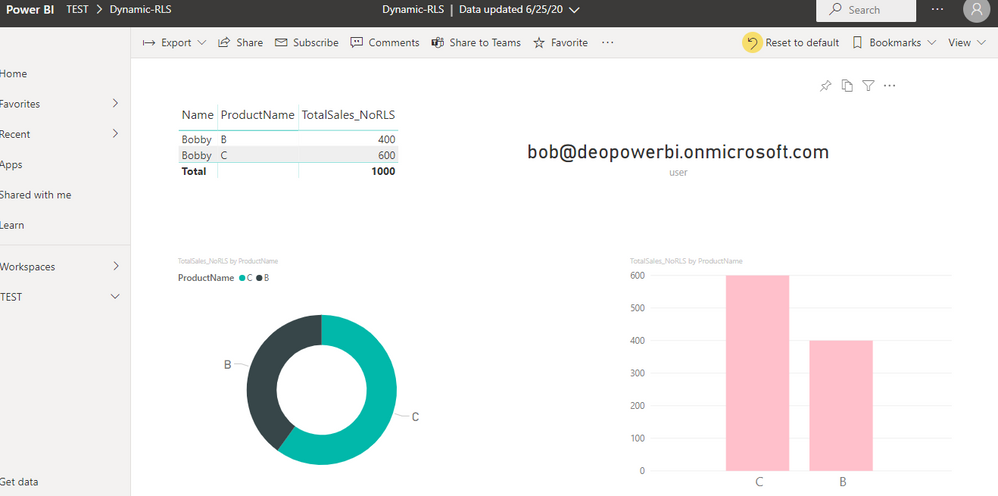


NoRLS.PNG


1 ACCEPTED SOLUTION
Anonymous
Not applicable

Hi @sbm ,


Thanks for sharing.

Actually this is different from RLS. In your scenario, only the measure value was be filtered but the underlying data wasn't. If you create a visual with out the formula, you will find all the data is there.


Best Regards,

Jay


Community Support Team _ Jay Wang

If this post helps, then please consider Accept it as the solution to help the other members find it more quickly.


View solution in original post

3 REPLIES 3
Anonymous
Not applicable

Hi @sbm ,


Thanks for sharing.

Actually this is different from RLS. In your scenario, only the measure value was be filtered but the underlying data wasn't. If you create a visual with out the formula, you will find all the data is there.


Best Regards,

Jay


Community Support Team _ Jay Wang

If this post helps, then please consider Accept it as the solution to help the other members find it more quickly.


Thank you @Anonymous , I agree, it works as simple dynamic RLS but not RLS really in we must follow the steps to implement. I just thought the other way that if we can implement. the magic is only in the formula that is why the measure is showing dynamically for the logged-in user only. 


I really appreciate your suggestion.

parry2k
Super User
Super User

@sbm it is not a scalable solution, what happens if something has to roll up or someone has to see all the data, these filters has to be in every measure and I worked in models where we have 250+ measures and maintaining all this will be a daunting task and it can also lead to poor performance. 


So for smaller stuff, maybe yes, but I would not use or recommend this. 


Good idea though.


I would  Kudos if my solution helped. 👉 If you can spend time posting the question, you can also make efforts to give Kudos whoever helped to solve your problem. It is a token of appreciation!

Visit us at https://perytus.com, your one-stop shop for Power BI related projects/training/consultancy.


Subscribe to the @PowerBIHowTo YT channel for an upcoming video on List and Record functions in Power Query!!

Learn Power BI and Fabric - subscribe to our YT channel - Click here: @PowerBIHowTo

If my solution proved useful, I'd be delighted to receive Kudos. When you put effort into asking a question, it's equally thoughtful to acknowledge and give Kudos to the individual who helped you solve the problem. It's a small gesture that shows appreciation and encouragement! ❤


Did I answer your question? Mark my post as a solution. Proud to be a Super User! Appreciate your Kudos 🙂
Feel free to email me with any of your BI needs.

Helpful resources

Announcements
Power BI DataViz World Championships

Power BI Dataviz World Championships

The Power BI Data Visualization World Championships is back! Get ahead of the game and start preparing now!

December 2025 Power BI Update Carousel

Power BI Monthly Update - December 2025

Check out the December 2025 Power BI Holiday Recap!

FabCon Atlanta 2026 carousel

FabCon Atlanta 2026

Join us at FabCon Atlanta, March 16-20, for the ultimate Fabric, Power BI, AI and SQL community-led event. Save $200 with code FABCOMM.