cancel
Showing results for 
Search instead for 
Did you mean: 

The Power BI Data Visualization World Championships is back! Get ahead of the game and start preparing now! Learn more

Reply
DonalMc
Advocate II
Advocate II

New Table Question

Folks,

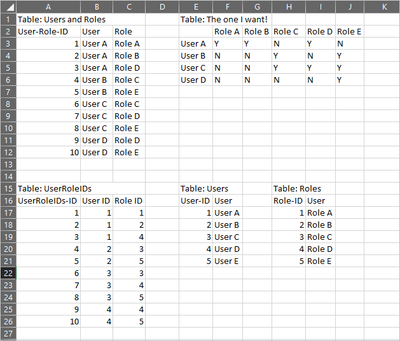
I have the following tables and I would like to know how to generate 'Table:The one that I want'.

The bottom three tables are pulled from the CDS, and the Table: Users and Roles is one I created in the Power Query Editor with merges.

Is there an easy way to create my desired table, or do I have to create a measure per role?

Thanks! 


DonalMc_0-1601560619080.png


1 ACCEPTED SOLUTION
ImkeF
Community Champion
Community Champion

Hi @DonalMc ,

if you duplicate the column User in the "User and Roles" table and pivot on User, you'll get the desired result:


let
    Source = Table.FromRows(Json.Document(Binary.Decompress(Binary.FromText("i45WMlTSUQotTi1ScAQygvJzUoGMWJ1oJSMMcSewuDGGuAtY3AQm7gQTdwaLm2KIu4LFzWDizqjqzTHEIeZbYIhDzLGEibugqjc0wJAAaogFAA==", BinaryEncoding.Base64), Compression.Deflate)), let _t = ((type nullable text) meta [Serialized.Text = true]) in type table [#"User-Role-ID" = _t, User = _t, Role = _t]),
    #"Removed Columns" = Table.RemoveColumns(Source,{"User-Role-ID"}),
    #"Duplicated Column" = Table.DuplicateColumn(#"Removed Columns", "User", "User - Copy"),
    #"Pivoted Column" = Table.Pivot(#"Duplicated Column", List.Distinct(#"Duplicated Column"[Role]), "Role", "User", each if List.Count(_) = 1 then "Y" else "N")
in
    #"Pivoted Column"

oh yes: and remove the ID-column before.


Imke Feldmann (The BIccountant)

If you liked my solution, please give it a thumbs up. And if I did answer your question, please mark this post as a solution. Thanks!

How to integrate M-code into your solution -- How to get your questions answered quickly -- How to provide sample data -- Check out more PBI- learning resources here -- Performance Tipps for M-queries

View solution in original post

4 REPLIES 4
vanessafvg
Super User
Super User

if you can provide dummy date in text format i can put it together in a pbix for you.


If I took the time to answer your question and I came up with a solution, please mark my post as a solution and /or give kudos freely for the effort 🙂 Thank you!

Proud to be a Super User!


Hi @vanessafvg 


See user-roels.xlsx for the xlsx I took the screencap of - is this enough?

I simplfied things to make it easier to explain.


Thanks in advance,

Donal

ImkeF
Community Champion
Community Champion

Hi @DonalMc ,

if you duplicate the column User in the "User and Roles" table and pivot on User, you'll get the desired result:


let
    Source = Table.FromRows(Json.Document(Binary.Decompress(Binary.FromText("i45WMlTSUQotTi1ScAQygvJzUoGMWJ1oJSMMcSewuDGGuAtY3AQm7gQTdwaLm2KIu4LFzWDizqjqzTHEIeZbYIhDzLGEibugqjc0wJAAaogFAA==", BinaryEncoding.Base64), Compression.Deflate)), let _t = ((type nullable text) meta [Serialized.Text = true]) in type table [#"User-Role-ID" = _t, User = _t, Role = _t]),
    #"Removed Columns" = Table.RemoveColumns(Source,{"User-Role-ID"}),
    #"Duplicated Column" = Table.DuplicateColumn(#"Removed Columns", "User", "User - Copy"),
    #"Pivoted Column" = Table.Pivot(#"Duplicated Column", List.Distinct(#"Duplicated Column"[Role]), "Role", "User", each if List.Count(_) = 1 then "Y" else "N")
in
    #"Pivoted Column"

oh yes: and remove the ID-column before.


Imke Feldmann (The BIccountant)

If you liked my solution, please give it a thumbs up. And if I did answer your question, please mark this post as a solution. Thanks!

How to integrate M-code into your solution -- How to get your questions answered quickly -- How to provide sample data -- Check out more PBI- learning resources here -- Performance Tipps for M-queries

Hi @ImkeF - thanks so much - that worked perfectly!


Helpful resources

Announcements
Power BI DataViz World Championships

Power BI Dataviz World Championships

The Power BI Data Visualization World Championships is back! Get ahead of the game and start preparing now!

December 2025 Power BI Update Carousel

Power BI Monthly Update - December 2025

Check out the December 2025 Power BI Holiday Recap!

FabCon Atlanta 2026 carousel

FabCon Atlanta 2026

Join us at FabCon Atlanta, March 16-20, for the ultimate Fabric, Power BI, AI and SQL community-led event. Save $200 with code FABCOMM.