Join us at FabCon Atlanta from March 16 - 20, 2026, for the ultimate Fabric, Power BI, AI and SQL community-led event. Save $200 with code FABCOMM.
Register now!Get Fabric Certified for FREE during Fabric Data Days. Don't miss your chance! Request now
Hi all,
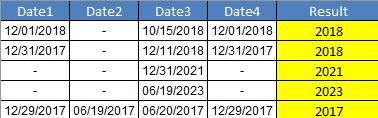
I'm struggling turning this formula in Exel to Power BI
=IF(Date2<>"-",YEAR(Date2),IF(Date3<>"-",YEAR(Date3),IF(Date4<>"-",YEAR(Date4),IF(Date1<>"-",YEAR(Date1),2020))))
The yellow column is what I want.
Can someone please help?
Thank you
Solved! Go to Solution.
If this is a calculated column, then it should be:
=IF([Date2]<>"-",YEAR([Date2]),IF([Date3]<>"-",YEAR([Date3]),IF([Date4]<>"-",YEAR([Date4]),IF([Date1]<>"-",YEAR([Date1]),2020))))
@Greg_DecklerThank you Greg. The solution you posted it work but I slighly edited the function. Because the column is a date type it cannot be text "-" so I replaced with BLANK().
Column =IF([Date2]<>BLANK(),YEAR([Date2]),
IF([Date3]<>BLANK(),YEAR([Date3]),
IF([Date4]<>BLANK(),YEAR([Date4]),
IF([Date1]<>BLANK(),YEAR([Date1]),2020))))
If this is a calculated column, then it should be:
=IF([Date2]<>"-",YEAR([Date2]),IF([Date3]<>"-",YEAR([Date3]),IF([Date4]<>"-",YEAR([Date4]),IF([Date1]<>"-",YEAR([Date1]),2020))))
@Greg_DecklerThank you Greg. The solution you posted it work but I slighly edited the function. Because the column is a date type it cannot be text "-" so I replaced with BLANK().
Column =IF([Date2]<>BLANK(),YEAR([Date2]),
IF([Date3]<>BLANK(),YEAR([Date3]),
IF([Date4]<>BLANK(),YEAR([Date4]),
IF([Date1]<>BLANK(),YEAR([Date1]),2020))))
Check out the November 2025 Power BI update to learn about new features.
Advance your Data & AI career with 50 days of live learning, contests, hands-on challenges, study groups & certifications and more!