FabCon is coming to Atlanta
Join us at FabCon Atlanta from March 16 - 20, 2026, for the ultimate Fabric, Power BI, AI and SQL community-led event. Save $200 with code FABCOMM.
Register now!- Power BI forums
- Get Help with Power BI
- Desktop
- Service
- Report Server
- Power Query
- Mobile Apps
- Developer
- DAX Commands and Tips
- Custom Visuals Development Discussion
- Health and Life Sciences
- Power BI Spanish forums
- Translated Spanish Desktop
- Training and Consulting
- Instructor Led Training
- Dashboard in a Day for Women, by Women
- Galleries
- Data Stories Gallery
- Themes Gallery
- Contests Gallery
- QuickViz Gallery
- Quick Measures Gallery
- Visual Calculations Gallery
- Notebook Gallery
- Translytical Task Flow Gallery
- TMDL Gallery
- R Script Showcase
- Webinars and Video Gallery
- Ideas
- Custom Visuals Ideas (read-only)
- Issues
- Issues
- Events
- Upcoming Events
The Power BI Data Visualization World Championships is back! Get ahead of the game and start preparing now! Learn more
- Power BI forums
- Forums
- Get Help with Power BI
- Desktop
- Needing Help with Date Out Not Showing Certain Cri...
- Subscribe to RSS Feed
- Mark Topic as New
- Mark Topic as Read
- Float this Topic for Current User
- Bookmark
- Subscribe
- Printer Friendly Page


- Mark as New
- Bookmark
- Subscribe
- Mute
- Subscribe to RSS Feed
- Permalink
- Report Inappropriate Content
Needing Help with Date Out Not Showing Certain Criteria
Hello,
I am trying to get my report to show our Voids that we have in our project list. I am currently filtering out everything using my Date Out field but the voids do not have a date entered for that field because they were never sent out. I was wondering if there was some way to get my Voids to show up and still get my Date Out data. below is the formula that I am currently running with. I have also attached screenshots of my report so you can see what I am working with.
JOB LIST =
VAR jobList = SWITCH(TRUE(),MJS_PRICE_PW[J6STAT]="E" && MJS_PRICE_PW[J6REV#]=0,"PWE (NEW JOBS)",MJS_PRICE_PW[J6STAT]="E" && MJS_PRICE_PW[J6REV#]>0,"PWE (REV)",MJS_PRICE_PW[J6STAT]="O" && MJS_PRICE_PW[J6REV#]=0,"NEW JOBS",MJS_PRICE_PW[J6STAT]="O" && MJS_PRICE_PW[J6REV#]>0,"REV",MJS_PRICE_PW[J6STAT]="W","ON HOLD")
Return IF(AND(ISBLANK(MJS_PRICE_PW[DATE OUT]),MJS_PRICE_PW[J6STAT]="V"),"VOIDED",jobList)
Any help is appreciated.
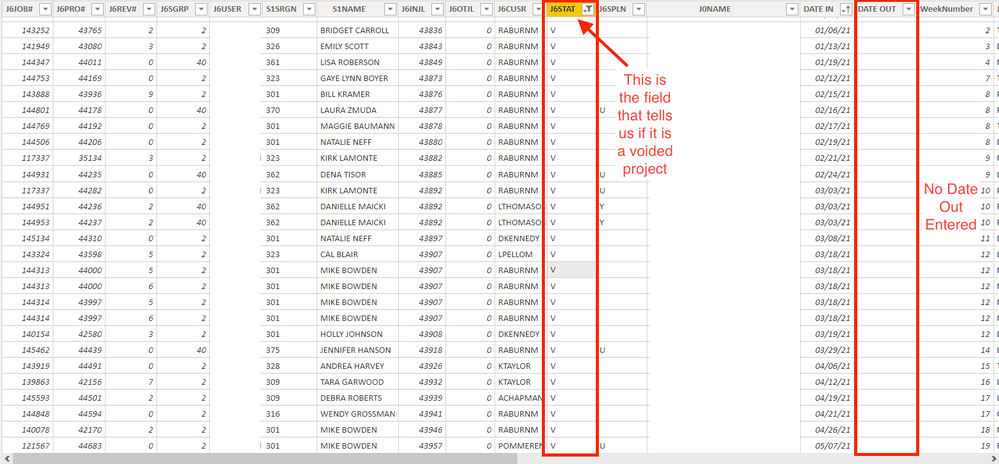

Solved! Go to Solution.
- Mark as New
- Bookmark
- Subscribe
- Mute
- Subscribe to RSS Feed
- Permalink
- Report Inappropriate Content
I was able to figure it out. Thank you for the help that both of you have given.

- Mark as New
- Bookmark
- Subscribe
- Mute
- Subscribe to RSS Feed
- Permalink
- Report Inappropriate Content
Hi @Matt_Mohawk ,
Whether your problem has been resolved? If yes, could you please mark the helpful post as Answered? It will help the others in the community find the solution easily if they face the same problem with yours. Thank you.
Best Regards
- Mark as New
- Bookmark
- Subscribe
- Mute
- Subscribe to RSS Feed
- Permalink
- Report Inappropriate Content
Yes the dates that are shown are by month. The first image that was in the attachment shows that on 5/7/21 there was a void. It isn't showing up though for the month of May on the chart.
- Mark as New
- Bookmark
- Subscribe
- Mute
- Subscribe to RSS Feed
- Permalink
- Report Inappropriate Content
Hi @Matt_Mohawk ,
It seems that the field [JOB LIST] is a calculated column, could you please check whether it can return the value "VOIDED" in table MJS_PRICE_PW when it fulfill the listed conditions(AND(ISBLANK(MJS_PRICE_PW[DATE OUT]),MJS_PRICE_PW[J6STAT]="V"))? Besides that, please check if there is any sync slicer or report-level filter to apply in the report pages to affect the column chart result....
Best Regards
- Mark as New
- Bookmark
- Subscribe
- Mute
- Subscribe to RSS Feed
- Permalink
- Report Inappropriate Content
I was able to figure it out. Thank you for the help that both of you have given.
- Mark as New
- Bookmark
- Subscribe
- Mute
- Subscribe to RSS Feed
- Permalink
- Report Inappropriate Content
On the legend field, click the arrow and then select "Show items with no data" as per the screenshot below:

- Mark as New
- Bookmark
- Subscribe
- Mute
- Subscribe to RSS Feed
- Permalink
- Report Inappropriate Content
Thank you @Anonymous for your quick response. I tried doing that and it didn't work.
- Mark as New
- Bookmark
- Subscribe
- Mute
- Subscribe to RSS Feed
- Permalink
- Report Inappropriate Content
Are you sure there are voids on the dates shown on the chart?
Helpful resources

Power BI Dataviz World Championships
The Power BI Data Visualization World Championships is back! Get ahead of the game and start preparing now!

Power BI Monthly Update - December 2025
Check out the December 2025 Power BI Holiday Recap!

FabCon Atlanta 2026
Join us at FabCon Atlanta, March 16-20, for the ultimate Fabric, Power BI, AI and SQL community-led event. Save $200 with code FABCOMM.

| User | Count |
|---|---|
| 41 | |
| 38 | |
| 36 | |
| 30 | |
| 28 |


| User | Count |
|---|---|
| 129 | |
| 88 | |
| 79 | |
| 68 | |
| 63 |


